Theres two options here that I can think of:
- Don’t store the displayed counter, and simply use
counter.at()to get the value at the label position:
#let my-counter = counter("my-counter")

#let frame(label: none) = {
  my-counter.step()
  context {
    let displayed-counter = my-counter.display()

    rect([Frame #displayed-counter #label])
  }
}

#let ref-frame(label) = {
  context numbering("1", ..my-counter.at(label))
}

#frame()

#frame(label: <foo>)

#frame()

#ref-frame(<foo>)
-
Write a custom show-rule to be able to reference metadata.
It is never possible to reference context, but it is possible to reference metadata if you have a custom
show ref:rule. You can store the rendered counter inside metadata, and attach the label to the metadata. This will then give the error that you “cant reference metadata”, but that is not completely true. You can write a customshow ref:rule which handles this case and it will be fine.
#let my-counter = counter("my-counter")

#let frame(label: none) = {
  my-counter.step()
  context {
    let displayed-counter = my-counter.display()

    // here, it is important that the `metadata` is inside the `context` block
    [#metadata((frame-counter: displayed-counter))#label]

    rect([Frame #displayed-counter])
  }
}

#show ref: it => {
  if it.element != none and it.element.func() == metadata and "frame-counter" in it.element.value {
    it.element.value.frame-counter
  } else {
    it
  }
}

#frame()

#frame(label: <foo>)

#frame()

@foo
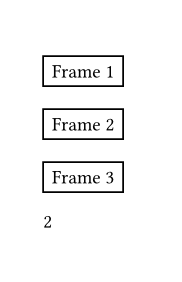
Both of these code examples produce the following output:
The following topics might also have useful info for you: