I use function #let scal(x,y) =math.class("fence", $<#x,#y>$) for scalar product. but if I want to write more than one letter, it would output letters with spacing between them, like <x y, z>--><x y,z>. What can I do, so it would be like in common math mode
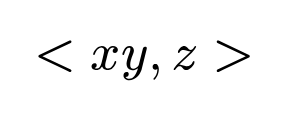
<x y, z>--> <xy,z>?
Doing it like this makes x and y touch. It however introduces spacing between brackets and the contents.
#let scal(x, y) = $<#x, #y>$
#scal($x y$, $z$)
1 Like
Thanks!
P.S. I removed spacing between brackets and the contents by adding #h(0pt,weak:true)
the correct way to use math classes is to apply them to the particular special characters you want to modify (in this case < & >), not to the entire piece of content. like this:
#let scal(x, y) = $class("opening", <) #x, #y class("closing", >)$
this prevents the spaces around the angle brackets without needing ad hoc h(0)s, and it follows what you were originally trying to do.
also, remember that you can just call functions directly in math to avoid interpolation syntax:
$scal(x y, z)$
I think you could consider using angle.l and angle.r for this, they are the regular symbols to use for a scalar product I think, and they don’t need this spacing tweak
1 Like