How to scope text modifications to only the outer grid?

Is there a better way to set text parameters per grid/table?

In the example below, I have to explicitly unset the show rules of the outer grid for every inner grid. These show rule reversals are annoying to type and could easily get desynchronized from each other and the larger document.

I wish the grid function itself would accept text properties without having to show-set them before the grid call.

#{
  show grid.cell.where(x: 0): set text(size: 14pt, weight: "bold")
  show grid.cell.where(x: 2): set text(size: 14pt, weight: "bold")
  grid(
    columns: 4,
    gutter: 2em,
    "A",
    "Text",
    "B",
    "Text",
    "C",
    grid(
      columns: 2,
      align: (right, left),
      gutter: 0.5em,
      [Inner], [Grid],
      [Inhereits], [Rules],
    ),
    "D",
    {
      // Need a new scoping and show rule to revert outer changes
      show grid.cell: set text(size: 10pt, weight: "regular")
      grid(
        columns: 2,
        align: (right, left),
        gutter: 0.5em,
        [Inner], [Grid],
        [Inhereits], [Rules],
      )
    }
  )
}
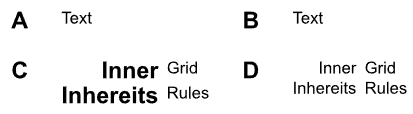
Also, is there an easy way to combine the first two lines together with calc.even(x) or similar? I couldn’t figure out the syntax to make where work with an unnamed function.
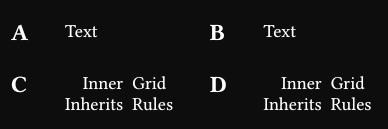
You could just use the text function at the place you want to change the font like this:

#{
  grid(
    columns: 4,
    gutter: 2em,
    text(size: 14pt, weight: "bold")[A],
    "Text",
    "B",
    "Text",
    text(size: 14pt, weight: "bold")[C],
    grid(
      columns: 2,
      align: (right, left),
      gutter: 0.5em,
      [Inner], [Grid],
      [Inhereits], [Rules],
    ),
    "D",
    {
      // Need a new scoping and show rule to revert outer changes
      show grid.cell: set text(size: 10pt, weight: "regular")
      grid(
        columns: 2,
        align: (right, left),
        gutter: 0.5em,
        [Inner], [Grid],
        [Inhereits], [Rules],
      )
    }
  )
}

I am not sure if that is what you are searching for. You could also shorten it further if you define a function like

let t(body) = text(…)[#body]

and use it in the grid.

1 Like

For applying stuff only to top-level elements, you need to write a show rule for it, where you disable those stuff, to not affect inner ones.

  show grid.cell: set text(size: 14pt, weight: "bold")
  show grid.cell: it => {
    show grid.cell: set text(size: 11pt, weight: "regular")
    it
  }

#import "@preview/sela:0.1.0": any, sel

#{
  let sel = sel.with(scope: (cell: grid.cell))
  show sel(grid.cell.where(x: any(0, 2))): set text(size: 14pt, weight: "bold")
  show grid.cell: it => {
    show grid.cell: set text(size: 11pt, weight: "regular")
    it
  }
  grid(
    columns: 4,
    gutter: 2em,
    "A", "Text", "B", "Text",
    "C",
    grid(
      columns: 2,
      align: (right, left),
      gutter: 0.5em,
      [Inner], [Grid],
      [Inherits], [Rules],
    ),
    "D",
    {
      // Need a new scoping and show rule to revert outer changes
      // show grid.cell: set text(size: 10pt, weight: "regular")
      grid(
        columns: 2,
        align: (right, left),
        gutter: 0.5em,
        [Inner], [Grid],
        [Inherits], [Rules],
      )
    },
  )
}

#import "@preview/sela:0.1.0": any, sel

#{
  let sel = sel.with(scope: (cell: grid.cell))
  show sel(grid.cell.where(x: any(0, 2))): set text(size: 14pt, weight: "bold")
  show grid.cell: it => {
    show grid.cell: set text(size: 11pt, weight: "regular")
    it
  }
  let inner-grid = grid.with(columns: 2, align: (right, left), gutter: 0.5em)
  grid(
    columns: 4,
    gutter: 2em,
    "A", "Text", "B", "Text",
    "C",
    inner-grid(
      [Inner], [Grid],
      [Inherits], [Rules],
    ),
    "D",
    {
      inner-grid(
        [Inner], [Grid],
        [Inherits], [Rules],
      )
    },
  )
}
1 Like