How to show <H1>:<H2> in header?

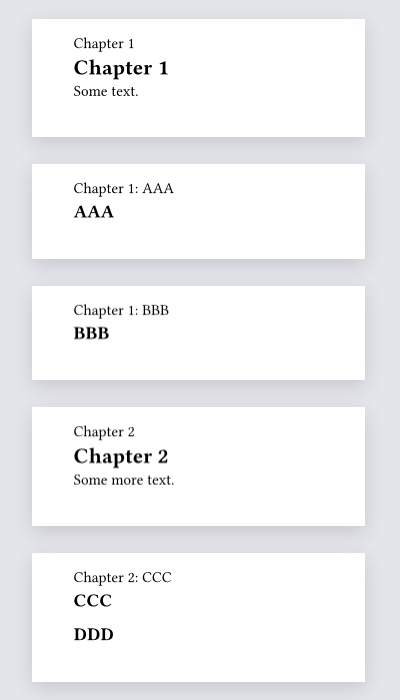
I am struggling with queries. I am trying to show in the header the current chapter and the latest known H2 (including current page). However they both “lag” by one page.

#let current-chapter-title() = context {
  let h1 = query(heading.where(level: 1).before(here()))
  let h2 = query(heading.where(level: 2).before(here()))
  if h1 != () {
    let main = upper(h1.last().body)
    let sub = if h2 != () { h2.last().body } else { none }
    [#main: #sub]
  }
}
#set page(header: current-chapter-title())

= Chapter 1
Some text.

#pagebreak()
== AAA 

#pagebreak()
== BBB

#pagebreak()

= Chapter 2
Some more text.

#pagebreak()
== CCC
== DDD

You can use the hydra package.

#set page(height: auto, width: 240pt, margin: 30pt)

#import "@preview/hydra:0.6.2": hydra

#let current-chapter-title() = {
  let h1 = hydra(1, skip-starting: false)
  let h2 = hydra(2, skip-starting: false)
  if h1 == none {
    return
  }

  if h2 == none {
    [#h1]
  } else {
    [#h1: #h2]
  }
}
#set page(header: context current-chapter-title())

= Chapter 1
Some text.

#pagebreak()
== AAA

#pagebreak()
== BBB

#pagebreak()

= Chapter 2
Some more text.

#pagebreak()
== CCC
== DDD

We have to set skip-starting to false, because hydra’s author thinks:

When a new page starts and introduced a chapter or heading it’s usually unecessary to show that same chapter or section in the header. In fact, for chapters this is undesirable too. If #hydra is used with ⟨skip-starting⟩: true on such a starting page, it will not show anything. This is turned on by default.

1 Like

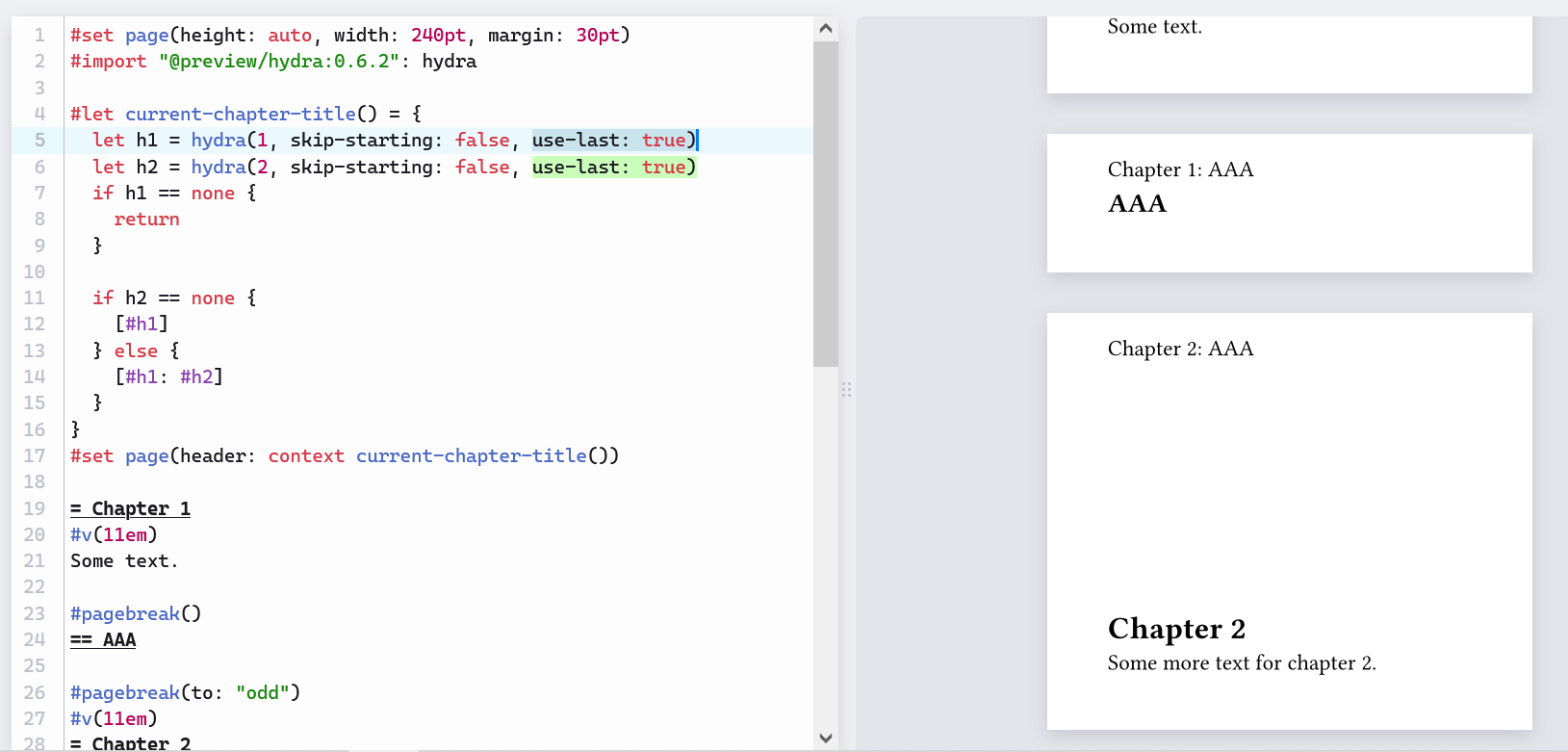
Thank you this a bit better but I have noticed that there is a bug on #v where the previous chapter is still shown on the next chapter page (see samples below).

#import "@preview/hydra:0.6.2": hydra

#let current-chapter-title() = {
  let h1 = hydra(1, skip-starting: false)
  let h2 = hydra(2, skip-starting: false)
  if h1 == none {return}

  if h2 == none {[#h1] } else {[#h1: #h2]}
}
#set page(header: context current-chapter-title())

= Chapter 1
#v(11em)
Some text.

#pagebreak()
== AAA

#pagebreak(to: "odd")
#v(11em)
= Chapter 2
Some more text for chapter 2.
t.pdf (11.1 KB)

I have reported the issue on their github page: Wrong header when using `#v` · Issue #46 · tingerrr/hydra · GitHub .

I wonder if this is surfacing an issue with typst that it is not possible to implement without a lot of code (see hydra/src/core.typ at main · tingerrr/hydra · GitHub).

1 Like

Maybe it’s done intentionally? If #v is normal text, then that header is surrounded by Chapter 1, so some conventions might prefer Chapter 1.

Perhaps enabling use-last will solve your issue. Please refer to manual.pdf for further info.

  let h1 = hydra(1, skip-starting: false, use-last: true)
  let h2 = hydra(2, skip-starting: false, use-last: true)

Full code
#set page(height: auto, width: 240pt, margin: 30pt)
#import "@preview/hydra:0.6.2": hydra

#let current-chapter-title() = {
  let h1 = hydra(1, skip-starting: false, use-last: true)
  let h2 = hydra(2, skip-starting: false, use-last: true)
  if h1 == none {
    return
  }

  if h2 == none {
    [#h1]
  } else {
    [#h1: #h2]
  }
}
#set page(header: context current-chapter-title())

= Chapter 1
#v(11em)
Some text.

#pagebreak()
== AAA

#pagebreak(to: "odd")
#v(11em)
= Chapter 2
Some more text for chapter 2.

Besides, I suggest also pasting a link of here in the issue on GitHub.