Hi!
I’m already using Typst to transfer my worksheets from Affinity Designer to it, but as a teacher I need line numbering!
I have now a working line numbering for “normal” text, but I’m struggling with the following:
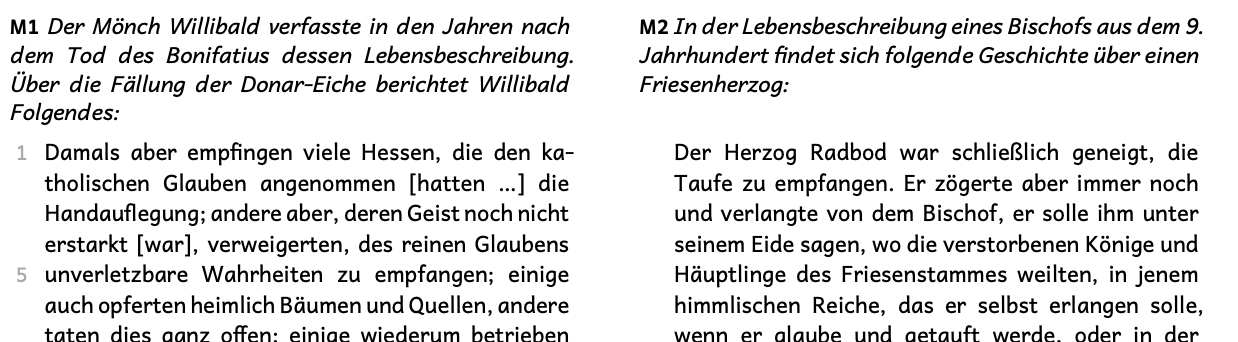
Two sources (history) must be compared by the students, so they are side by side. I use a grid for this. Line numbering for the first source works will, but the second one’s are displayed also at the left side. It is also a bit tricky as the heading of the sources may differ in length, so both sources may not start at the same line. See screenshot (deactivated line numbering for the second source):
I have reformatted the title of your post as a question in accordance with our guidelines:
Please feel free to adapt as you see fit. I also have added the line-numbering tag.
Would you care sharing your code please so we have something to work from? And perhaps a screenshot of the intended results as it is not clear (to me at least) what the intended result is.
Thanks a lot! Maybe I was too tired, and I already talked to a collegue that is using Typst for a much longer time – and started my interest in it. He had no solution.
And this is the code in Typst document - not pretty, but first it must work ^^
#let koerperNumberingInGrid2(body) = {
  set text(
    lang: "de",
    font: "Andika",
    size: 9pt,
    style: "normal"
  )

  set par.line(numbering: n => {
    if n == 1 or n - calc.floor((n / 5)) * 5 == 0 {
      text(fill: gray)[#n]
    } else {
      none
    }
  })
  set par.line(number-margin: left, number-align: right, number-clearance: -0.9em) // Abstand der Zeilennummern
  set par.line(numbering-scope: "page")
  block(
    inset: (left: 0.5cm)  // hier den zusätzlichen Rand einstellen
  )[#body]
}

...

#grid(
  columns: (1fr, 1fr),
  gutter: 1cm,
  [
    *M3* #intro[Gregor von Tours über die Taufe Chlodwigs I.:] \
    ],
  [
    *M4* #intro[Papst Gregor II. schreib 722 n. Chr. an Bonifatius]
  ],
)
#grid(
  columns: (0.5fr, 0.5fr),
  gutter: 1cm,
  [
    #koerperNumberingInGrid2[
      Aber auf keine Weise konnte ...
    ]
   \
    Gregor von Tours: Decem libri Historiarum, II. Cap. 28, 29, 20.31; zit. n. Lautemann, Wolfgang/Schlenke, Manfred (Hrsg.): Geschichte in Quellen, Ba. 2, 2. Aufl. München 1978. S. 26ff.
  ],
  [
    #koerperNoNumberingInGrid2[
      Wir sind von großer ...
    ]
   \
    Rudolf Buchner (Hrsg.): Ausgewählte Quellen zur Geschichte des deutschen Mittelalters, Band 4b, 3. Aufl. Darmstadt 2011. S. 67.
  ]
)
Custom line numbering is not so easy to do, that’s the reason it’s a builtin feature. Further I think the builtin feature is quite limited in what in can do, just so that it will have good performance and work with big documents.
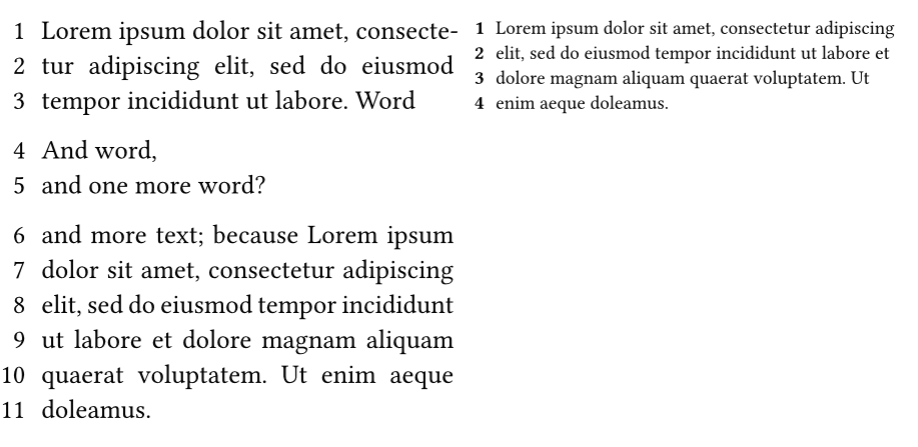
I’ve created a quick line numbering function that only works for a few paragraphs of text (only works inside a single page, not across pages). This is a starting point that can be used for numbering small text pieces.
Hope it helps somewhat, but this is just the first iteration. It should be possible using counters and placement (place with a show rule on metadata directly) to make it work across page breaks. Others on the forum might iterate further on it.
#let round-pt(x, digits: 6) = {
  calc.round(x.pt(), digits: digits) * 1pt
}

/// Custom simple line numbering function
/// This can add left side line numbers to text, but only inside a single page.
/// Only works inside a single page, and places the line number on the left side of the text
/// By bluss, license MIT/Apache-2.0
#let linenumbered(body, numbering: "1", pad: 0.6em, style: x => x, wordpattern: "\w+\.?") = {
  let wordlabel = <_linenumbered_word>
  context {
    let origpos = here().position()
    let wordpos = query(
      selector(wordlabel)
      .after(here())
      .before(selector(<_linenumbered_end>).after(here()))
    ).map(mt => {
      let p = mt.location().position()
      (x: round-pt(p.x), y: round-pt(p.y), page: p.page)
    }).dedup(key: p => (p.y, p.page))

    show wordlabel: mt => {
      ""  // XXX this helps with empty and single word lines for some reason
    }

    let n = 1
    for p in wordpos {
      box(context {
        let pos = here().position()

        // Place line number at:
        // x: original x - pad
        // y: word's y
        let dx = origpos.x - pos.x - pad
        let dy = p.y - pos.y
        place(end + bottom, dx: dx, dy: dy, style(std.numbering(numbering, n)))
      })
      n += 1
    }


    // mark each word start so that we know when we pass a new line
    show regex(wordpattern): it => it + [#metadata(none)#wordlabel]
    body
  }
  [#metadata(none)<_linenumbered_end>]
}
#grid(
  columns: 2,
  column-gutter: 2em,
  {
    set text(size: 14pt)
    set par(justify: true)
    show: linenumbered
    lorem(15)
    [
      Word

      And word, \
      and one more word?

      and more text; because #lorem(25)]
  },
  {
    set text(size: 10pt)
    linenumbered(lorem(25), numbering: "1", style: strong)
  },
)
I think it is essential that Typst will have a better integrated line numbering. It is a basic feature (for schools) but also for your thesis and manuscripts at university.
I think the intention is absolutely that theses and manuscripts are covered by the existing par.line line numbering support. It works for regular text, also in multiple columns, so using two columns would be an option for you.
However, it’s limited how much it can be configured. Your exact picture is impossible using par.line due to not using whole-page columns and because it’s restarting line numbering (reset to zero)
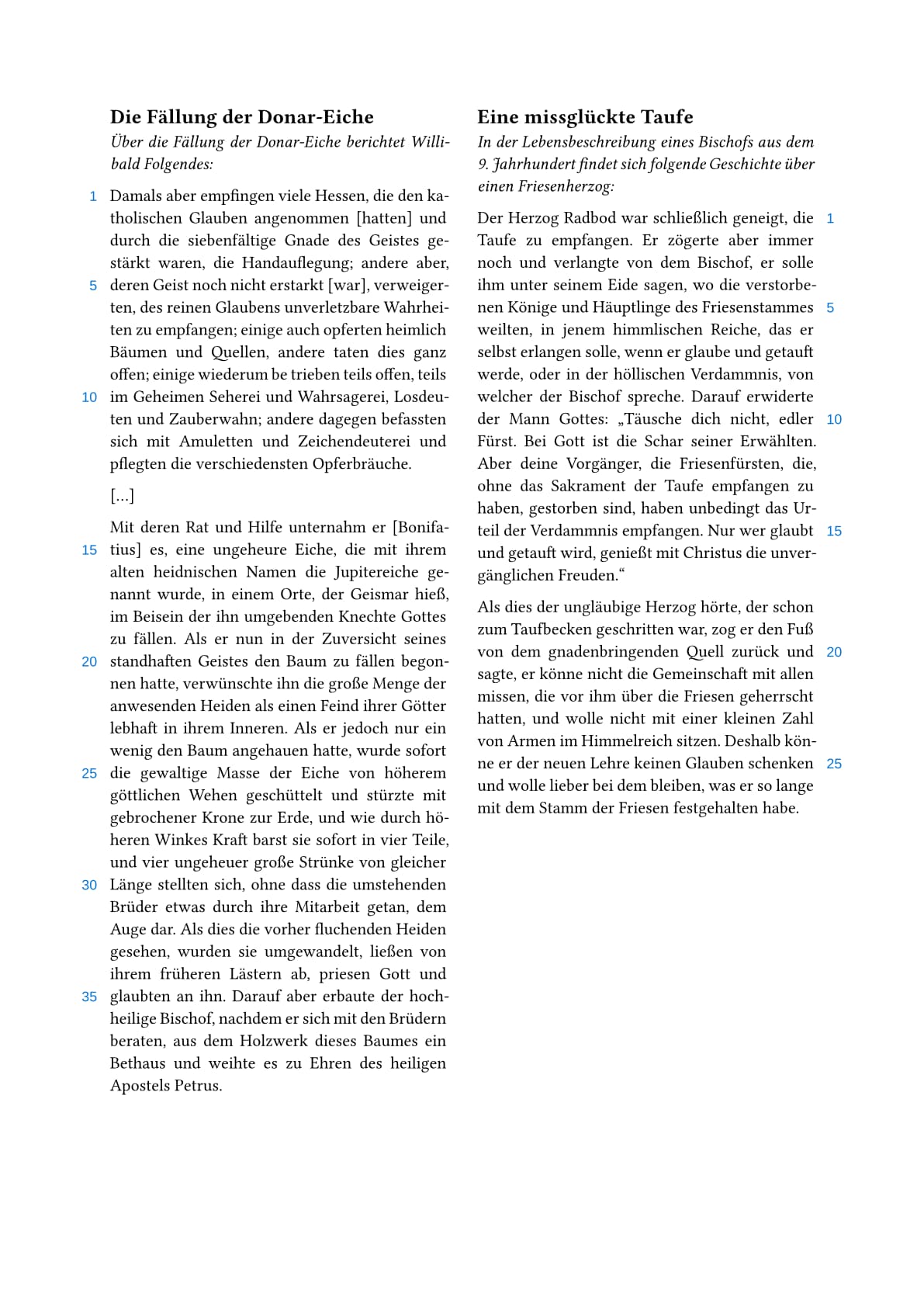
I continued working on these line numbers because it was fun, so I now have a completed version of it. The completed version supports texts that break across pages or columns (Typst 0.13 and Typst 0.14).
I searched the web for the text in your example! So I went all the way to creating an example document. I think it looks pretty good, the source code for it is in the same directory.
Like the file says, there are two main ways to do this layout - either with a grid or using regular columns. Both will do the job. I hope this helps.
I think this line numbering function should be headed towards a typst package, but unsure when that will happen. And, it has rather high overhead since it annotates every word in the numbered text to find all lines! So it’s noticeable on the compile time unfortunately.
There’s one small difference - in my example it doesn’t consider the line with [...] to be a line at all, since it doesn’t find a word on that line. But it can be changed with configuration, in theory.