Your code is incomplete and doesn’t compile, so I have done some guesswork in this code.
#import "@preview/lilaq:0.5.0" as lq

#let unit(x) = x // FIXME:

#let linear-regression(xs, ys) = {
  let len = xs.len()

  let x_mean = xs.sum() / len
  let y_mean = ys.sum() / len

  let sum_dx2 = xs.map(x => calc.pow(x - x_mean, 2)).sum()
  let sum_dxdy = xs.zip(ys).map(((x, y)) => (y - y_mean) * (x - x_mean)).sum()

  let a = sum_dxdy / sum_dx2
  let b = y_mean - a * x_mean

  (a, b)
}

#let xs = (0.09883, 0.20096, 0.30255, 0.40468, 0.50568)
#let ys = (0.14, 0.29, 0.43, 0.57, 0.71)

#let (a, b) = linear-regression(xs, ys)
#let best-fit-line = x => a * x + b

#let margin = 0.1

#align(center)[
  #lq.diagram(
    title: [Main method graph],
    xlabel: [Mass ($#unit[g]$)],
    ylabel: [$T^2$ ($#unit[s^2]$)],
    margin: 0%,
    width: 90%,

    lq.plot(
      mark: none,
      lq.linspace(
        calc.min(..xs) - margin,
        calc.max(..xs) + margin,
      ),
      best-fit-line,
    ),

    lq.scatter(xs, ys),
  )
]
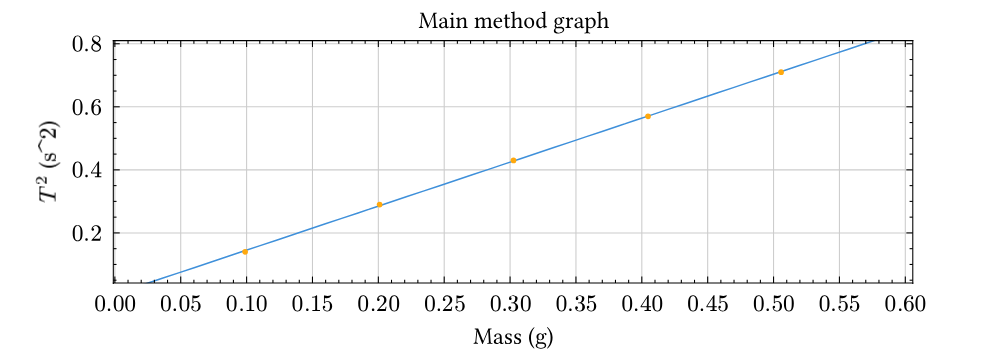
My solution is based off How do you draw a trend line in typst? and consequently Linear regression · lilaq-project · Discussion #113 · GitHub
One problem with this code is, it doesn’t give y=1.41119x, but roughly y=1.39 + 0.005, so did you want a line with b=0? Then the linear-regression function needs to change.
Another problem is that I have to hardcode a margin value and use that when computing the linspace for the lq.plot, not really ideal if the data points can vary in orders of magnitude…