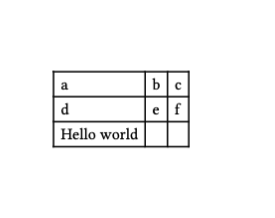
I’d like to style a table footer, and I was wondering why the following “does not work” (e.g., ignored), and what would be the recommended way of styling a footer using set/show rules:
#show table.footer: set text(fill: red)

#table(
  columns: 3,
  [a], [b], [c], [d], [e], [f],
  table.footer("Hello world")
)
The only ressource I could find was this other discussion on the forum: How to style table.header / table.footer?, but it does not have very satisfying solutions.
As you have probably seen in the thread you linked, there is no direct way to style the footer. But if you know how many rows your table spans, you can simply apply styling on the last row.
#table(
  columns: 3,
  fill: (_, y) => if (y == 2) { red },
  [a], [b], [c], [d], [e], [f],
  table.footer("Hello world")
)
But of course, this breaks if your table spans multiple pages and therefore has multiple footers.
Yep that’s what my workaround is since fortunately I know how many rows there are. Thanks!