Hi, I’m struggling with styling terms. I want them italics and not bold, but can’t figure it out.
I found this question How to adjust the style for the terms only in a term list? but as a beginner I don’t follow the accepted answer…
Here are two ways to do it:
#[
#show terms: it => {
  show strong: it => emph(it.body)
  it
}

/ Term1: The explanation
/ Term2: The explanation is longer this time
]

#[
#show terms.item: it => {
  emph(it.term)
  terms.separator
  it.description
  linebreak()
}

/ Term1: The explanation
/ Term2: The explanation is longer this time
]
Based on How to change the appearance of the terms in a term list? - #4 by SillyFreak
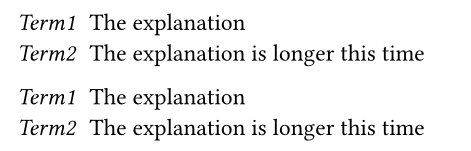
I find both of your solutions lacking.
The first one overrides strong in the whole list, so, if I strongly emhasize something in the description, it is just emphasized (italic, not bold).
The second one obeys paragraph indentation, while the default does not. So, if you have paragraphs with first lines indented, the first line of the list is indented, which is likely undesirable. Also, this list ignores the settings tight, separator, indent, hanging-indent, spacing.
Is the solution here (found by some link hops above) ok: How to adjust the style for the terms only in a term list? - #2 by Aegon ?
The main problem IMO is that Typst doesn’t expose the term itself as a separate element to be styled, so there’s no good way to style it. I mean for example that terms.item is a stylable element today, but for example terms.term is not an element.