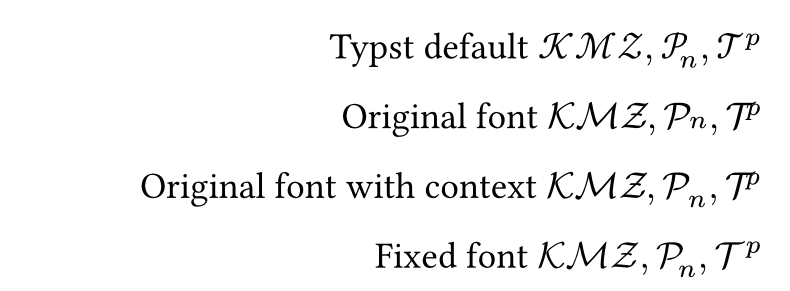
My friend wants to use the Computer Modern Math font for math.cal.
We manage to define our own cal as the following, but we encounter issues on the positioning of sub/superscripts. And it’s quite strange that the result changes if we prepend a context.
// Using cmsy10.ttf:
#let cal(s) = text(font: "cmsy10", math.upright(s))

// Using context + cmsy10.ttf:
#let cal(s) = context text(font: "cmsy10", math.upright(s))
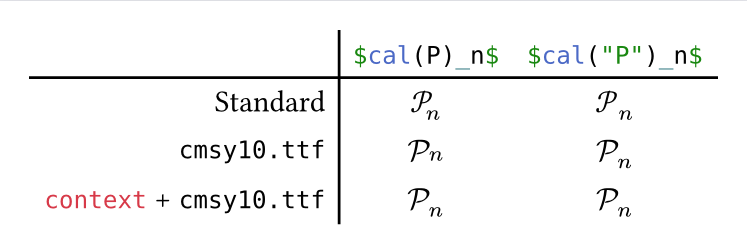
$cal(P)_n$ |
$cal("P")_n$ |
|
|---|---|---|
| Standard |  Good Good |
 Bad kerning, but good height Bad kerning, but good height |
cmsy10.ttf |
 Bad kerning and height Bad kerning and height |
Bad kerning, but good height |
context + cmsy10.ttf |
Bad kerning, but good height |
Bad kerning, but good height |
Full code
#let cal(s) = text(font: "cmsy10", math.upright(s))
#let ccal(s) = context cal(s)

#set text(fallback: false)
#set raw(lang: "typc")
#table(
  columns: 3,
  stroke: none,
  align: (end, center, center),

  table.header([], `$cal(P)_n$`, `$cal("P")_n$`),
  table.hline(),
  table.vline(x: 1),

  [Standard], $std.math.cal(P)_n$, $std.math.cal("P")_n$,
  [`cmsy10.ttf`], $cal(P)_n$, $cal("P")_n$,
  [`context` + `cmsy10.ttf`], $ccal(P)_n$, $ccal("P")_n$,
)
Could anyone offer any advice or explanation? Thanks in advance.
Futher info about the font
We mean the the old Computer Modern Math, the default font in LaTeX (without loading new packages like newcomputermodern and unicode-math).
The original Computer Modern Math predates OpenType, and only exists as antique font formats in typical TeX distributions. The matplotlib project has converted the font to OTF.
That is the font file used above, and can be downloaded from lib/matplotlib/mpl-data/fonts/ttf/cmsy10.ttf.
Note that cmsy10.ttf maps cal(P) to P (ASCII P), rather than 𝒫 (Unicode math symbol, U+1D4AB). Therefore, we added upright to our customized cal.
Relates to Is there still difference between `$upright(…)$` and `$"…"$` in v0.14.0?