How to vertically align a custom list marker to the center of a capital 'T'?

Hi everyone, I am customizing the list marker (bullet point) using circle. I have a specific alignment requirement: the center of the circle marker should align vertically with the exact half-height of the capital letter “T” in the current font context.

I assume this requires context and measure(), but I am struggling to get the implementation to pass the test below. Any help would be appreciated!

#set text(size: 12pt)
- Text at 12pt (Standard)

#set text(size: 24pt)
- Text at 24pt (Large)

#set text(size: 8pt)
- Text at 8pt (Small)

You could add this style as an experiment: #show list: block.with(stroke: 1pt + red)

What is the result: all the three items are wrapped into one block, which means that it’s still just one list. We can’t have different markers per item in a list, so there is no way to achieve it in this way.

Two ways I’d suggest to go from here:

  • Use a linebreak or other way to separate the items so that they are not part of the same list
  • Use package itemize and use it to customize the list marker per item, which it can do.
1 Like

Thanks! I hadn’t realized that all the items form a single block. I’ll take a closer look at the itemize package later.

On another note, I noticed something I don’t quite understand. In the code below, if I hover over t-height, it displays 7.9pt (×3). Since there is only one list item, is this expected behavior?

#set list(
  marker: context {
    // Measure the height of capital "T" with current text settings
    let t-height = measure("T").height
  }
)

- Text at 12pt (Standard)

It sounds like a reasonable result I think. There’s nothing in the context or in the content passed to measure with a list, so nothing about a list is going to affect the result, only text settings.

You could look at the function debug-font if you want to know more about the size of text. If you want to use the current text size (here 12pt) as a length, it’s already available as 1em.


I should add for clarity: every letter will measure as the same size if we don’t change the method. We can measure the actual bounds of the letter like this:

#context {
    // Measure the height of capital "T" with current text settings
    let t-height = measure({
      set text(top-edge: "bounds", bottom-edge: "bounds")
      [T]
    }).height
    t-height
}

Thanks for reminding me to measure the bounding box. I might not have explained myself clearly. In the code below:

#set list(
  marker: context {
    // Measure the height of capital "T" with current text settings
    let t-height = measure("T").height
  }
)

#set text(size: 12pt)
- Text at 12pt (Standard)
\
#set text(size: 24pt)
- Text at 24pt (Large)
\
#set text(size: 8pt)
- Text at 8pt (Small)

When I hover over t-height in this code, it displays 7.9pt (×3), 15.79pt (×3), 5.26pt (×3). I expected to see just 7.9pt, 15.79pt, 5.26pt. I don’t understand why the (×3) appears.

Hi~ The following might be one way to implement it.

#let cap = [T]
#let marker-size = .2em
#let dot-box = context {
  let t-height = measure({
      cap
    }).height
  set text(baseline: (t-height - marker-size) / 2)
  box(height: marker-size,width: marker-size, fill: black, radius: marker-size) 
}

#set list(marker: dot-box)

#set text(size: 12pt)
- Text at 12pt (Standard)
\
#set text(size: 24pt)
- Text at 24pt (Large)
\
#set text(size: 8pt)
- Text at 8pt (Small)

#set text(size: 2em)

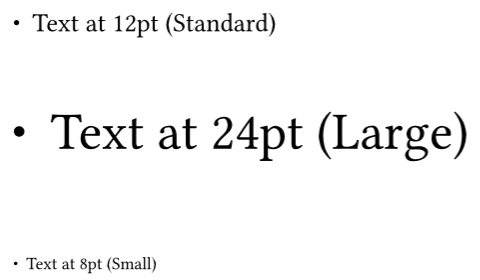
Because the alignment of different characters depends heavily on the `text` settings, we set `list.marker` as a `box` to facilitate alignment. The native implementation of lists in Typst uses the `grid` function, so `list.marker` and its body are *top-aligned*. Setting the baseline of `list.marker` aligns it with the capital letters of the first line.

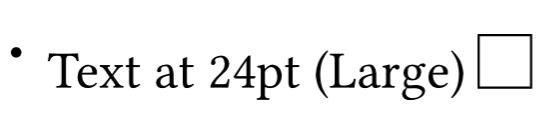
Note: If the height of the current line is greater than the height of one character, there is still a problem. For example,

#set text(size: 24pt)
- Text at 24pt (Large) #box(stroke: 1pt, height: 1em, width: 1em)


Another way: use the package itemize.

#import "@preview/itemize:0.2.0" as el 
#let marker-size = .2em
#let dot-box = {
  box(height: marker-size,width: marker-size, fill: black, radius: marker-size) 
}
#set list(marker: dot-box)
#let center-list(doc) = {
  show : el.default-list.with(label-baseline: "center")
  doc
}
#center-list[
#set text(size: 24pt)
- Text at 24pt (Large) #box(stroke: 1pt, height: 1em, width: 1em)
]

Or, for all lists in the document, use

#import "@preview/itemize:0.2.0" as el 
#let marker-size = .2em
#let dot-box = {
  box(height: marker-size,width: marker-size, fill: black, radius: marker-size) 
}
#set list(marker: dot-box)
#show : el.default-list.with(label-baseline: "center")

image
Note: This can still be problematic at times, for example, when the font size of the capital letters in the first line differs from the font size of the current line, etc.


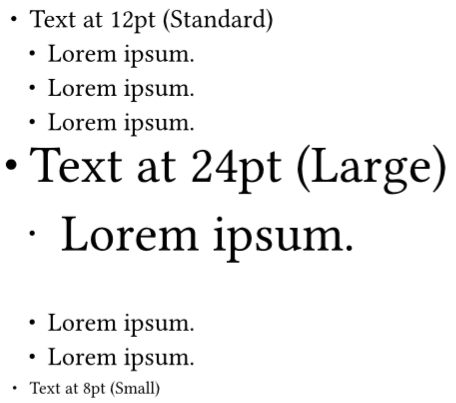
Finally, if it is necessary to interpret the list as one list (without using line breaks), it is typically very difficult to achieve. However, by using itemize to take control of the font size settings for each item, this is feasible. For example:

#import "@preview/itemize:0.2.0" as el 
#let marker-size = .2em
#let dot-box = {
  box(height: marker-size,width: marker-size, fill: black, radius: marker-size) 
}

#let per-size = (12pt, 24pt, 8pt, auto) // >= 4-item, use the current text size
#set list(marker: dot-box)
#show : el.default-list.with(
  size: ((per-size),auto), // only for 1-level
  label-baseline: "center",
  body-format: (
    style: (
      size: (per-size, auto) 
    )
  )
)
#set text(size: 12pt)
- Text at 12pt (Standard)
  - #lorem(2)
  - #lorem(2)
  - #lorem(2)
- Text at 24pt (Large)
  - #lorem(2)
  #show list: it => it // in order to treat the next list as a new list
  #set text(size: 12pt)
  - #lorem(2)
  - #lorem(2)
- Text at 8pt (Small)
1 Like