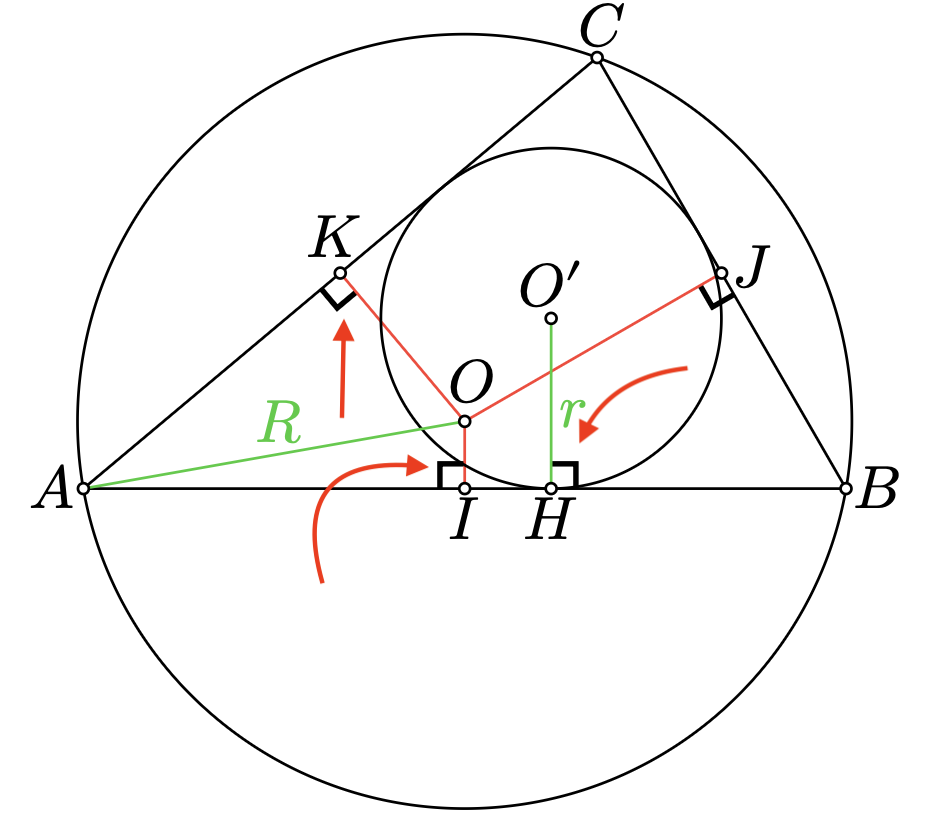
    ctz-draw-mark-right-angle("A", "K", "O", size: 0.16)
    ctz-draw-mark-right-angle("A", "I", "O", size: 0.16)
    ctz-draw-mark-right-angle("O", "J", "B", size: 0.16)
    ctz-draw-mark-right-angle("O'", "H", "B", size: 0.16)
First some comments about how your question was asked:
- The title is well written to be descriptive but it would be nice to have a bit more detail in the body in case it wasn’t clear
- Links to the package you are using can decrease friction for answering, and allow others to more easily discover cool packages
- You posted some code which is great, but
- The default code block on the forum is set to use “Typst markup mode” language. Your code is “Typst code mode”. Simply use
```typc ``` - A minimal-working-example (MWE) is really nice to have when trying to answer a question. See below for one
- The default code block on the forum is set to use “Typst markup mode” language. Your code is “Typst code mode”. Simply use
MWE
#import "@preview/ctz-euclide:0.1.5": *

#let line-stroke = black + .25pt

#ctz-canvas(
  length: 0.8cm,
  {
    import cetz.draw: *
    ctz-init()
    ctz-def-points(A: (0, 0), B: (4, 0), C: (0, 3))
    ctz-draw(segment: ("A", "B"), stroke: line-stroke)
    ctz-draw(segment: ("A", "C"), stroke: line-stroke)

    ctz-draw-mark-right-angle(
      "B", "A", "C",
      size: 0.4,
    )

    ctz-draw(
      points: ("A", "B", "C"),
      labels: (
        A: "below left",
        B: "right",
        C: "above"
      )
    )
  }
)
Now on to answering the question itself.
The code shows that the stroke weight for this mark is fixed (line 1608):
cetz-draw.line(p1, p2, p3, stroke: color + 1pt)
Sources of information I checked:
- The manual
- The Universe page
- The github page
Given that this text was in the readme,I assume changing the style of the 90° marker is simply not supported yet.I wrote this before looking at the code which confirms it is not supported.This package is by no means definitive. Improvements and features are planned and will be implemented over time. The API may change as the package evolves.
- The package code itself. Lines for the right-angle function
3 Likes
My apologies for the lack of clarity and improper formatting in my question. I will strive to provide more detailed and standardized information next time. Thank you for your patience.
1 Like
No worries, I was probably a bit harsh with how I chose my words.
For implementing this feature, you could
- make a local copy of the package and add it yourself.
- even better, implement the feature and give it back to the community via github
- make a feature request on the issues page of the github repository.
1 Like