Ok, I have finally gotten around to trying the Low Memory Mode.
I went down the wrong path at the beginning because the link for git download was wrong. I had to download the zip file, expand it, then copy over the khmer-segmenter folder. Finally everything compiled properly on my 2GB RPi, and I was able to sic it onto the full 400 pages of “Origin of Species”, and it works brilliantly.
Thank you.
1 Like
Thank you, David. Testing the full 400 pages of “Origin of Species” on a 2GB Raspberry Pi is a really valuable data point for me, and I’m very glad Low Memory Mode held up well.
Also, thanks for flagging the incorrect Git download link. I’ll fix that so others don’t have to take the same detour.
If you notice any other issues while using it on the Pi, please let me know. This kind of real-world testing is extremely helpful.
I have tried the latest version of Typsastra (as of 2 days ago) where the low-memory-mode was merged into the main branch.
I compiled it on my 2GB RPi 5, all worked well, and it recompiles the full Origin Of Species successfully in only a few seconds.
However, I also re-compiled it on my 4GB RPi 5. I have had to re-install the system recently, so I found that I had to install a few extra modules to get it all to compile.
This is now my full script to compile Typsastra –
sudo apt update
sudo apt install pkg-config libglib2.0-dev libwebkit2gtk-4.1-dev \
  build-essential curl wget file libxdo-dev libssl-dev \
  libayatana-appindicator3-dev librsvg2-dev unzip

sudo apt-get install libgtk-3-dev # For Raspberry Pi
sudo apt install libjavascriptcoregtk-4.1-dev libsoup-3.0-dev

git clone --recurse-submodules https://github.com/Sovichea/typsastra.git
cd typsastra
bun install --frozen-lockfile

bun run tauri:build
3 hours later…
I have been experimenting, and impressed with the new memory-management.
Even with Preview on Type set, and Low Memory Mode disabled, I can compile the complete Origin (400+ pages) on my 4 GB RPi 5 without using any Swap space. It seems to use less than 1 GB of RAM to do the full compile.
Very impressed.
3 Likes
Thank you, David, both for the detailed dependency script and for putting Typsastra through a genuinely demanding test. Compiling the full 400-page Origin of Species on a 2 GB and a 4 GB Raspberry Pi 5, and finding it stays under ~1 GB of RAM with Preview on Type enabled and Low Memory Mode off, is exactly the kind of real-world data I can’t easily produce myself. I’m really glad it held up.
Good news: starting with v0.9.0, Typsastra supports Raspberry Pi out of the box. The release now ships a native Linux ARM64 build for 64-bit Raspberry Pi OS (Bookworm or newer):
Typsastra_0.9.0_arm64.debTypsastra_0.9.0_aarch64.AppImage
Both are built on an ARM64 CI runner, so there’s no manual compiling or dependency hunting. sudo apt install ./Typsastra_0.9.0_arm64.deb is enough, and the built-in updater handles ARM64 too. Your dependency list was the blueprint for the CI environment, so thank you again for sharing it.
If you try the packaged build, I’d love to hear how it compares to your from-source ones.
Release notice:
Typsastra v0.9.0
- Table Tool: build Typst tables from a spreadsheet-style grid with multi-row headers, merged cells, alignment, fills, text color, insets, rotation, page-break control, explicit rules, and default/report/banded/booktabs styles, plus CSV/TSV import, sort/transpose, and linked
//@table:directives that keep the builder and code in sync. Tables export and import losslessly as.typ. - Create New Project from templates: start from a searchable Typst Universe template, an offline copy you downloaded before, a managed user
.typsastratemplate, or a blank project. - Image Tools: non-destructive cropping for optimized copies.
- Raspberry Pi: native Linux ARM64
.deband.AppImagefor 64-bit Raspberry Pi OS (Bookworm or newer), with updater support.
1 Like
I’m loving this editor so far, it’s quite neat. I came across a rendering bug. the following source for some reason bugs out after adding the set rule:
#let card = v(1cm) + block(
  align(left)[
    #set text(font: "something")
  ]
) + if answer == [] {
  v(3cm)
} else {
  v(0.2cm) + block()[Something.]
}
It renders as shown in the following image:
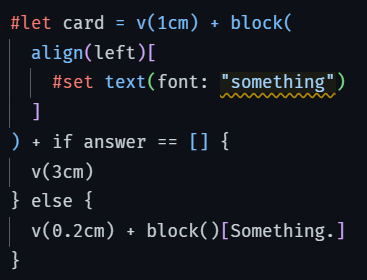
The editor does not consider the bottom part as a scripting section, but a markdown one. This get’s fixed the moment I remove the
#set rule at the top: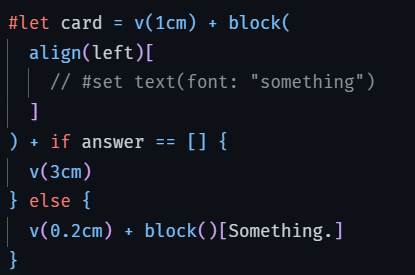
Not quite sure what causes this but thought it would be worth mentioning :)))
1 Like
Thank you @Oroux for the feedback. I have found and fixed the issue in my syntax highlight code. I will push the fix in the next update. Thank you for trying out Typsastra 
1 Like