Hello,
I am drawing an image using cetz. There I also import some external svgs (e.g. this one) which I would like to mirror (not rotate!).
My attempts so far:
#import "@preview/cetz:0.4.2"

// Normal usage of scale to mirror svg outside of cetz
*Svg mirroring in typst works*
#scale(x: -100%, image("clker-free-vector-images-airplane-309386.svg", width: 1cm))

*cetz*
#cetz.canvas({
  import cetz.draw: *

  content((0,0), [Normal embedding works ✅])
  content((rel: (0, -1)), image("clker-free-vector-images-airplane-309386.svg", height: 1cm))

  // Rotating works
  content((rel: (0, -2)), [Rotating works ✅])
  content((rel: (0, -1)), angle: 20deg, image("clker-free-vector-images-airplane-309386.svg", height: 1cm))

  // Mirroring not
  content((rel: (0, -2)), [Mirroring not ❌])
  // > As I interpret https://cetz-package.github.io/docs/api/draw-functions/transformations/scale/
  scale(x: -100%)
  content((rel: (0, -1)), image("clker-free-vector-images-airplane-309386.svg", height: 1cm))
  // > Other methods I tried
  content((rel: (0, -1)), scale: (x: -100%), image("clker-free-vector-images-airplane-309386.svg", height: 1cm))
  content((rel: (0, -1)), scale: (x: -100%, y: 100%), image("clker-free-vector-images-airplane-309386.svg", height: 1cm))
  // content((rel: (0, -1)), scale(x: -100%)[#image("clker-free-vector-images-airplane-309386.svg", height: 1cm)]) // Not working at all (wrnog usage of scale as far as I understand it)
})
Output
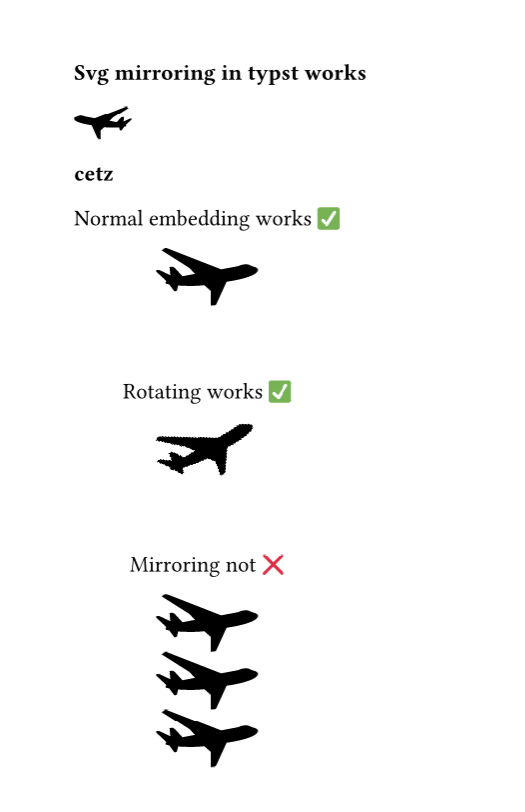
Is this just not possible in cetz, do you have other hints, am I just doing it wrong?