Is there a way to change default word or term spacing for math mode?

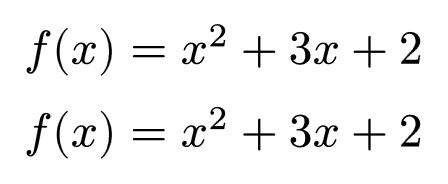
It seems like med or 2/9 em is the default spacing between words and terms in math mode; the following two lines of code render identically.

$
f(x) &= x^2 + 3x + 2 \
f(x) &= x^2 med + med 3x med + med 2
$

Is there a way to change this default spacing unit?

Why do you want to do this? Is it just stylistic choice, or something more specific?

This is relevant: Is there a better way to insert thin spaces?

Stylistic choice as I am a graphic designer :slight_smile:

1 Like

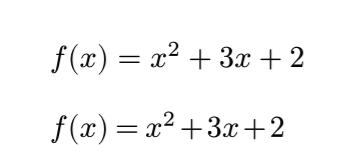
You can in some cases tweak the spacing. But typst is not designed for this possibility. Math spacing is governed my math classes, and if it were configurable, you’d be able to set the spacing for each class (and their combinations).

The following is ad-hoc

#let math-symbol = $+$.body.func()
#show math.equation: set align(start)
$
f(x) &= x^2 + 3x + 2 \
$

#show math.equation: eq => {
  show math-symbol.where(text: "+"): h(0.1em) + [+] + h(0.1em)
  show math-symbol.where(text: "="): h(0.2em) + [=] + h(0.2em)
  eq
}
$
f(x) &= x^2 + 3x + 2 \
$

1 Like

Thanks. I still need to wrap my head arownd elements, element functions, content types, etc. It seems like the documentation has no definition of what an element actually is vs what it is used for, which is annoying.