Hi everyone,
For fellow Joplin users, I’ve written a small plugin called JoTypst that renders Typst code blocks directly in Joplin’s Markdown preview.
The plugin is intentionally lightweight: it doesn’t bundle Typst itself and simply relies on a local Typst installation. As long as the typst executable is available in Joplin’s PATH, the plugin uses it to compile each block to SVG.
A Typst block looks like this:
```typst
#align(center)[
  Hello from Typst!
]
```
There are currently three ways to control the rendering width:
width=previewuses the width of the preview pane and recompiles when it is resized, which is useful for wrapping text for example;- a fixed width such as
width=400pt; width=auto(the default), which lets the page fit its content.
For example:
```typst width=preview
#set par(justify: true)
#lorem(50)
```
Typst packages also work, since compilation is handled by the local Typst installation.
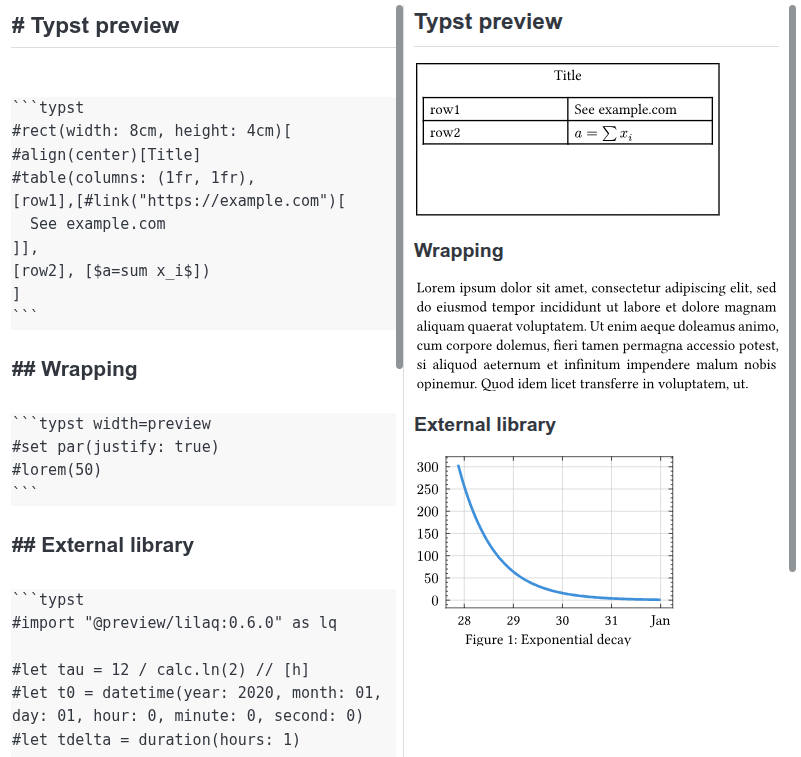
The plugin is still small and fairly new, but it already covers my main use case: using Typst for equations, figures, plots, tables, and other content directly inside my Joplin notes, while keeping the notes themselves as Markdown.
You can install JoTypst directly from Joplin’s plugin manager. The source code and build instructions are available on GitHub.
Source code: https://github.com/aspyk/jotypst