Explicit page.footercontent needs to explicitly show page number. The set rule does not display page number in any way. Furthermore, the provided example does not compile. Page Function – Typst Documentation
Instructions don’t tell anything about a placeholder code for the page number that I can put at X. (Everything would be much easier if we had a placeholder to introduce it in a string.)
You provided a snippet from the page footer, where set rules written in the code mode block, therefore adding # is like forcing to switch to code mode that is already active. Moreover, set rules must go above a styled content. The provided link demonstraits this.
#set page(
  paper: "a4",
  margin: (left: 25mm, right: 70mm, top: 20mm, bottom: 28mm),
  numbering: "1",
  number-align: start,
  footer:
    context {//Code mode
      //Configure where and how large the text should be
      set align(left)
      set text(10pt)

      //Values can be saved and used later (like this), or the values can be calculated in the place they are needed
      let placeholder = counter(page).display()

      //So far nothing has been displayed
      //The [ below starts a block of content which will be displayed
      [#placeholder - My Footer] //Within this content is some code marked by the #
   },
  footer-descent: 10% + 15pt,
)
I’ve also included some comments. Hopefully are helpful.
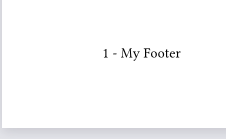
The above code results in a footer that looks like this:
Typst allows defining your own variables which act as placeholders. The closest documentation I know of for this is on the Scripting page. It doesn’t describe them, but does show them being used like this:
#{
  let a = [from]
  let b = [*world*]
  [hello ]
  a + [ the ] + b
}
There are many small things to learn at the beginning but I hope those don’t discourage you from continuing to learn Typst. And the forum is here to answer any questions you have!