Hi, I’m trying to highlight some formatted text that contains math in my document with some fun colours. I did the following:
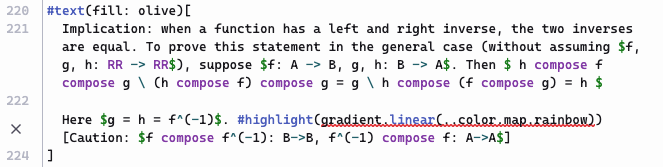
#text(fill: olive)[
  Implication: when a function has a left and right inverse, the two inverses are equal. To prove this statement in the general case (without assuming $f, g, h: RR -> RR$), suppose $f: A -> B, g, h: B -> A$. Then $ h compose f compose g \ (h compose f) compose g = g \ h compose (f compose g) = h $

  Here $g = h = f^(-1)$. #highlight(gradient.linear(..color.map.rainbow))[Caution: $f compose f^(-1): B->B, f^(-1) compose f: A->A$]
]
The compiler is giving me an error:
Error: Expected content, found gradient
How to fix this?
- Replace the gradient.linear(…color.map.rainbow) with content.
- Did you store content in a variable? Insert the variable’s name.
I’m a little confused why this is the case, because I took this syntax from an example in the documentation on highlight and gradient:
This is #highlight(
  fill: blue
)[highlighted with blue].
As a fill to paint the interior of a shape:
rect(fill: gradient.linear(..))
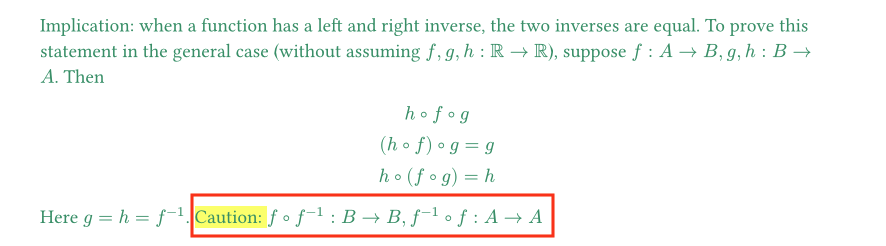
If things were working as I expected, everything in the red rectangle should have rainbow highlight:
How do I fix this?