Observations from this new Typst user

Hi all,

I recently discovered Typst through an article in LWN and started toying with it. I’m looking for an alternative for Latex, which I kind of have been able to bend to my will, but not really. Whether you asked for it or not, here are some of my remarks and observations:

  1. Installing just one executable is really nice.
  2. The tutorial and reference documentation is nice.
  3. The intermixing of code and text feels natural but geared towards short documents. I miss clearly defined environments. As far as I can see, the idiomatic way to divide a document in large sections, is wrapping the sections in a function, which works nice in a short document but falls short in a long document. For instance, to kind of replicate Latex’s frontmatter, mainmatter and backmatter, I would encapsulate the front matter in a #frontmatter function, leave the main matter as is, and encapsulate the back matter in corresponding #backmatter function. Good luck hunting for the closing right angle bracket of #frontmatter. Am I overlooking something here?
  4. I’ve already been bitten by different required line endings between different modes. When you’re in a set-rule delimited by (), you need commas, but in a code block delimited by {}, you need semicolons. Surely this makes sense from a programming point of view, but why can’t one use commas or semicolons interchangeably?
  5. There is some confusion about significant whitespace or not. For instance in term lists, the amount of returns between terms overrules the setting for tightness. I would really like a concise overview about where whitespace and/or linebreaks are significant and where not. I would also expect that explicitly setting the tightness would overrule the source document layout.
  6. show rules feel like you’re overwriting a global function. Not being able to see the original definition makes it kind of scary. It also feels brittle.

Anyway, thanks for Typst and thanks for reading this far.

6 Likes

Hi @bdr. I can answer your point 3. I developed the bookly template and I defined environments such as frontmatter, mainmatter and backmatter. For these environments, no need to encapsulate the content into square brackets. You just has to type show: frontmatter and you are done.

I generally use show rules to deeply customize elements.

1 Like

Hi! Thanks for sharing your observations. Here are some thoughts:

  1. If the approach of @maucejo doesn’t work for you, you can do something like this:

    #front-matter[
      #include "font-matter.typ"
    ]
    
    #main-matter[
      #include "chapter1.typ"
      #include "chapter2.typ"
    ]
    
    #back-matter[
      #include "back-matter.typ"
    ]
    
  2. I think Typst generally avoids offering two ways to do the same thing without a good reason (see “consistency” in the design principles).

    In set rules you use commas to separate parameters (because set rules use the syntax of a function call). This is unrelated to line endings. You can add a newline before the comma if you want.

    In code blocks you can use semicolons to put several statements on the same line, but this is not particularly encouraged. It’s usually better to simply write one statement per line, without semicolon.

    You’re right that this use of commas and semicolons feels natural to programmers but maybe not so much to others. I guess the fact is that Typst combines a markup language with a proper programming language, and users do need to learn a bit more of programming, compared to LaTeX.

  3. Agreed: an overview of where whitespace is significant would be a great addition to the docs!

    Regarding terms lists (and other lists): tight is a property of each list that describes how the list is written in markup. The default from the set rule is not used because it’s defined locally by markup. If you build a list from code, there is no markup defining the tightness; in this case it will use the default unless the value is given explicitly:

    // Default
    #set terms(tight: false)
    
    #terms(
      tight: true, // override global set rule
      terms.item("a", "b"),
      terms.item("c", "d"),
    )
    

    You can use set terms(spacing: ...) to set the spacing globally for all lists.

  4. Can you elaborate on this point? (What kind of show rules do you have in mind, and how do you feel it’s brittle?)

I think that I understand global show-rules, so what you did in the bookly-template actually causes Typst to process the text in this way:

#frontmatter[frontmatter text]
#mainmatter[#frontmatter[mainmatter text]]
#backmatter[#mainmatter[#frontmatter[backmatter text]]]

Correct?

So, in the definition of your backmatter-layout, you not only need to account for what is defined for unadorned text but you need to actively undo whatever you’ve programmed for mainmatter and frontmatter?

In bookly, environments overwrites the rules defined previously. Of course, any rules that are not overwritten is still applied. But I try to avoid this by defining the global show or set rules in the core of the function defining the template.

Hi Sijo,

Thanks for your elaborate answer. I’ll go over it, one by one, but it might be better to break out the discussion into separate topics. Concerning:

  1. I’ve already answered @maucejo below. I’ll most likely be using your approach, but I strenghtens my belief that Typst markup is not suited for long documents. I would rather have something like <frontmatter>quite a lot of text, multiple chapters</frontmatter> as a functional equivalent to #frontmatter[quite a lot of text, multiple chapters]. There is value in not splitting your document over multiple files, global search and replace for instance. One can of course write something like ] // frontmatter but it feels kind of hacky.
  2. While I much applaud consistency, it’s only consistent from the programmer’s point of view. Having been a teacher, I can assure you that for everybody else it is like grouping a bunch of stuff together in rather inconsistent ways. You can have
#set something (
    some-property: some-value,
    another-property: another-value,
)

#let some-name = {
    let a-thing = another-thing;
    something;
    something else;
    some more things to do;
}

#show some-element: => {
     something
     something else
     some more things to do
}

but not

#set something {
   some-property = some-value;
   another-property = another-value;
}

#let some-name => {
   let a-thing => another-thing,
   something,
   something else,
   some more things to do,
}

#show some-element = {
    something
    something else
    some more things to do
}
  1. Programmatically defining terms look like a really tedious way to write terms. I’ll be using the terms list type for dialogue in a theatrical script, not because it’s the right thing to do, but because / Someone: Are you talking to me? is really handy source formatting.
  2. Brittleness of show rules: I’ve been rewriting the terms list type to make it do what I want. It would really help if I could see how the standard terms list is defined. See also this answer: How to referencing custom numbering for appendicies - #6 by Mc-Zen . The way the entry in the outline is redefined looks like something magic.

Anyway, thanks for your answer!

1 Like

Some counterpoints :slight_smile:

  1. Yeah having to split the documents into multiple files has some inconveniences. It’s a trade-off… Some sub-points:

    • Single files also have downsides, such has harder navigation in the file.
    • The longer the document, the more sense it makes to split it.
    • The LaTeX solution with \frontmatter, etc. is similar to @maucejo’s solution in Typst: \frontmatter is not an environment, but a command with global effects, so \mainmatter has to “undo” these effects. (Though I suppose \frontmatter could have been implemented with environments in LaTeX).
    • As you mentioned, you can also write ] // frontmatter. To me this vs #endfrontmatter seems like a small syntax difference rather than the thing that would distinguish between “unsuited” and “well-suited” systems…
  2. Yes it does steepen the learning curve. It’s the fundamental syntax users have to learn to be able to use the system effectively. It takes some time to learn the basics of a language but it’s not for nothing. In particular, knowing how to write functions (and that => is a way to do that) is very empowering. As a teacher myself I would not like a system that encourages “whatever, just throw in some puncutation we’ll make it work and maybe it even does the right thing” instead of learning the fundamentals of a consistent system with clear rules.

  3. Sorry I wasn’t clear. The point is that tight is a property that tells you how the markup was written (tight or not). Summary: use the handy / a: b markup syntax, and use set terms(spacing: ...) to change the spacing globally. (And hopefully Typst’s documentation will be improved to make this clearer.)

  4. I agree… There are some issues open about this, see Revoke default rules for an element · Issue #6302 · typst/typst · GitHub and Add default typst implementation code where possible · Issue #5095 · typst/typst · GitHub .

    Regarding the outline entry thing: yeah you need to know quite a bit of Typst to understand that code. But it’s already advanced stuff! Customizing the look of some section titles in the outline… You need to know functions, show rules, elements, supplements, and the structure and helper functions of outline entries. But what’s the alternative? Ideally you would have a simple setting that does exactly what you want. Maybe one day Typst will have a setting for that outline appendix thing, but you cannot have settings for all possible use cases… Sometimes you need to implement the thing yourself (acting like a developer more than a user) and that requires more knowledge about the system. See how a similar task is done in LaTeX: https://stackoverflow.com/a/718094 . I think the language and building blocks that Typst provides are rather nice.

Anyway, I hope I don’t come across as too argumentative. I agree that several things you mentioned point to possible improvements in Typst.

2 Likes

Hi Sijo, multiple answers to disentagle the discussion.

About 3: I think the markup language shapes your document in subtle ways. I also think that the unsuitable markup for large text divisions (sections, environments, whatever you want to call it) leads to an overreliance on global show rules. For me, there is a large difference between a template author saying something like: “wrap your text in this tag and you get this layout” against “show: my-special-template-formatting” to start formatting your text from this starting point to the end of the document.

Anyway, I think I’ve made my point clear enough. I just want to make sure that I understand everything correctly. If this is the markup:

#show: frontmatter

My front matter text

#show: mainmatter

My main matter text

#show: backmatter

My back matter text

It is going to result in

#frontmatter[
  My front matter text
  #mainmatter[
    My main matter text
    #backmatter[
       My back matter text
    ]
  ]
]

right?

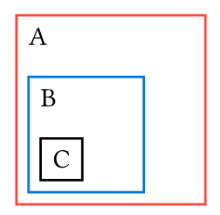
Exactly right. To illustrate:

#show: square.with(stroke: red)
A

#show: square.with(stroke: blue)
B

#show: square
C

So there’s a difference compared to how \frontmatter works in LaTeX: in LaTeX’s \frontmatter code you can only change the global state to affect the rest of the document. In Typst, #frontmatter gets the rest of the document as a parameter. It’s more flexible since you can do

#let frontmatter(doc) = {
 // Styling...
 doc
 // more stuff after the doc
}

or use doc several times in the function (e.g. to show first the questions and then the answers).

But I agree on the main point about the language shaping the document in subtle ways. In Typst it feels like you’re nesting things, so it feels like not quite right for this use case.

By the way here’s what I would actually do in this use case:

In main.typ:

#include "frontmatter.typ"
#include "mainmatter.typ"
#include "backmatter.typ"

and in frontmatter.typ:

#show: frontmatter

// We can also put the styles directly here without show rule: unlike in LaTeX,
// the styles will affect only this file!

content...

I find it quite clean but I like having multiple files for large documents anyway :slight_smile:

How would one do that, the questions and answers thing? AFAIK, you would have to parse (with string.search, replace or regex) the raw doc-string into it’s different parts? Or is there any way you can get at Typst’s tokenized stream, if such a thing exists?

Using EOF as a scope delimiter is quite an unintuitive trick, but thanks anyway!

OK, I see. You could make two functions, run1 and run2 and run them both with doc as input. In run1 you could redefine all #answers to nothing to hide them, in run2 you could do the same thing with the #questions.

Rerunning the input multiple times is something to remember.

Something like that yes (using show rules and tagged containers). It’s not necessarily the best way to do it, I meant it as an example of how it can be useful to have “everything below” as a variable. I’m not sure there are many cases where it’s really the right thing to do :slight_smile:

This isn’t a trick though: the general rule in Typst is that things have only local effect. You have to go out of your way to have global effect, e.g. using states or queries. This makes code easier to analyze: you don’t have to look at other files to verify or understand what one file is doing (unlike in LaTeX where a macro redefinition in one file can have unwanted consequences in a different file).

In the following code

#let func(x) = [
  ...
  #show: ...
  ...
]

the show rule is scoped to the rest of the function. If you put it outside it’s scope to the rest of the file.

1 Like

I think the #show: frontmatter fashion in Typst is the same as \frontmatter fashion in LaTeX?

In LaTeX, if you override default settings in \frontmatter, you also have to revert them in \mainmatter. In my practive, I actually edit \mainmatter after duplicating the whole \frontmatter.

\RenewDocumentCommand \frontmatter {} {
  \ctexset{
    chapter = {
      numbering = false,
    }
  }
  \pagenumbering{Roman}
  \pagestyle{CustomizationA}
}
\RenewDocumentCommand \mainmatter {} {
  \cleardoublepage
  \ctexset{
    chapter = {
      numbering = true,
    }
  }
  \pagenumbering{arabic}
  \pagestyle{CustomizationB}
}

The above example is equivalent to the following typst code. You see the only essential difference is body.
(Sijo mentioned that Typst #let frontmatter is more flexible than LaTeX \RenewDocumentCommand \frontmatter. Yes, but in this scenario, I don’t think it makes any difference.)

#let frontmatter(body) = {
  set heading(numbering: none)
  set page(
    numbering: "I",
    // Customization A
    header: { … },
    …,
  )
  body
}
#let mainmatter(body) = {
  pagebreak(to: "odd", weak: true)
  set heading(numbering: "1.1")
  set page(
    numbering: "1.1",
    // Customization B
    header: { … },
    …,
  )
  body
}
Notes on the details

The above two codes are the lines you’ll write in real documents/templates, but they are not strictly equivalent. The following are their differences.

  1. The \ctexset command provided by ctex controls the numbering by levels. Therefore, I write \ctexset{ chapter = { … } } even if there’s no \section in my front matter.

    • If you want to only change chapters’ numbering, use show header.where(level: 1): set heading(numbering: none).
    • If you want to set numbering in a more LaTeX-like way, use numbly.
  2. Page styles are hardly reused, so I think it’s more straightforward to define them in place, without creating a new name.

    • If you really want the LaTeX way, use spreading.

      let customization-a = (
        header: { … },
        …,
      )
      set page(..customization-a)
      

It’s possible. You can let frontmatter be a metadata, and query it in the overall setup.
However, it’s too complicated for an average perpson to implement.


I agree that the current Typst is not suitable for long documents, but it’s because the implementation still has bugs, ans not because of the markup or the overall design.

Shortcomings of the current Typst (v0.13/v0.14) for long documents:

  • (#4367) If you want the page number for a multi-part document to be formatted as 1 / 9, where 9 is the number of pages in each part, then you need a workaround.

  • (#1097) There’s no native way to list bibliographies per chapter. You have to use third-party packages like alexandria.

I don’t fully agree with this statement. In LaTeX, I divide my long document using \include{chapterX.tex}. I can do exactly the same in Typst. The only difference is that I need to #import all the packages I want to use in chapterX.typ file. It is a little bit inconvenient, but I am fine with it.

Hi there.

With the new version, the reference docs indeed got a hell of a lot better, but tutorials are technically (but not generally) pretty bad, IMO. See Refactor tutorials by Andrew15-5 · Pull Request #6417 · typst/typst · GitHub.

With Vim keymaps it’s as easy as moving cursor to opening square bracket, and hitting %. Although without contextual clues, when there is an unpaired bracket somewhere in the text, it will break. Which happens rather frequently for big files with parentheses, depending on the content.

It sounds very generic, but Create a dedicated section on dangers of using square brackets carelessly (multi-line) · Issue #6844 · typst/typst · GitHub is related to significance of whitespaces/newlines in square brackets.

This is kinda what I have in my methodological guidelines project structure: a template function, then prefix() with a bunch of info that can be changed, then included “main” file, then postfix() with a different set of data that fills the gaps in the stuff that goes at the end of each document. This makes it easy to see all the core info that is included at the front and back. The main content goes completely separately, making use of “separation of concerns”.

There are some related packages: its-scripted – Typst Universe.

See Which show rule takes precedence?.

My document is over 100 pages and it’s fine. But depending on use cases, it can be annoying to make it work like you want, often involving workarounds and hacks.

These are not common requirements even for long documents. For example LaTeX is regarded as well suited to large documents I think, but also needs third-party packages or hacks to do these things. But yeah Typst aims higher than LaTeX and should probably have better out-of-the-box support for these use cases.

(I don’t quite agree, but I don’t want this thread become Observations from desperate LaTeX users, so let’s stop here.)

My opinion, if you really care

In the following sense, your comparison is unfair.

Typst = latex/xelatex/lualatex + basic utilities from standard clases + ubiquitous packages like geometry + (bibtex + bibtex-* packages)/(biblatex + biblatex-* packages).

Therefore, I don’t think packages like biblatex are “practically” third-party, and I expect typst/hayagriva to be capable of all the features of biblatex, including ref sections.

(OK but that seems rather unfair: Typst is allegedly unsuited to large documents because it sometimes needs a third-party package, but LaTeX gets a free pass with third-party packages because it needs them even more!?)

1 Like

(I mean you cannot just drop this claim and then say that the discussion is closed because the original thread would become too sidetracked LOL. Having written a 200-page PhD manuscript in Typst, I wouldn’t say that I agree with your statement. Maybe create the thread “Observations from desperate LaTeX users”? :sweat_smile:)

3 Likes

Thanks for all of your feedback.

I do use Vim, and I know I can jump from bracket to bracket, but not everyone is using a programmer’s editor. I do stand by my observation: because the square bracket syntax is not suitable for divisions of text that are longer than a screenfull, it is substituted by end-of-file as a meaningful scope delimiter, either by an “everything show” rule or by putting sections of your document in different files.

Things to gain by including a clearly named scope delimiters, i.e. something akin to <mydivision(arguments)> lots of text text</mydivision>:

  1. You can scan the document a lot faster, as in, see the structure of a document in a glance.
  2. Better diagnostics in case of missing or overlapping delimiters.
  3. These named delimiters could have other behaviour than square brackets. For instance, they could gobble up spurious whitespace and line breaks after and before the tags. This would help with synthesized manuscripts where you do not always have precise control over line endings. For instance, most of my old LateX documents are based on a bunch of files concatenated together. Some are taken as is, others are preprocessed by various scripts.

That is like the most painfull way to write dialogue. Also, movie scripts are something else, I see no reason not to use Fountain for those.

1 Like