uwni
February 24, 2026, 1:58pm
1
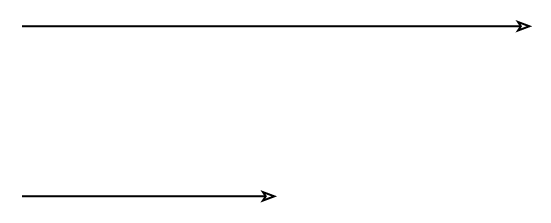
Hi. I want to shift the mark to the middle point of the line attached. And I have tried the following codes
#import "@preview/cetz:0.4.2"
#cetz.canvas(length: 3cm, {
  import cetz.draw: *
  line((0, 1), (3, 1), mark: (end: ">>", offset: 0%))

  line((0, 0), (3, 0), mark: (end: ">>", offset: 50%))
})
however it produced
This shows that not only is the mark placed in the middle, but the rest of the line is also not drawn. is this a intended feature or a bug?
1 Like
Y.D.X
February 24, 2026, 3:14pm
2
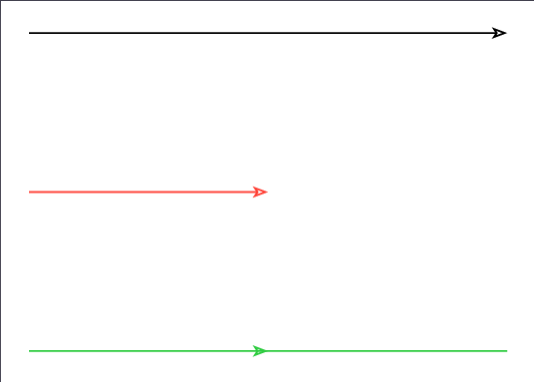
Hi! I guess this is the desired behaviour.
If you don’t want the line to be shortened, pass/set shorten-to: none.
#import "@preview/cetz:0.4.2"
#cetz.canvas(length: 3cm, {
  import cetz.draw: *
  line((0, 1), (3, 1), mark: (end: ">>", offset: 0%))
  line((0, 0), (3, 0), stroke: red, mark: (end: ">>", offset: 50%))
  line((0, -1), (3, -1), stroke: green, mark: (
    end: ">>",
    offset: 50%,
    shorten-to: none, // 👈 Here
  ))

  // Alternatively
  set-style(mark: (shorten-to: none))
})
shorten-to
int or auto or none
Default: auto
Which mark to shorten the path to when multiple marks are given. auto will shorten to the last mark, none will shorten to the first mark (effectively disabling path shortening). An integer can be given to select the mark’s index.
Further explanation: Pos and offset property of mark in CeTZ Hi. I want to shift the mark… | DeepWiki
5 Likes
uwni
February 24, 2026, 5:36pm
3
Solved. Thank you very much.
1 Like