#show heading.where(level: 6): it => {
  show regex("^(.*\.)"): first-word => text(fill: rgb("#7a1f1f"), weight: "bold", first-word)
  it
}

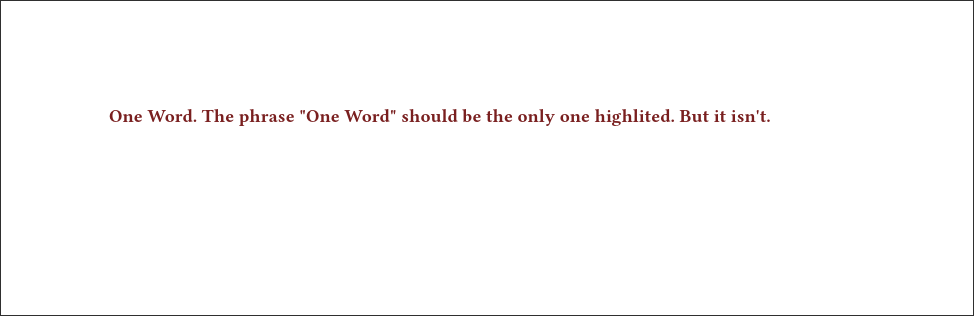
====== One Word. The phrase "One Word" should be the only one highlited. But it isn't.
Every other regex engine I tested captures the phrase “One Word.”, but in typst:
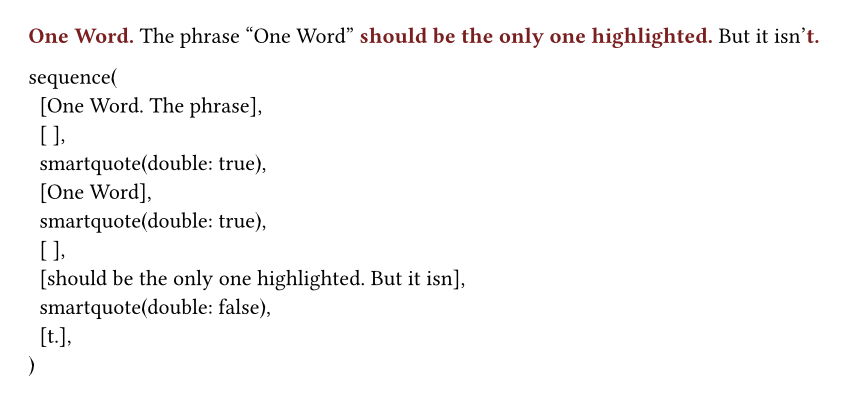
I think this is because content in typst gets turned into a sequence in the background, so raw text in the body of the text doesn’t necessarily maintain the same structure post-processing. Thus, ^ ends up behaving differently. Take a look at this modified version of your example:
#show text: it => {
  show regex("^(.*\.)"): first-word => text(fill: rgb("#7a1f1f"), weight: "bold", first-word)
  it
}

#let txt = [One Word. The phrase "One Word" should be the only one highlighted. But it isn't.]

#txt

#repr(txt)
The repr function shows how the text is processed by typst. You can see the highlighting behavior correctly applies the regex to each line in the sequence.
Not sure why the whole title is highlighted for the header, though. Regardless, hopefully this shows that ^ doesn’t end up being a very helpful regex symbol in typst.
Thanks for the reply, but my question still stands, how do I only highlight the first sentence (or in other words, everything before the first period)?
Man, this is a bit of a mess, but I think it works as a drop-in solution for what you were hoping to do.
#let get_body_children(it) = if not it.body.has("children") {(it.body,)} else {it.body.children}
#let is_processed(first_child) = first_child.at("value", default:"") == "processed"
#show heading.where(level: 6): it => {
  let children = get_body_children(it)
  if not is_processed(children.first()) {
    heading(level:6)[#metadata("processed")
      #let is_before_period = true
      #let style_words = text.with(fill: rgb("#7a1f1f"), weight: "bold")
      #for c in children {
        if is_before_period {
          if c.has("text") and c.text.contains(".") {
            is_before_period = false
            show regex(".*\."): style_words
            c
          } else if is_before_period {
            show: style_words
            c
          }
        } else {
          c
        }
      }
    ]
  } else {
    it
  }
}

====== One Word. The phrase "One Word" should be the only one highlighted. And now it is!
You might be better off defining your own function that will do this though. Hope this helps.
Also, to make your question’s title more searchable for others, you might rename this thread as “Why does regex start-line character ^ not match text as expected?” or something like that.
It’s a little bit beside the point, but we can test the Rust regex engine (regex crate) on this website:
And it confirms that the first result is actually correct. It’s the case that .* is greedy and matches as much as possible, including periods. Ungreedy matching is what you would have wanted, and it looks like this: ^(.*?\.)
Hovering over first-word confirms that these two patterns match different texts. Yet the result is the same… And the reason for that is the rest of the thread.
[/sidenote}
I recommend using explicit markup in this case. Regex and/or content introspection are not reliable tools for this job.
Maybe, possibly, you could use regex + state to make something useful. But it will always have quirks due to the limitations of regex rules, we can’t really use it for finding words unfortunately, not in general, styled, documents.
#let _dot-done = state("dot-done", false)

#show heading.where(level: 6): it => {
  _dot-done.update(false)
  show regex("[^.]*\\."): t => context {
    if _dot-done.get() {
      t
    } else {
      _dot-done.update(true)
      text(fill: rgb("#7a1f1f"), t)
    }
  }
  it
}


====== One Word. The phrase "One Word" should be the only one highlited. But it isn't.
It seems that Typst reapplies the show rule. Others here in the forum may explain this in a better way.