#import "@preview/cetz:0.4.2"
#set page(width: auto, height: auto, margin: 0.5cm)

#cetz.canvas(length:3cm,{import cetz.draw: *

	ortho(x: 150deg,y: 160deg,z: 180deg,{

		on-xz(y:0,{
			line(
				name:"a",stroke:blue,
				(to:(2,3),rel:(220deg,0.75)),
				(2,3),
				(to:(2,3),rel:(40deg,0.75))
			)
			line(
				name:"b",stroke:red,
				(to:(2,3),rel:(180deg,0.75)),
				(2,3),
				(to:(2,3),rel:(0deg,0.75))
			)
		})

		intersections("i",{
			line(
				stroke:green,
				"a.end",
				(rel:"a.end",to:(0,0,-0.5)),
			)
			line(
				stroke:none,
				"b.start",
				"b.end"
			)
		})

		circle(stroke:purple,"i.0",radius:0.04)
		circle(stroke:orange,"a.end",radius:0.04)
		circle(stroke:olive,(2,0,3),radius:0.04)

		cetz.angle.right-angle(
			radius:0.25,
			"i.0",   // purple circle
			"a.end", // orange circle
			(2,0,3), // olive circle
		)

	})
})
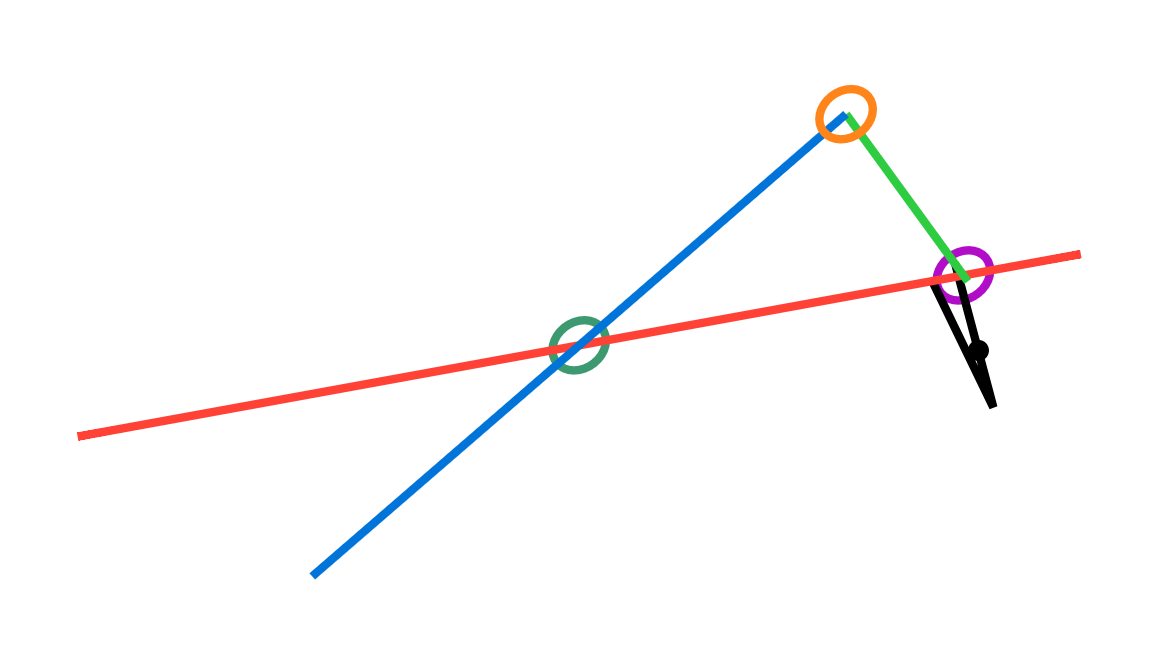
It’s a right triangle on the xz plane.
I highlighted the points with differently colored circles to make it clearer.
How can I solve this? I tried to manually make a square with a centered dot, but when I tried to insert a dot in the middle of it, the named anchors “a.0” don’t work along with coordinates inside of on-xz(y:,{}) environments.