I hesitated to post these here because I’m not sure they are especially groundbreaking or “Showcase”-worthy. I finally decided to share my work with the Typst community, in case it might be helpful to someone who is trying to create similar-style documents – particularly if s/he is working with a tight deadline.
(I’m neither a graphic designer nor a trained typographer, so I may have committed a variety of cardinal sins here.  ) Based on my reading, the main (typographical) goal of this sort of document is to be crisp, clear and conservative.
I added explanatory notes in the Comments for each project. Please feel free to correct and/or improve these documents.
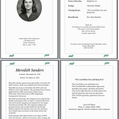
“Celebration of Life” booklet (read-only link)
( )
)
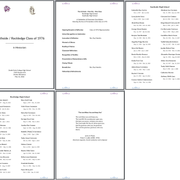
Memorial Booklet for Class Reunion (read-only link)
( )
)
Another challenge with this project was that I had never tried creating a folded, saddle-stitched booklet. I didn’t understand the principle of page imposition until I actually made a physical mockup of the booklet(s).
Fortunately, there are two useful tools to help you with imposition:
and designer Ingo Schaefer’s tool:
Seitenreihenfolge-Rechner (‘Page Order Calculator’)
- Choose the Rückensteckheftung (‘Spine stitching’) option,
- Fill in the Seitenanzahl (‘Number of pages’) box
- and press Enter.
The calculator will output the (correct) order of pages. The calculated page order refers to duplex printing.
The correct page imposition order for the 4-page “Celebration of Life” booklet is:
4,1 / 2,3
The correct page imposition order for the 8-page Memorial Booklet is:
8,1 / 2,7 / 6,3 / 4,5
Note about the page geometry:
The page size is “us-statement” (aka half letter size): 5.5in x 8.5in (140mm x 216mm)
The grid mode “1x2” is standard for booklets. This means that each printed sheet is laid out in a 1x2 grid, duplex printed (or duplex photocopied). Then the sheets are folded in half and nested one inside the other, and stapled through the fold line with wire staples.
