Hi. Here is how I’d probably do it:
#import "@preview/touying:0.6.3": *
#import themes.simple: *

// #let red = rgb("#ff0000") // rgb("#391881")
#let red = rgb("#ff0404") // rgb("#391881")

#let header(self) = {
  {
    show: components.cell.with(inset: 5mm)
    text(2.5em, strong(utils.display-current-heading()))
    h(1fr)
    show: box
    show: move.with(dx: 0.5em, dy: 0.5em)
    context utils.slide-counter.display()
  }
  line(length: 100%, stroke: red + 3pt)
}

#let title-background = {
  set align(top + left)
  set rect(stroke: blue.lighten(50%) + 4pt)
  show: pad.with(2pt)
  grid(
    columns: 3,
    gutter: 5mm,
    align: bottom,
    rect(width: 40mm, height: 30mm),
    rect(width: 37mm, height: 27mm),
    rect(width: 35mm, height: 25mm),
  )
}

#show: simple-theme.with(
  header: header,
  footer-right: none,
  subslide-preamble: none,
  config-info(title: "Title"),
  config-page(margin: (top: 3em, rest: 5mm), fill: gray.lighten(50%)),
  config-common(zero-margin-header: true, zero-margin-footer: true),
  config-colors(primary: black),
)
#set text(font: "Liberation Sans")

#title-slide(config: config-page(background: title-background))[
  #title()
  Subtitle
]

== Slide 1
#lorem(98)

== Slide 2
#lorem(98)
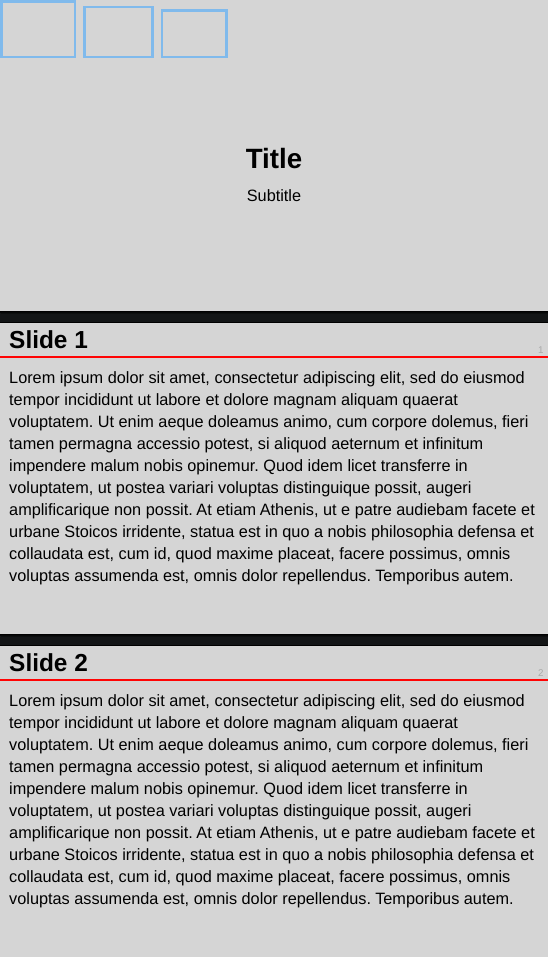
This is not how it works, nor how presentations work in general. You clearly have some padding around all text boxes and just in general for the main slide text. This contradicts with your reproduction goal.