Welcome @TWG
In short: you generally use #import when you want to use a function, a module and/or a template in a separate document. Remember what keyword you use when loading packages from Typst Universe ;)
Long Version
#import inserts modules, functions, variables, everything that is non-content into your document. Content are things such as equations, lists, paragraphs, etc.
#include inserts the contents, but leaves out any non-content. So you get the paragraphs, equations, images, tables, etc.
Here’s an example on how you can see that effect (and how to fill the page red). You have two files main.typ and style.typ
Contents of style.typ
#let make-it-red(body) = {
  set page(fill: red)

  body
}

Hello, it's me `style.typ`!
Now let’s see how the end results differ when using either #import or #include
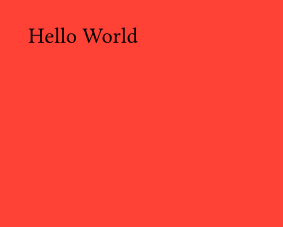
Importing style and then applying everything after the #show statement with the function make-it-red
#import "style.typ": *

#set page(width: 5cm, height: 4cm, margin: 5mm)

#show: make-it-red

Hello World
yields
This is essentially what creating a document template is. When you state #show: function, it means take everything below this statement and apply function to it. function would have at least one parameter which represents the taken content. If you want to have a parameter for filling the page with a different color, you have function(content, fill: red). Since fill has a default value, the above #show statement sill works. If you want to change the background to blue, you then have to use function.with(fill: blue), because #show: always wants a function. Read more on Making a Template - Typst Documentation.
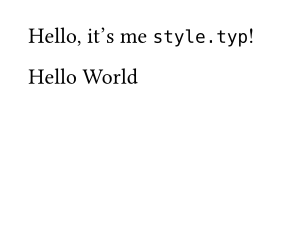
When we include style.typ like following
#set page(width: 5cm, height: 4cm, margin: 5mm)

#include "style.typ"

Hello World
we get
You can imagine the rendering process as compiling everything inside the document style.typ and then inserting it into main.typ. (I think) This unfortunately makes it impossible to have something like subfiles from LaTeX.