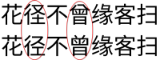
Should Typst doc mention CJKV glyph fallback?

Not a typst issue, but my computer issue:

/* imput method and text editors???
(Fcitx5 and Kate/SublimeText) */
花径不曾缘客扫

/* browser, system and terminal
Firefox, Debian+KDE, Nano editor */
#set text(font:"Noto Sans CJK SC")
花径不曾缘客扫

How to fix?
cjkv_glyph

And I can’t search the weird glyphs online as my browser will auto convert them into right ones…

Too long dont read:
→ how to fix
→ github issue
→ typst doc

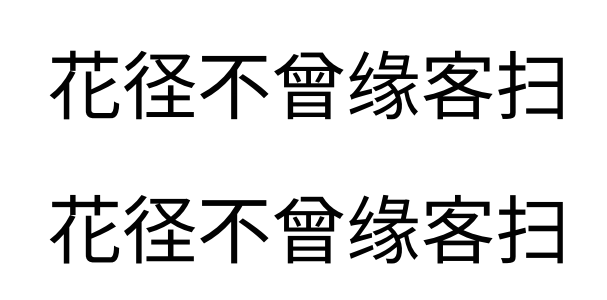
If you look carefully, you’ll find that 花 and 客 are also different

The character shapes are different in different parts of East Asia, and they were unified in Unicode.
The first line of your screenshot uses Japanese glyphs. You can reprodue it with Typst like this:

#text(font: "Noto Sans CJK JP")[花径不曾缘客扫]

#text(font: "Noto Sans CJK SC", lang: "ja")[花径不曾缘客扫]

I guess you’ve installed via apt install fonts-noto-cjk, which downloaded OpenType Collections containing both SC and JP glyphs?

1 Like

Thx ur insight! To get proper glyphs:

	"font_face": "Noto Sans Mono CJK SC",
	"font_size": 10,
	"line_padding_top": -1.01,
	"line_padding_bottom": -1.01,

…I have to SIGH with a quote:

It’s not easy for people to use non-English computer, to code non-English software, to edit non-English typesetting.
As there are too many techs, traps, tricks, etc for non-English cases.

I did not install any fonts, my Linux Debian KDE is vanilla as-is. Only two fonts, Droid Sans and Noto Sans/Serif, support proper CJKV glyphs. While, if u set Noto Sans CJK SC via KDE GUI menu:

  • im-config: I’m a input method, jp first
  • google noto: I’m a fontset, jp first
  • sublimetext: I don’t know fontset, so I use jp
  • firefox: I know, so I use sc
1 Like

Not solved!? @Y.D.X
Now my system, terminal, browser, editor and input method all support proper glyphs, but typst compiled PDF is wrong still…

  • What should I do, modify font fallback order of google noto?
  • Just remove google noto and install a proper font?
  • Should typst auto choose proper glyph like firefox? (based on system settings)

The glyphs that look weird to Chinese may be considered proper by Japanese.
(See https://help.mirrors.cernet.edu.cn/adobe-fonts/#source-han-sans-versions → 字形覆盖范围)

Therefore, you need to tell Typst you prefer which kind of glyphs.
There are two ways to do so:

  • set text(lang: "zh")
  • adding SC to the font name

If you still have problems, please show your exact code.

1 Like

@Y.D.X No, it’s not proper. Typst selects wrong glyphs while any other software or operating system selects proper glyphs!

Eventually, I solve the issue by a single file (but Typst not):
Arch Wiki: Place SC Chinese before JP Chinese

$ fc-match -s | grep 'Noto Sans CJK'
NotoSansCJK-Regular.ttc: "Noto Sans CJK JP" "Regular"
$ cd /etc/fonts/conf.avail/
$ sudo touch 64-language-selector-prefer.conf
$ sudo nano 64-language-selector-prefer.conf
# see arch wiki 1.2.2.2 section
$ sudo ln -s /etc/fonts/conf.avail/64-language-selector-prefer.conf /etc/fonts/conf.d/64-language-selector-prefer.conf
$ sudo fc-cache -fv
$ fc-match -s | grep 'Noto Sans CJK'
NotoSansCJK-Regular.ttc: "Noto Sans CJK SC" "Regular"
# now, system and every software are proper
# but Typst NOT

Shouldn’t Typst select proper glyph like any other software?

1st 花径不曾缘客扫  // output jp

#set text(font:"Noto Sans CJK SC")
2nd 花径不曾缘客扫  // output sc

/* Perhaps 1st == 2nd should be true,
do you agree?*/

At present, there’s no guarantee if no font is selected in the Typst document. There’re discussions in the links under clreq-gap for typst.

If you want Typst to read the system configuration, you can open an issue.

In this specific case, I think it is better to render the Han characters in the first line in Noto Serif CJK SC (instead of the sans-serif version), because 1st is rendered in Libertinus Serif.

1 Like

I’ve just posted it to Writing non-Latin (e.g. Chinese) text without a configured font leads to unpredictable font fallback · Issue #5040 · typst/typst · GitHub.

1 Like

Thx to GitHub issue comment. It’s not hard to realize,

  • if someone write Simplified Chinese, he/she expect that China Mainland glyphs will be print out;
  • if someone write Traditional Chinese, he/she expect that Taiwan Province glyphs will be print out;
  • if someone write Portuguese, he/she expect that Brazil glyphs will be print out … as Brazil is much bigger than Portugal.

However, perhaps it’s not easy to apply the rule,

  • Process: keyboard → system → inputMethod → font → glyph
    • System: Android Debian Fedora Mac Ubuntu Windows …
    • Input Method: Baidu Bing Fcitx5 Google iBus …
    • Font: DejaVu Noto Source …
    • Glyph: HK JP KR SC TC …
  • Store: ANSI UTF8 GB2312 GB18030 …

Now, Typst doesn’t warn about tofus, let alone show proper glyph.

So my suggestion is to document the issue:

Text

Parameters

font


Note: To set proper font set before any composing is recommended. Because for complex languages (e.g. CJKV), it’s hard to assert that the final glyphs are as expected.