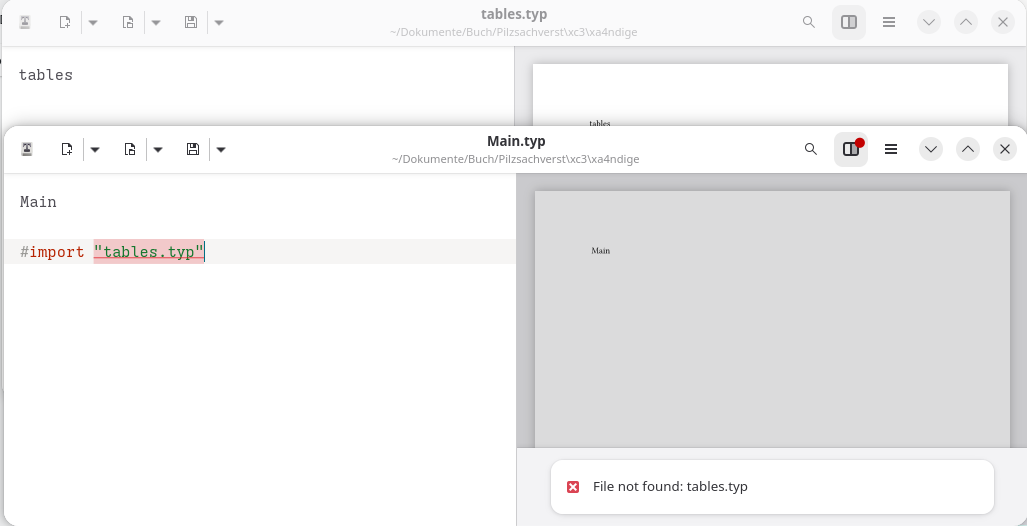
I’m trying to explain my problem with the screenshot. See the message “File not found”
I’m working offline. Both files are in the same directory.
I must have missed something.
I’m far from experienced in Typst, but looking at your screenshot, I think it should be #include "tables.typ". I had a similar problem a while ago; I think you use#import "…"for packages or templates from Typst Universe for instance, not for files in the same folder/directory.
This should completely work if this file is sibling to your main file (regardless of whether you use include or import). What editor are you using?
Note that include and import have two different purposes:
import imports the definitions from the module so that you can programmatically access them in your file. Content that is defined in the imported module and that is not bound to any variable will not be available.
include includes all contents into the current file. However, definitions are not imported into the current scope.
I haven’t yet come across the term “sibling” while reading the documentary.
I would like to understand the effects of import and include using a simple example.
It took me a while to understand the concept of projects in Typst.
Once a project is created, images can be added using the Navigator, similarly, new content files can be created with the extension “typ”. In my attempt, the name of the content file is “chapter 2.typ”.
This file contains the content that will later be incorporated into the main file.
Despite much trial and error, I haven’t yet managed to integrate them into the main file.
Using the functions #import or #include “chapter 2” produces the following output:
File not found: chapter 2
Unfortunately, the documentation is unclear at this point, or have I overlooked something?
As far as I know, the Typesetter editor is restricted by operating system sandboxing in which files it is allowed to read, so maybe that’s the issue? Typesetter is a third-party project, so I’m not sure. If you are comfortable with using a terminal, you could try checking whether you can reproduce the problem with the official Typst command line compiler or whether that just works.