Akira
1
I have
#set heading(numbering: "1.A.1.")
#set text(lang: "fr")
#set text(size: 12pt)

= Chapter 1

== Section title

=== Section title

= Chapter 2

== Section title

=== Section title
that produces the numbering
1. Chapter 1
1.A. Section title
1.A.1. Section title
2. Chapter 2
2.A. Section title
2.A.1. Section title
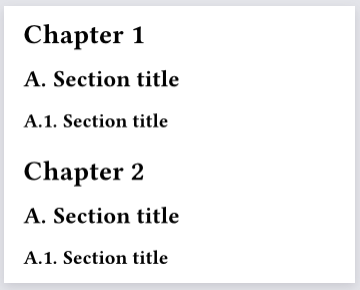
I would like to ask how to suppress the first-level numbering, i.e., to obtain
Chapter 1
A. Section title
A.1. Section title
Chapter 2
A. Section title
A.1. Section title
and make the first-level heading centered. Here they are Chapter 1 and Chapter 2.
Thank you for your elaboration.
This really appears to be different from How can I prevent level 1 headings from being numbered?. By using the set rule from there, this is what I think could be viable:
#show heading.where(level: 1): it => block(it.body)
#set heading(numbering: (first, ..nums) => numbering("A.1.", ..nums))

= Chapter 1

== Section title

=== Section title

= Chapter 2

== Section title

=== Section title
Output
So the first-level heading still has numbering, it’s simply not visible due to its show rule.
Apply this change:
- #show heading.where(level: 1): it => block(it.body)
+ #show heading.where(level: 1): it => align(center, block(it.body))
Or add this:
#show heading.where(level: 1): set align(center)
Akira
3
Thank you very much for your solution.
Note that as a general solution it => block(it.body) won’t cut it, since heading style can include settings that are handled in the default show rule. See Add default typst implementation code where possible · Issue #5095 · typst/typst · GitHub.