The problem
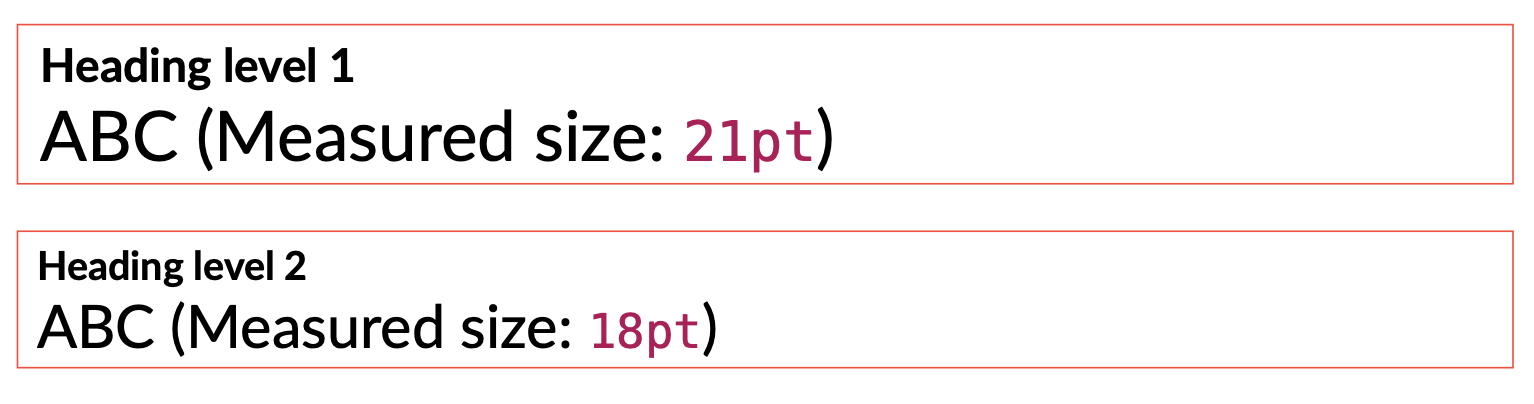
Relative sizes are scaled by the heading’s own native size. In H1 (1.4x), 1.5em becomes 21pt (1.4 × 1.5 × 10 pt). In H2 (1.2x), 1.5em becomes 18pt (1.2 × 1.5 × 10 pt).
show heading: h => {
   let relative-size = 1.5em
   block(stroke: red)[
      Heading level #h.level
      Text in 1.5em: #text(size: relative-size)[ABC]
   ]
}
The workaround
Applying 1em / scale to recover the document’s true base size (10pt). Now, 1.5em correctly becomes 15pt (1.0 × 1.5 × 10 pt) everywhere.
show heading: h => {
   // Define Typst's default scale factors
   let scale = if h.level == 1 { 1.4 } else if h.level == 2 { 1.2 } else { 1.0 }
   // Apply inverse scale to neutralize the heading's influence
   set text(size: 1em / scale)
   let relative-size = 1.5em
   block(stroke: green)[ ... ]
}

Conclusion & open question
This behavior creates a challenge when designing consistent UI elements (like info boxes, navigation aids, or automated headers) that are triggered by headings. Since these elements often rely on relative units (em) for consistent internal spacing and typography, their visual appearance shifts depending on the heading level that invokes them.
While the inverse scaling workaround works, it requires hardcoding Typst’s internal scale factors. Is there a more idiomatic way to “escape” the local heading’s style context and evaluate content relative to the document’s root font size from within a show rule, without forcing absolute lengths?
 . This will help others find the solution in the future. If something is missing, please let us know what so we can resolve your issue. Thanks!