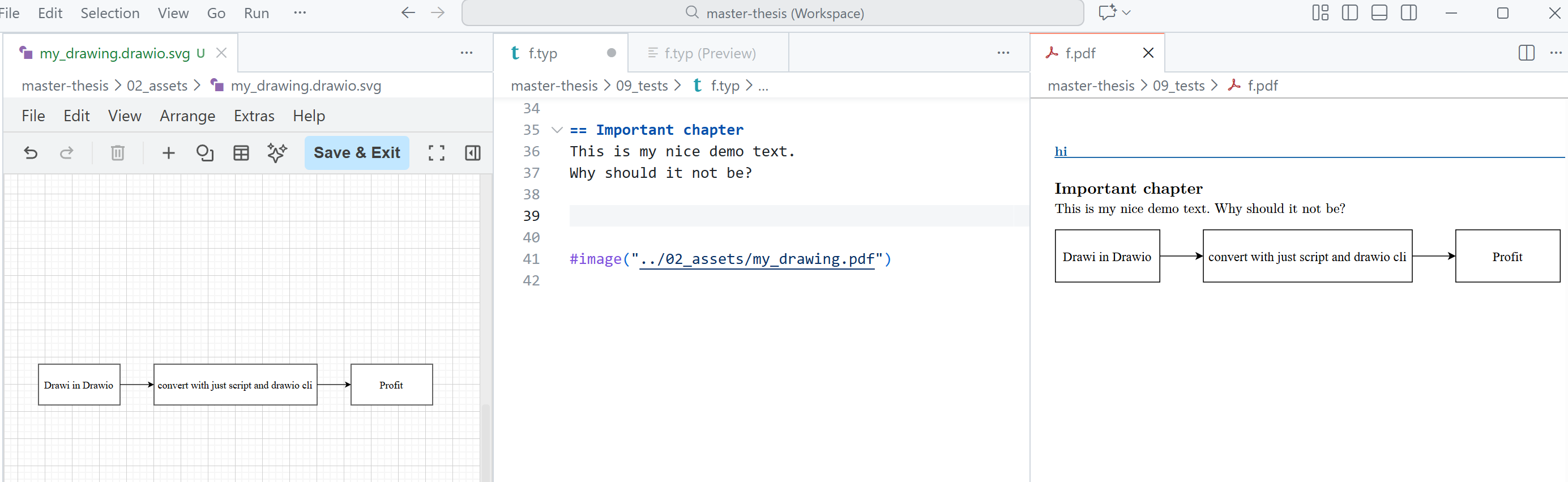
I use CeTZ a lot for graphics, but not every situation benefits from code-based drawings. So I looked around for a GUI tool with proper Typst support. I didn’t really find anything, and since draw.io is the most common recommendation, I settled on that.
A key issue: SVGs exported by drawio don’t render correctly in Typst-generated PDFs. (Important: they look fine in the preview, but the final PDF is where things break.)
My setup in VS Code:
- Typst using Tinymist
- drawio extension
- drawio desktop installed for CLI export
- Typst installed on Windows
- Justfile for convenience (optional)
Folder layout:
/root
  /chapters
    chap1.typ
  /assets
    grafic.drawio.svg
    grafic.pdf
    /subfolder
      more .svg and .pdf
  justfile
  main.typ
I create name.drawio.svg files inside the assets folder. I can edit them directly inside VS Code with the drawio extension, and they also open normally in other programs or online viewers.
For conversion, I use PowerShell and the drawio CLI to generate the corresponding PDFs. To simplify the process, I wrapped the conversion in a just command:
#render all .drawio.svg files to .pdf
[windows]
drawio:
    #!powershell
    Get-ChildItem -Path 'assets' -Recurse -Filter '*.drawio.svg' | ForEach-Object { $outFile = $_.FullName -replace '\.drawio\.svg$', '.pdf'; Start-Process -FilePath 'C:\Program Files\draw.io\draw.io.exe' -ArgumentList '-x', '-o', $outFile, '--crop', '-f', 'pdf', $_.FullName -Wait -NoNewWindow }

# render only pdfs that do not exist yet
[windows]
drawio_missing:
    #!powershell
    Get-ChildItem -Path 'assets' -Recurse -Filter '*.drawio.svg' | ForEach-Object { $outFile = $_.FullName -replace '\.drawio\.svg$', '.pdf'; if (!(Test-Path $outFile)) { Start-Process -FilePath 'C:\Program Files\draw.io\draw.io.exe' -ArgumentList '-x', '-o', $outFile, '--crop', '-f', 'pdf', $_.FullName -Wait -NoNewWindow } }
I then #include the pdf in my .typ files.
In the drawio vs code extension please note the settings:
Hediet › Vscode-drawio: Offline
I disabled it to get a newer version of drawio
Hediet › Vscode-drawio: Custom Fonts
I added New Computer Modern