Hi everyone,
I was trying to make a simple addition to handle units, preferably with unify, but manually setting them is fine too, since it is not reused. I have provided the best I could come up with for using a theme for the glossary. If i should use glossarium or something else instead, that is fine, the end result should have units as I use that a lot. I honestly don’t really know how to proceed without making a fork of the glossy package.
Top of main.typ:
  #import "@preview/glossy:0.9.2": *
    #show: init-glossary.with(yaml("glossaries/sinter.yaml"))
Using the abbreviations and printing the glossary:
@wb:cap  @wb1 @wb13 @wb14 @wb15 @void
  #include "backmatter/symbols.typ"
backmatter/symbols.typ:
#import "@preview/glossy:0.9.2": *
#import "@preview/unify:0.8.1": *
// https://github.com/swaits/typst-collection/blob/main/glossy/src/themes/table.typ
#let theme-mytable = (
  section: (title, body) => {
    heading(level: 2, title)
    body
  },
  group: (name, index, total, body) => {
    if name != "" and total > 1 {
      heading(level: 2, name)
    }

    table(
      columns: 4,
      stroke: none,
      inset: (x, y) => {
        if (x == 0) {
          (left: 0pt, rest: 5pt)
        } else if (x == 2) {
          (right: 0pt, rest: 5pt)
        } else {
          5pt
        }
      },
      table.header([*Abbreviation*], [*Full Name*], [*Description*], [*Unit*]),
      ..body,
    )
  },
  entry: (entry, index, total) => {
    (
      entry.short + entry.label,
      entry.long,
      entry.description,
      if "unit" in entry {
        unit(entry.unit)
      } else {
        [[--]]
      },
    )
  },
)

// this is what prints the glossaries
= Glossary

#glossary(
  title: "sinter Abbreviations",
  theme: theme-mytable,
  groups: ("sinter machine")
)

#glossary(
  title: "other Abbreviations",
  theme: theme-mytable,
  groups: ("")
)
here is the sinter.yaml:
wb:
  short: WB
  long: windbox
  description: The windbox is the windbox. The windbox is the windbox. The windbox is the windbox. The windbox is the windbox. The windbox is the windbox. The windbox is the windbox. The windbox is the windbox.
  group: sinter machine

wb1:
  short: WB
  long: windbox
  description: The windbox is the windbox. The windbox is the windbox. The windbox is the windbox. The windbox is the windbox. The windbox is the windbox. The windbox is the windbox. The windbox is the windbox.
  group: sinter machine


void:
  short: ε
  long: void fraction
  description: Fraction of empty space in a given volume.
  unit: nothing

wb13:
  short: WB
  long: windbox
  description: The windbox is the windbox.
  unit: "m"

wb14:
  short: WB
  long: windbox
  description: The windbox is the windbox.

wb15:
  short: WB
  long: windbox
  description: The windbox is the windbox.
result:

and then:
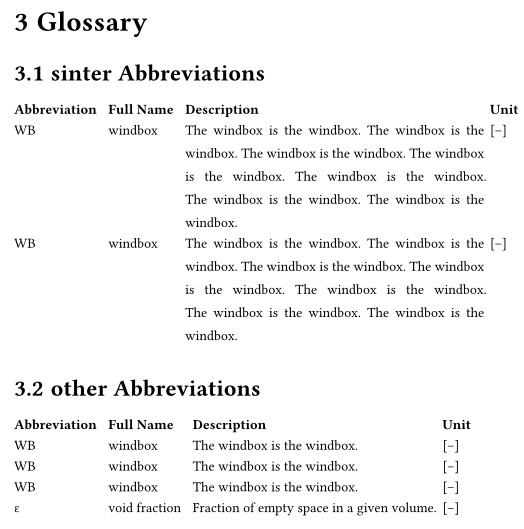
As you can see, the default unit, defined in the #let theme-mytable code, is used but not the units defined in the yaml.
I hope this is not too convoluted, if it is, i can make a simpler version, but the main focus is the #let theme-mytable is the most central part (me thinks).
Here is a simpler version, or at least self contained
view only project on typst.app
I thank you all in advance