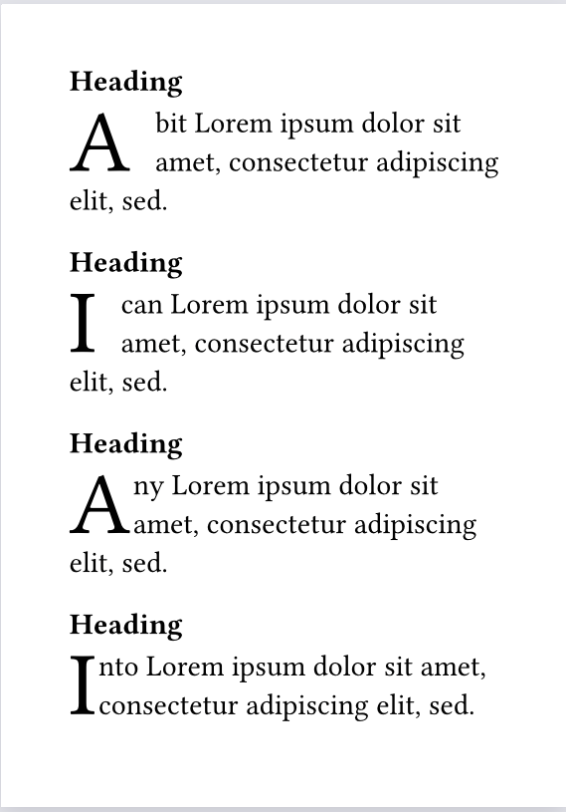
If you are using “Droplet” and the paragraph begins with either “A” or “I” followed by a space, the space is included as part of the dropcap, as follows:
#set page(paper: "a7")
#set par(first-line-indent: 1em, spacing: 0.5em, justify: false)
#import "@preview/droplet:0.3.1": dropcap

// Keep original dropcap
#let orig-dropcap = dropcap

// My dropcap with my defaults
#let dropcap(body) = orig-dropcap(
  height: 2,
  gap: 1pt,
  hanging-indent: 0pt,
  body,
)

==== Heading

#dropcap[A bit #lorem(9)]

==== Heading

#dropcap[I can #lorem(9)]

==== Heading

#dropcap[Any #lorem(9)]

==== Heading

#dropcap[Into #lorem(9)]
Thank you both. I should have posted this some time ago, but I’ve been otherwise engaged. In the meantime, I’ve been rewriting paragraphs to avoid this, but that’s not a solution.
As a non-coder, I don’t follow too easily, and I’m not at my computer at the moment, but I’ll experiment when I am.
While I see what the code does, I don’t really understand the different working of #let dropcap = orig-dropcap.with() compared to #let dropcap(body) = orig-dropcap().
As for transform: it => it.trim(), I am completely in the dark with that!
Finally, while some graphic design guru(s) may consider the dropcap including the space as acceptable, I find them exceedingly ugly and to me they stand out like a sore thumb against the other non-spaced dropcaps.
I shall now (when I have time, that is) experiment to see if one could, on the basis of this code, use a decorated font for the dropcaps à la mediaeval manuscript.