Firstly, apologies if this belongs on another site like the computer graphics stack exchange.
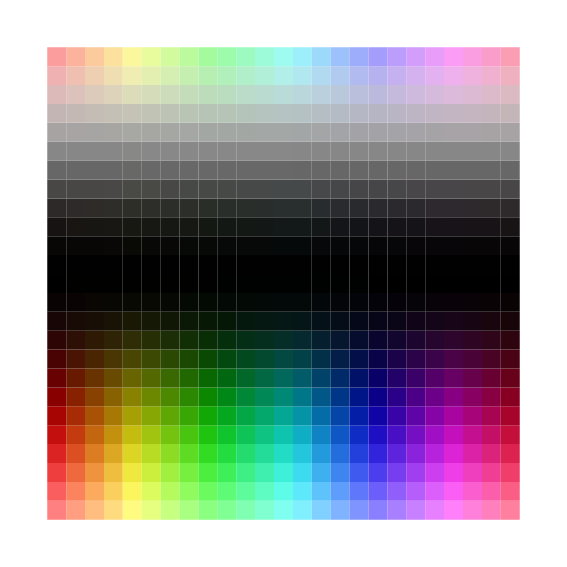
For some mathematical visualizations, I am trying to find a way to smoothly color the torus in such a way that each point gets a unique color. I tried starting with using the hue and lightness (based on a stackexchange post I can’t find anymore. On the square, this looks like:
#import "@preview/cetz:0.4.2"

#set page(
  width: auto,
  height: auto,
  margin: 1mm,
)

#cetz.canvas({
  import cetz.draw: *

  let steps = 25
  let step-size = 1.0 / steps

  // Pre-compute colors to avoid recomputation
  let colors = {
    let cols = ()
    for i in range(steps + 1) {
      let x = i * step-size
      let row = ()
      for j in range(steps + 1) {
        let y = j * step-size
        let hue = x * 360deg
        let saturation = 50% + 50% * calc.sin(2 * calc.pi * y)
        let value = 50% + 50% * calc.cos(2 * calc.pi * y)
        row.push(color.hsv(hue, saturation, value))
      }
      cols.push(row)
    }
    cols
  }

  // Draw rectangles with precomputed colors
  for i in range(steps) {
    for j in range(steps) {
      let x = i * step-size
      let y = j * step-size

      rect(
        (x, y),
        (x + step-size, y + step-size),
        fill: colors.at(i).at(j),
        stroke: none
      )
    }
  }
})
(as a sidenote, I’d also like to figure out why some white lines are still being made here despite me setting the stroke to none). Note that, on the square, smoothly coloring the torus requires that the right edge matches the left edge colors, and similarly between the top and bottom edges.
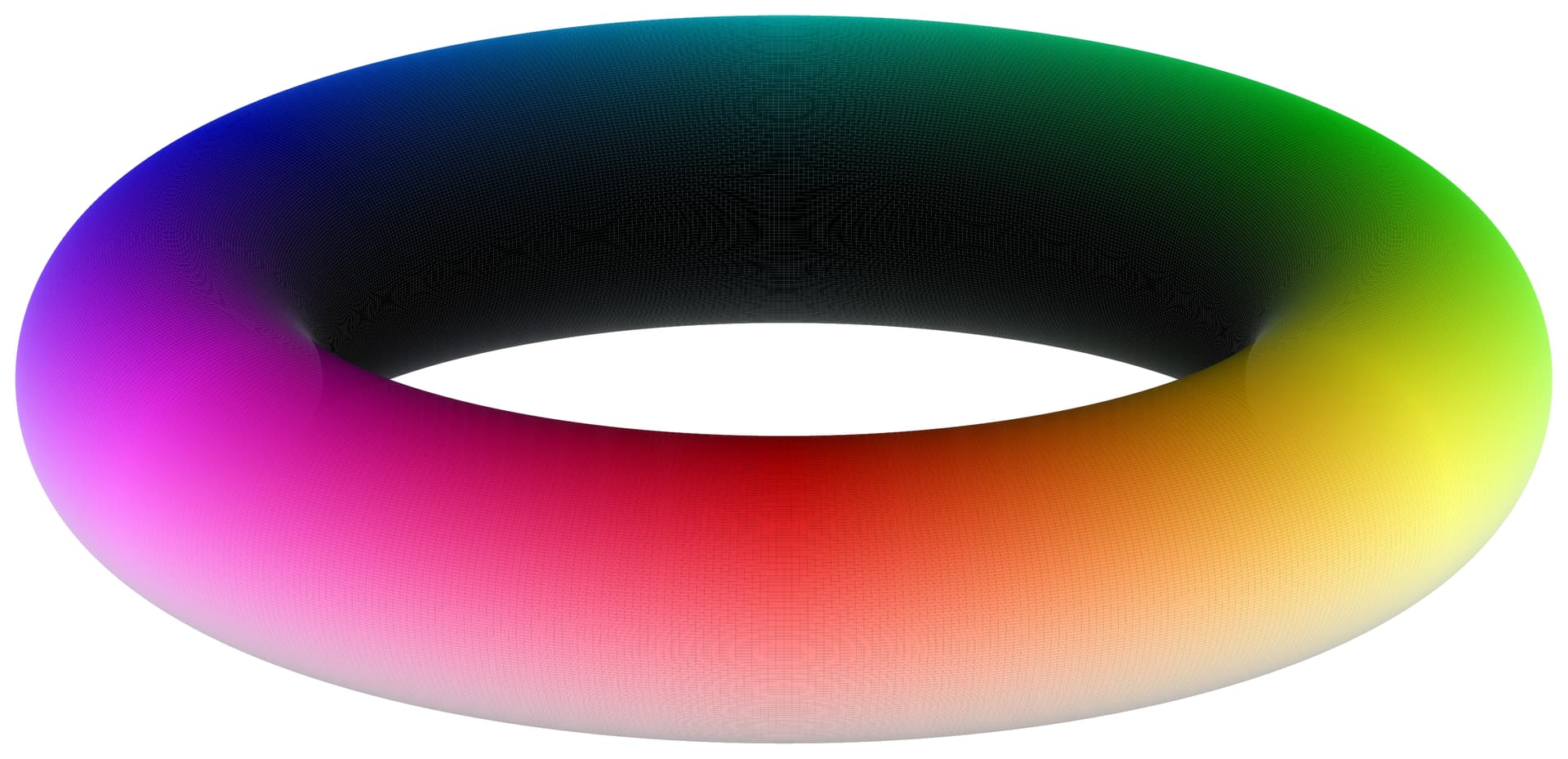
On the torus, this looks like:
#import "@preview/cetz:0.4.2"

#set page(
  width: auto,
  height: auto,
  margin: 1mm,
)

#cetz.canvas({
  import cetz.draw: *

  let R = 4      // Major radius
  let r = 1      // Minor radius
  let theta-divisions = 600
  let phi-divisions = 300

  let get-torus-point(theta, phi) = (
    (R + r * calc.cos(phi)) * calc.cos(theta),
    (R + r * calc.cos(phi)) * calc.sin(theta),
    r * calc.sin(phi)
  )

  // Pre-compute color grid
  let colors = {
    let cols = ()
    for i in range(theta-divisions + 1) {
      let x = i / theta-divisions  // normalized theta coordinate
      let row = ()
      for j in range(phi-divisions + 1) {
        let y = j / phi-divisions  // normalized phi coordinate

        // Your doubly periodic coloring
        let hue = x * 360deg
        let saturation = 50% + 50% * calc.sin(2 * calc.pi * y)
        let value = 50% + 50% * calc.cos(2 * calc.pi * y)

        row.push(color.hsv(hue, saturation, value))
      }
      cols.push(row)
    }
    cols
  }

  ortho(x: -70deg, y: 0deg, z: -90deg, sorted: true, {
    for i in range(theta-divisions) {
      for j in range(phi-divisions) {
        let theta1 = (2 * calc.pi * i) / theta-divisions
        let theta2 = (2 * calc.pi * (i + 1)) / theta-divisions
        let phi1 = (2 * calc.pi * j) / phi-divisions
        let phi2 = (2 * calc.pi * (j + 1)) / phi-divisions

        let point1 = get-torus-point(theta1, phi1)
        let point2 = get-torus-point(theta2, phi1)
        let point3 = get-torus-point(theta2, phi2)
        let point4 = get-torus-point(theta1, phi2)

        line(
          point1,
          point2,
          point3,
          point4,
          close: true,
          stroke: none,
          fill: colors.at(i).at(j)
        )
      }
    }
  })
})
This is close, but the white and black colors form a couple singular points where there are duplicate colors along lines.
I don’t know if the structure of color spaces simply prohibits such a 2d gradient setup for the square/torus, but I can’t find anything in the literature, especially if I try to add on the additional constraint of being CVD friendly.
Thus, does anyone have any ideas for making a 2D gradient for the torus that:
- gives each point a unique color,
- smoothly colors the torus, with no discontinuities along lines, (and, ideally)
- maintains CVD friendliness?
Thank you for your time.
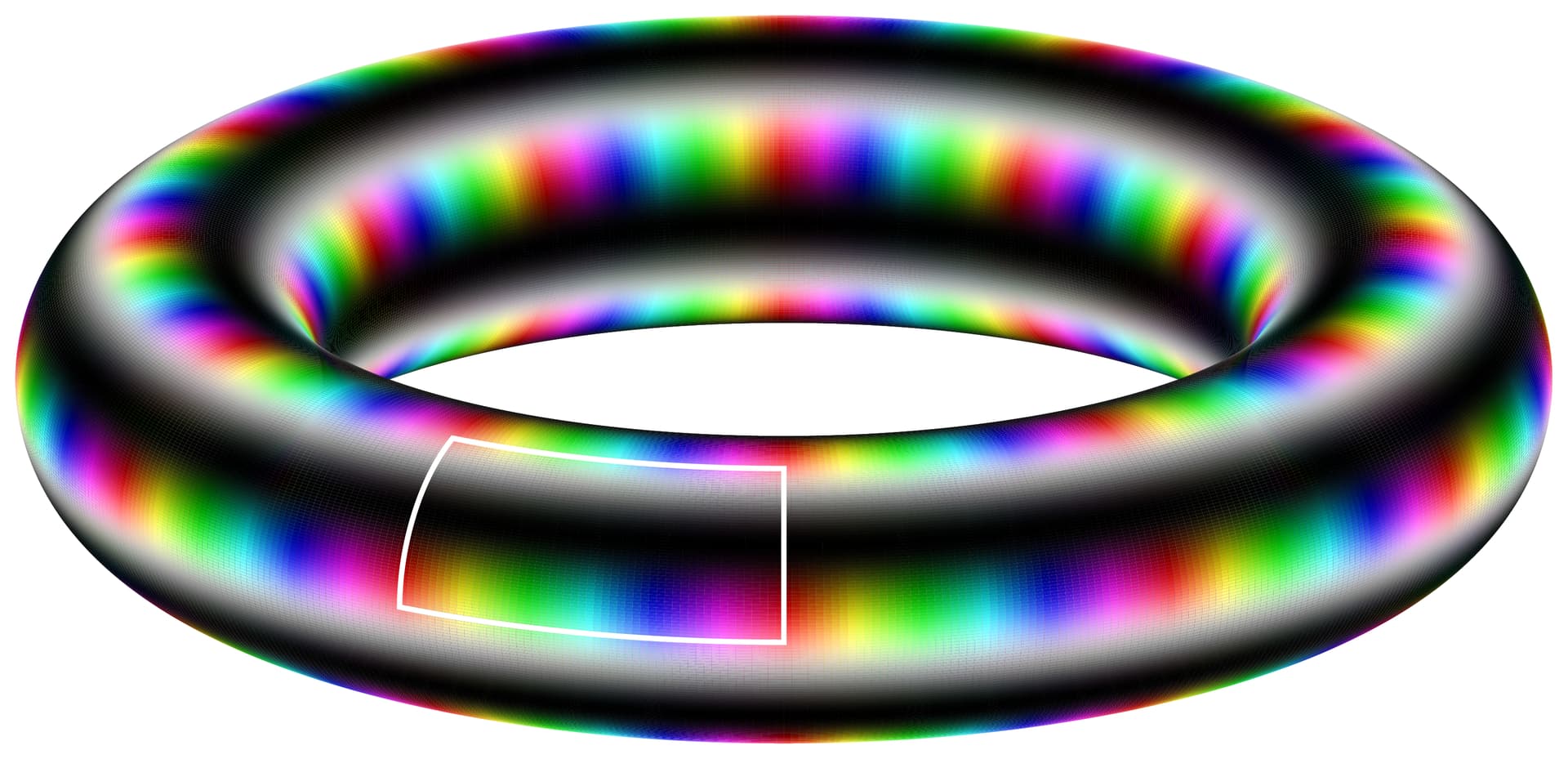
For anyone wondering why I really don’t want even a single line of discontinuous colors, it’s because I would like to eventually provide smooth tilings of the torus by applying the square coloring multiple times, like below:
#import "@preview/cetz:0.4.2"

#set page(
  width: auto,
  height: auto,
  margin: 1mm,
)

#cetz.canvas({
  import cetz.draw: *

  let R = 4      // Major radius
  let r = 1      // Minor radius
  let theta-divisions = 600
  let phi-divisions = 300
  let theta-wraps = 12  // Number of times to wrap around theta (longitude)
  let phi-wraps = 5    // Number of times to wrap around phi (latitude)

  let get-torus-point(theta, phi) = (
    (R + r * calc.cos(phi)) * calc.cos(theta),
    (R + r * calc.cos(phi)) * calc.sin(theta),
    r * calc.sin(phi)
  )

  // Pre-compute color grid
  let colors = {
    let cols = ()
    for i in range(theta-divisions + 1) {
      let x = calc.rem(i / theta-divisions * theta-wraps, 1.0)
      let row = ()
      for j in range(phi-divisions + 1) {
        let y = calc.rem(j / phi-divisions * phi-wraps, 1.0)

        let hue = x * 360deg
        let saturation = 50% + 50% * calc.sin(2 * calc.pi * y)
        let value = 50% + 50% * calc.cos(2 * calc.pi * y)

        row.push(color.hsv(hue, saturation, value))
      }
      cols.push(row)
    }
    cols
  }

  ortho(x: -70deg, y: 0deg, z: -90deg, sorted: true, {
    for i in range(theta-divisions) {
      for j in range(phi-divisions) {
        let theta1 = (2 * calc.pi * i) / theta-divisions
        let theta2 = (2 * calc.pi * (i + 1)) / theta-divisions
        let phi1 = (2 * calc.pi * j) / phi-divisions
        let phi2 = (2 * calc.pi * (j + 1)) / phi-divisions

        let point1 = get-torus-point(theta1, phi1)
        let point2 = get-torus-point(theta2, phi1)
        let point3 = get-torus-point(theta2, phi2)
        let point4 = get-torus-point(theta1, phi2)

        line(
          point1,
          point2,
          point3,
          point4,
          close: true,
          stroke: none,
          fill: colors.at(i).at(j)
        )
      }
    }

    // Draw contour around a representative rectangle
    // This selects one tile from the wrapped pattern
    let contour-tile-theta = 11  // Which tile in theta direction (0 to theta-wraps-1)
    let contour-tile-phi = 0    // Which tile in phi direction (0 to phi-wraps-1)

    // Convert tile index to angular coordinates
    let tile-height-theta = (2 * calc.pi) / theta-wraps
    let tile-height-phi = (2 * calc.pi) / phi-wraps

    let contour-theta1 = contour-tile-theta * tile-height-theta
    let contour-theta2 = (contour-tile-theta + 1) * tile-height-theta
    let contour-phi1 = contour-tile-phi * tile-height-phi
    let contour-phi2 = (contour-tile-phi + 1) * tile-height-phi

    // Sample the contour boundary with many points for smoothness
    let contour-samples = 200
    let contour-points = ()

    // Bottom edge (constant phi1, varying theta)
    for k in range(contour-samples) {
      let theta = contour-theta1 + (contour-theta2 - contour-theta1) * k / contour-samples
      contour-points.push(get-torus-point(theta, contour-phi1))
    }

    // Right edge (constant theta2, varying phi)
    for k in range(contour-samples) {
      let phi = contour-phi1 + (contour-phi2 - contour-phi1) * k / contour-samples
      contour-points.push(get-torus-point(contour-theta2, phi))
    }

    // Top edge (constant phi2, varying theta backwards)
    for k in range(contour-samples) {
      let theta = contour-theta2 - (contour-theta2 - contour-theta1) * k / contour-samples
      contour-points.push(get-torus-point(theta, contour-phi2))
    }

    // Left edge (constant theta1, varying phi backwards)
    for k in range(contour-samples) {
      let phi = contour-phi2 - (contour-phi2 - contour-phi1) * k / contour-samples
      contour-points.push(get-torus-point(contour-theta1, phi))
    }

    // Draw the contour
    set-style(stroke: white + 1pt)
    line(..contour-points, close: true)
  })
})