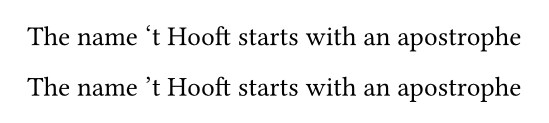
What is ‘the right way’ to insert an apostrophe at the start of a word?
For instance, in the sentence “The year '26 just started”, or the family name of this gentleman, typst will turn the apostrophe into an opening quote.
I could insert an apostrophe, e.g., as:
#let apostrophe = "\u{2019}"
#{apostrophe}t Hooft
but this feels clunky for something that should be easy.
X11 and Wayland supports Compose key, but for some reason the default sequences are described in share/X11/locale/en_US.UTF-8/Compose. With compose = "${bat}/bin/bat ${xorg.libX11}/share/X11/locale/en_US.UTF-8/Compose"; alias in NixOS, I can quickly find the necessary stuff, or you can configure a custom file where you add your own compose sequences. For ’ it’s:
<Multi_key> <greater> <apostrophe>  : "’" U2019 # RIGHT SINGLE QUOTATION MARK
<Multi_key> <apostrophe> <greater>  : "’" U2019 # RIGHT SINGLE QUOTATION MARK
So, Compose key then (' then > or > then '). Compose key is selected in the OS settings under keyboard/input.
Thanks. I was merely asking as a matter of information. I’m on Mac* so I use the Mac key-combo regularly, but was interested to know why the OP needed to ask his question and why the various much more convoluted solutions were needed.
* If Apple continues to produce bug-ridden versions of the OS like MacOS 26, I might jump ship to Linux at some point!
Thanks everyone!
I try to use “US international with altgr deadkeys” as much as I can so ‘ is alt+9 and ’ is alt+0. I just never needed those symbols, and they are not in my muscle memory, but this seems a good time to start doing that.
I guess I’ve seen to many computers with CP 1252 to sleep well using characters after \u{FF} in a language that wouldn’t need it per se…
For Dutch text ('m, 'n, 's and 't) and years without century, this should do the trick:
#show regex("'(\d\d|[mnst])\b"): it => {
  show "'": [#sym.quote.r.single]
  it
}