Why does this show rule work as intended:
#set enum(numbering:"(1)", start:0)
#let enum_child_counter = counter("enum_child_counter")
#show enum.where(start: 0): it => {
  let args = it.fields()
  for i in args.remove("children") {
    context {
      let current_child_count = enum_child_counter.get().first()
      enum(..args, start: current_child_count+1, i)
    }
    enum_child_counter.step()
  }
}

= Assignment

first paragraph here

+ first point
+ second point

second paragraph here

+ third point, continuing from second
+ fourth point
… but these two adjustments (see comments) cause a maximum show rule depth exceeded error?
#set enum(numbering:"(1)", start:0)
#let enum_child_counter = counter("enum_child_counter")
#show enum.where(start: 0): it => {
  let args = it.fields()
  for i in args.remove("children") {
    enum_child_counter.step() // moved this up
    context {
      let current_child_count = enum_child_counter.get().first()
      enum(..args, start: current_child_count, i) // no adding 1
    }
  }
}

// same markup
I expected both to output this:
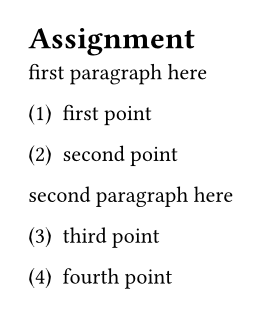
I am attempting to use the second approach given this direction from the docs:
When you define and use a custom counter, in general, you should first step the counter and then display it. This way, the stepping behaviour of a counter can depend on the element it is stepped for.
I thought this second approach, using step first, would work just fine, and be in line with the explanation given here:
The update will be in effect at the position where the returned content is inserted into the document. If you don’t put the output into the document, nothing happens! This would be the case, for example, if you write
let _ = counter(page).step(). Counter updates are always applied in layout order and in that case, Typst wouldn’t know when to step the counter.
The only explanation I can think of why the second approach does not work is that somehow the context being used within the for loop does not get the stepped value of the counter for some reason, but that is contrary to my understanding of how this all works.