Why are there occasionally gaps in my diagram?

Here is a sample code:

#import "@preview/fletcher:0.5.8": diagram, node, edge, shapes

#figure(
  caption: [E-R diagram for hospital],
  diagram(
    node-inset: 0pt,
    node((0, 0), [_takes_], inset: 1em, shape: shapes.diamond, stroke: 1pt),
    edge("l"),
    edge("r"),
    edge("d"),
    node((-1, 0), table([_patient_], [id \ name \ age])),
    node((+1, 0), table([_doctor_], [id \ name \ department])),
    node((0, 1), table([_test_and_exam_], [id \ name \ result])),
  ),
)

This produces:
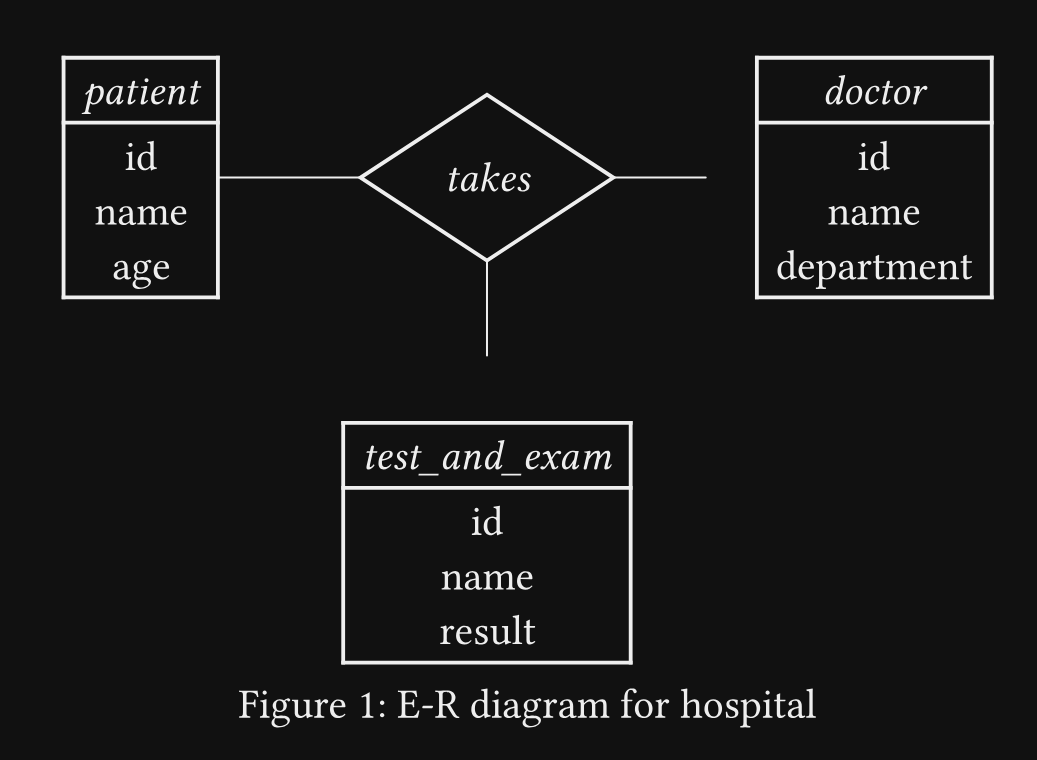
while I want all edges to be snapped to corresponding tables.
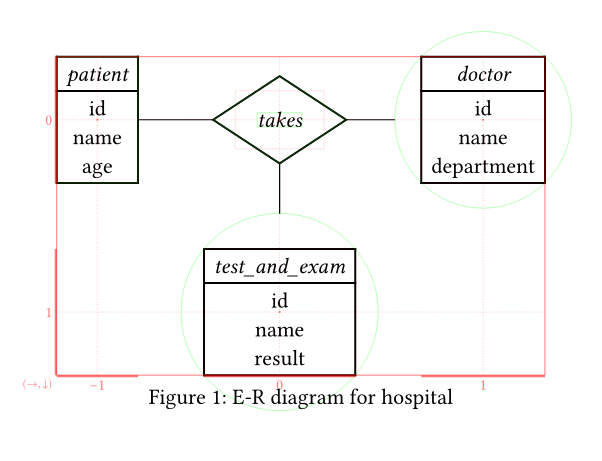
You can enable the debug option of the fletcher diagram with debug: 3, to see what is happening.


The shape automatically detected by fletcher is circle for the two nodes, due to the near quadratic aspect ratio of the content.
Similar to the first node, you can explicitly set the shape for the two nodes with shape: rect or set the default node shape of the diagram with node-shape: rect

#import "@preview/fletcher:0.5.8": diagram, node, edge, shapes

#figure(
  caption: [E-R diagram for hospital],
  diagram(
    debug: 3, // <- here
    node-inset: 0pt,
    //node-shape: rect, // <- default shape
    node((0, 0), [_takes_], inset: 1em, shape: shapes.diamond, stroke: 1pt),
    edge("l"),
    edge("r"),
    edge("d"),
    node((-1, 0), table([_patient_], [id \ name \ age])),
    node((+1, 0), table([_doctor_], [id \ name \ department]), shape: rect), // <- here
    node((0, 1), table([_test_and_exam_], [id \ name \ result]), shape: rect), // <- here
  ),
)
3 Likes

No, the only thing it produces is an error.

logs
error: cannot subtract length from integer
    โ”Œโ”€ @preview/fletcher:0.5.8/src/utils.typ:221:11
    โ”‚
221 โ”‚     calc.abs(x - o) <= s/2
    โ”‚              ^^^^^

help: error occurred in this call of function `point-is-in-rect`
    โ”Œโ”€ @preview/fletcher:0.5.8/src/draw.typ:821:3
    โ”‚
821 โ”‚ โ•ญ       point-is-in-rect(xy-pos, (
822 โ”‚ โ”‚         center: node.pos.xyz,
823 โ”‚ โ”‚         size: node.size,
824 โ”‚ โ”‚       ))
    โ”‚ โ•ฐโ”€โ”€โ”€โ”€โ”€โ”€โ”€โ”€^

help: error occurred in this call of function `filter`
    โ”Œโ”€ @preview/fletcher:0.5.8/src/draw.typ:819:19
    โ”‚
819 โ”‚       let candidates = nodes.filter(node => {
    โ”‚ โ•ญโ”€โ”€โ”€โ”€โ”€โ”€โ”€โ”€โ”€โ”€โ”€โ”€โ”€โ”€โ”€โ”€โ”€โ”€โ”€โ”€โ”€โ”€^
820 โ”‚ โ”‚       if node.snap == false { return false }
821 โ”‚ โ”‚       point-is-in-rect(xy-pos, (
822 โ”‚ โ”‚         center: node.pos.xyz,
823 โ”‚ โ”‚         size: node.size,
824 โ”‚ โ”‚       ))
825 โ”‚ โ”‚     })
    โ”‚ โ•ฐโ”€โ”€โ”€โ”€โ”€โ”€^

help: error occurred in this call of function `find-snapping-nodes`
    โ”Œโ”€ @preview/fletcher:0.5.8/src/draw.typ:851:2
    โ”‚
851 โ”‚     select-nodes(map-auto(given, key))
    โ”‚     ^^^^^^^^^^^^^^^^^^^^^^^^^^^^^^^^^^

help: error occurred in this call of function `map`
    โ”Œโ”€ @preview/fletcher:0.5.8/src/draw.typ:844:1
    โ”‚
844 โ”‚ โ•ญ   array.zip(
845 โ”‚ โ”‚     edge.snap-to,
846 โ”‚ โ”‚     first-last(edge.vertices),
847 โ”‚ โ”‚     first-last(edge.final-vertices),
    ยท โ”‚
851 โ”‚ โ”‚     select-nodes(map-auto(given, key))
852 โ”‚ โ”‚   })
    โ”‚ โ•ฐโ”€โ”€โ”€โ”€^

help: error occurred in this call of function `find-nodes-for-edge`
    โ”Œโ”€ @preview/fletcher:0.5.8/src/draw.typ:863:14
    โ”‚
863 โ”‚     let nodes = find-nodes-for-edge(grid, nodes, edge)
    โ”‚                 ^^^^^^^^^^^^^^^^^^^^^^^^^^^^^^^^^^^^^^

help: error occurred in this call of function `draw-diagram`
    โ”Œโ”€ @preview/fletcher:0.5.8/src/diagram.typ:464:14
    โ”‚
464 โ”‚     cetz.canvas(draw-diagram(grid, nodes, edges, debug: options.debug))
    โ”‚                 ^^^^^^^^^^^^^^^^^^^^^^^^^^^^^^^^^^^^^^^^^^^^^^^^^^^^^^

help: error occurred in this function call
    โ”Œโ”€ @preview/fletcher:0.5.8/src/diagram.typ:559:2
    โ”‚
559 โ”‚     render(grid, nodes, edges, options)
    โ”‚     ^^^^^^^^^^^^^^^^^^^^^^^^^^^^^^^^^^^

But without , snap-to: ((0, 0), (+1, 0)), the diagram is produced.

1 Like

Sorry for my oversight. Already fixed it.

1 Like

Thanks for your advice. I shall use the debug option more.