typst 0.15.1 / Linux
Please consider the following code:
#context {
  let hits = query(
    selector(<body-row-marker>).within(here())
  )

  let first = (:)

  for hit in hits {
    let pos = hit.location().position()
    let page = str(pos.page)

    if page not in first or pos.y < first.at(page).y {
      first.insert(page, (
        row: hit.value,
        y: pos.y,
      ))
    }
  }

  table(
    columns: 1,

    ..range(1, 3).map(i => [
      #metadata(i) <body-row-marker>
      Row #i
    ]),
  )

  [
  #first.len()\
  #first\
  #first.values()\
  #first.values().enumerate()\
//  #first.at("1")\
//  #first.values().at(0)
  ]
}
Just for explanation, the code basically determines the number of the first table row / cell on the page. But the purpose of the code is not relevant for the question. To understand the question. we first need to have a look at the output:
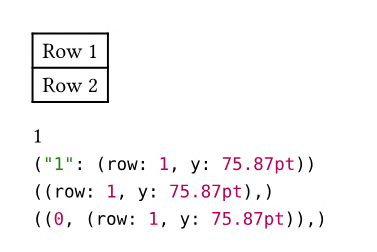
As expected, we see two table rows. The interesting part comes below the table. Again as expected,
#first is a dictionary that has one entry (first line). The entry consists of the key "1" and a value that is itself a dictionary (second line). Consequently, the values of the dictionary are represented by an array that consists of one element that is a dictionary (line 3). Finally, we see that this array has its only element at index 0.
So far, so good, everything is as expected here.
However, as soon as I un-comment the last line in the code (before the closing square bracket), the compiler throws the following error:
error: array index out of bounds (index: 0, len: 0) and no default value was specified
   ┌─ test2.typ:35:3
   │
35 │   #first.values().at(0)
   │    ^^^^^^^^^^^^^^^^^^^^
Likewise, if I comment out that line again and un-comment the line above it, the compiler throws the following error:
error: dictionary does not contain key "1" and no default value was specified
   ┌─ test2.typ:34:3
   │
34 │   #first.at("1")\
   │    ^^^^^^^^^^^^^
Could somebody please help me make sense of that?
The array definitely has length 1 (not 0), and the first element is definitely at index 0 (so index 0 can’t be out of bounds). Similarly, the dictionary definitely contains an entry under key “1”.
For the record, it’s just the .at() function that does not work. As we have seen in the output, the internal representation of the variables is correct, and even operations that are a bit more complex behave as expected.
For example, I have replaced the lines that use the .at() function by the following lines:
  #(1 in first.values().map(it => it.row)) \
  #(2 in first.values().map(it => it.row))
This did not lead to any compiler errors and did produce the expected result (two additional lines in the output with content “true” and “false”, in that order).
So I seemingly can use several element functions (including non-trivial ones) on this dictionary and this array, but not the .at() function.
Why is this the case, and how can I work around it?
Thank you very much in advance!
