I was writing some code that doesn’t do what i expected:
#context{
  set text(size: 1.2em)
  let content = box(lorem(4), width: float("inf")*1pt)
  let measured_width = measure(content).width
  box(
    width: measured_width,
    content,
    stroke: red
  )
}
What i expected was my lorem text inside a red box, but it is acutally overflowing the red box, because the measure statement does not take the set rule into account that changes the font size. I found that very interesting. Now i thought even more interesting is that the following code actually does what i expected:
#set text(size: 1.2em)
#context{
  //set text(size: 1.2em)
  let content = box(lorem(4), width: float("inf")*1pt)
  let measured_width = measure(content).width
  box(
    width: measured_width,
    content,
    stroke: red
  )
}
Now I got curious and just enabled both set rules (inside AND outside the context scope) and got a text that was the size of 1.4em for some reason?
I believe my confusion comes from the way that typst handles #context. I still found this a very confusing and unexpected behaviour. I hope some of you find it interesting too :D (and maybe have an explaination)
I did a bit more testing and stumbled across another interesting thing:
The following code also has overflowing text. Now for this one i actually believe this should in fact work and this is a bug in the typst-compiler.
#show par: set text(size: 1.3em)
#context {
  let content = box(lorem(4), width: float("inf")*1pt)
  let measured_width = measure(content).width
  box(
    width: measured_width,
    content,
    stroke: red
  )
}
Yes that’s exactly how it works: context can be used to access the “current settings”. You then see the setting values that are in effect at the place where the context block is inserted in the document. So the measure call will measure using the text size that was in effect before anything you do in the context block.
“em” is a relative unit: 1em is the current text size so set text(1.2em) means “set the text size to 1.2 times the current size”. If you do this twice you get 1.2*1.2 = 1.44 times the original text size.
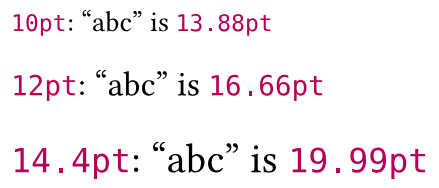
Here’s a small example to illustrate these points:
#set text(10pt)
#let size-check = context [#text.size: "abc" is #measure("abc").width]

#size-check

// Increase text size by 20%
#set text(1.2em)
#size-check

// Increase text size by 20%
#set text(1.2em)
#size-check
Here I insert the size-check value three times in the document. Each time, the context will pick up different settings and the measure call will give different results accordingly.
In this case you increase the text size only for paragraphs. This code doesn’t create paragraphs explicitly but paragraphs can be created implicitly: when you insert text in the document or in a container where it’s mixed with block-level content.
The result: the text in the inner box is not a paragraph so it’s measured without scaling. But when the outer box (with red stroke) is inserted in the document, it is wrapped in a paragraph so the text inside is scaled and doesn’t fit anymore.
By the way if you make the inner box text into a paragraph with box(par(lorem(4), ...) it will still overflow, because you will measure the text scaled by 1.3, but when the outer box is inserted in the document you will have the equivalent of par(box(stroke: red, box(par(lorem(4))))) so the text will be scaled by 1.3 twice.
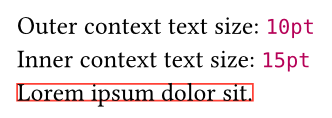
As @sijo pointed out, code within a call to context has access to the contextual information that existed when context was called. Basically a snapshot is taken and code within is allowed to view that snapshot.
You can nest these snapshots which allows you to get info based on changes made within the context call:
#set text(10pt)

#context {//Outer context
  set text(1.5em)
  let content = box(lorem(4), width: float("inf")*1pt)
  [Outer context text size: #text.size\ ]

  context {//Inner context
    [Inner context text size: #text.size\ ]
    let measured_width = measure(content).width
    box(
      width: measured_width,
      content,
      stroke: red
    )
  }
}
The best way in Typst to force creation of a paragraph - applies to short texts inside boxes, table cells or blocks - is to add a parbreak(). We can experiment with it in this kind of setup:
Just as a note, in all of the examples so far, the set text ultimately actually applied to the output. If you wanted to measure a “hypothetical” width, you could achieve that by putting the set text into the measure call. Compare these:
// 1) original case
#context{
  set text(size: 1.2em)
  let content = ...
  let measured_width = measure(content).width  // the measure does not see the new text size
  box(...)  // the content uses the new text size
}

// 2) suggested solution
#set text(size: 1.2em)
#context{
  let content = ...
  let measured_width = measure(content).width  // the measure uses the new text size
  box(...)  // the content also uses the new text size
}

// 3) measuring with a "hypothetical" style
#context{
  let content = ...
  let measured_width = measure({
    set text(size: 1.2em)
    content
  }).width  // the measure uses the new text size
  box(...)  // the content uses the original text size
}