Why does a centered dot render with different spacing in markup?

Hi there,

I am trying out Typst for typesetting a local journal, in french and I am seeing a bizarre rendering of middle dots in text mode.

In french, we may put middle points inside a word.

When using New Computer Modern shipped with my typst installation (ArchLinux, typst 0.13.1 (8ace67d9)), I am seeing the following behaviour:

#set text(lang: "fr")
#set text(font: "New Computer Modern")

= My title

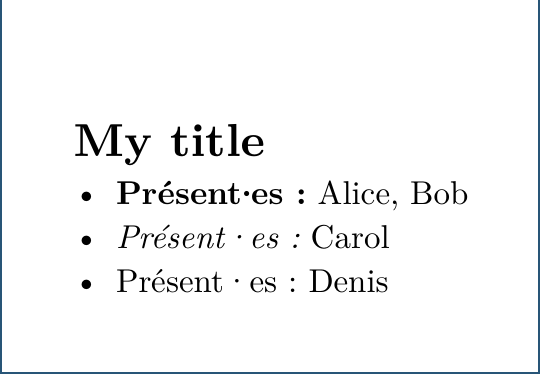
- *Présent·es :* Alice, Bob
- _Présent·es :_ Carol
- Présent·es : Denis

→ do note the extra space around the middle-dot (“·”) when using normal and emphasized text mode. (the horizontal space around the middle-dot is looking OK for bold text).

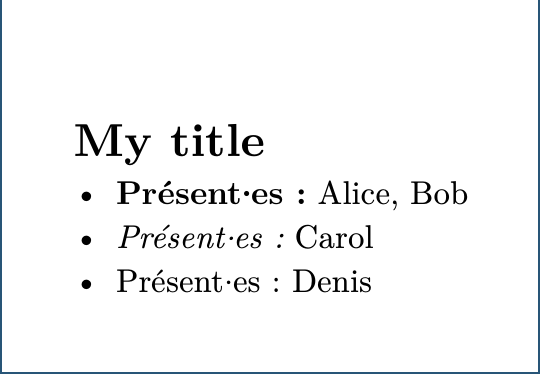
When using New Computer Modern from https://www.ctan.org/pkg/newcomputermodern (v7.0.4 2025-07-02), I get the following:

#set text(font: "New Computer Modern", weight: 450)

⇒ All the horizontal spaces around the middle-dots look OK.

(When using the default Typst font, “Libertinus Serif”, spaces around the middle-dot look also fine).

What am I doing wrong ?
And how do I fix this, short of installing this extra “New Computer Modern” font from CTAN ?

Cheers,
~kmnx

PS: I tried hacking this with a little function:

#show "·": h(-0.1em) + "·" + h(-0.1em)

but this was too naive an approach and didn’t yield anything really aesthetically satisfying :slight_smile:

1 Like

Hi, welcome to the Forum!

I can’t answer your question, but I am trying to reproduce your results.

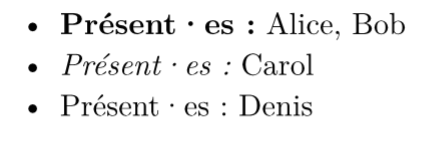
On typst.app, all three dots occupy large spaces.

Typst document
#set text(font: "New Computer Modern", fallback: false)

- *Présent·es :* Alice, Bob
- _Présent·es :_ Carol
- Présent·es : Denis

I have also tried LaTeX, and the dots are the same.

LaTeX document

TeX Live 2024, xelatex.

\documentclass{article}

\begin{document}

\begin{itemize}
  \item \textbf{Présent·es :} Alice, Bob
  \item \textit{Présent·es :} Carol
  \item Présent·es : Denis
\end{itemize}

\end{document}

I guess ArchLinux has a special version of New Computer Modern installed? Could you try typst compile main.typ --ignore-system-fonts? It will only use fonts embedded in the typst binary.


Besides, the embedded fonts can be downloaded at typst-assets/files/fonts at 0.13 · typst/typst-assets · GitHub. Typst v0.13 uses New Computer Modern v7.0.1, and the dev (main) version uses v7.0.4. I’m not sure typst.app or LaTeX uses which version…

1 Like

I did compile with typst c --ignore-system-fonts foo.typ to try to reduce the number of moving parts (the original screenshot was produced with --ignore-system-fonts and with #set text(font: "New Computer Modern"))

ArchLinux doesn’t seem to customize the package build much:

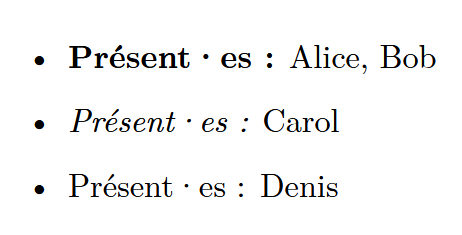
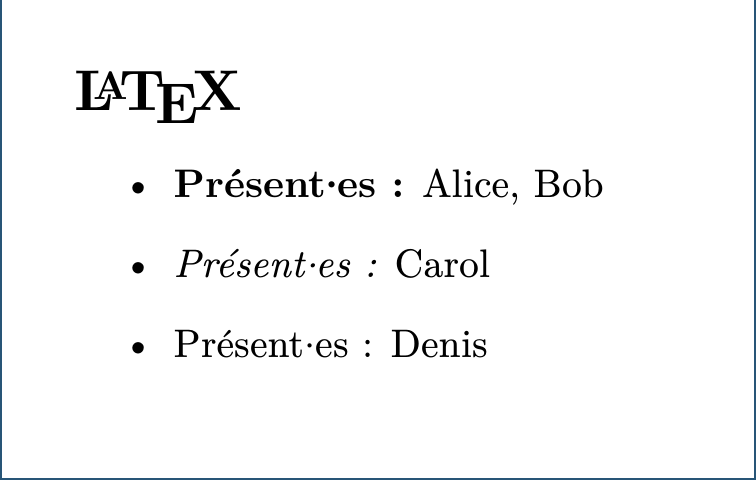
as for LaTeX, I get the same behaviour than yours if I were to use the same .tex, but using the NewComputerModern font, I get:

\documentclass{article}

\usepackage{newcomputermodern}

\begin{document}

\section*{\LaTeX}
\begin{itemize}
  \item \textbf{Présent·es :} Alice, Bob
  \item \textit{Présent·es :} Carol
  \item Présent·es : Denis
\end{itemize}

\end{document}

to muddy the waters some more, I just downloaded Typst from GitHub, and ran that version on the original foo.typ file.
⇒ I ended up with the same behaviour than with the ArchLinux version (ie: larger horizontal space around the middle-dot for the emphasized and ‘normal’ text.)

I also just tested w/ typst@e94269373, and I also ended up with the same behaviour than originally (ie: larger horizontal space around the middle-dot for the emphasized and ‘normal’ text.)

it’s quite baffling :}

1 Like

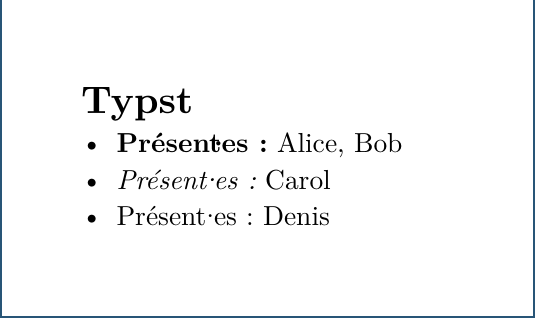
looking at typst-metalogo, I managed to get a hack working for emphasized and ‘normal’ mode, playing with the kerning:

#set text(lang: "fr")
//#set text(font: "New Computer Modern", weight: 450)
#set text(font: "New Computer Modern", weight: 400)
//#set text(font: "libertinus serif")
//#set text(font: "Liberation Serif")

#let defaults = (
  kern: -.25em,
)

#let config = state("mdot", defaults)
#let kern(distance) = h(distance)

#let mdot = context[#box[#{
  let cfg = config.get()

  kern(cfg.kern)
  [·]
  kern(cfg.kern)
}]]

#show "·" : mdot

= Typst

- *Présent·es :* Alice, Bob
- _Présent·es :_ Carol
- Présent·es : Denis

see:

now, the last leg of the journey would be to only apply that hacked up kerning for non-strongly-emphasized text.
I haven’t worked up how to detect this.

Any idea ?

Okay, this time I reproduce all your descriptions:

  • typst v0.13.1/dev + --ignore-system-fonts / --font-path path/to/texmf-dist/fonts/opentype/public/newcomputermodern/
  • LaTeX + New Computer Modern

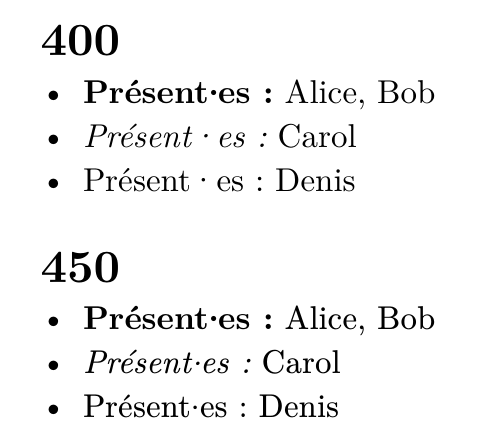
However, I notice that weight: 450 is important?

Full code
typst-dev c min.typ --ignore-system-fonts --font-path …/texmf-dist/fonts/opentype/public/newcomputermodern
#set text(font: "New Computer Modern", fallback: false)

= 400
#set text(weight: 400)
- *Présent·es :* Alice, Bob
- _Présent·es :_ Carol
- Présent·es : Denis

= 450
#set text(weight: 450)
- *Présent·es :* Alice, Bob
- _Présent·es :_ Carol
- Présent·es : Denis

typst fonts --variants gives the following.

New Computer Modern
- Style: Normal, Weight: 700, Stretch: FontStretch(1000)
- Style: Italic, Weight: 700, Stretch: FontStretch(1000)
- Style: Normal, Weight: 450, Stretch: FontStretch(1000)
- Style: Italic, Weight: 450, Stretch: FontStretch(1000)
- Style: Italic, Weight: 400, Stretch: FontStretch(1000)
- Style: Normal, Weight: 400, Stretch: FontStretch(1000)
- Style: Normal, Weight: 700, Stretch: FontStretch(1000)
- Style: Italic, Weight: 400, Stretch: FontStretch(1000)
- Style: Italic, Weight: 700, Stretch: FontStretch(1000)

IIUC, specifying 400 instructs typst to use the embedded NewComputerModern font.
specifying 450 will trigger the use of the system-installed NewComputerModern font (in my case, the one freshly installed from CTAN).

I doubt it. Maybe 400 = NewCM10 and 450 = NewCM10-Book? Only the former family is included in typst-assets.

It looks like HarfBuzz utils 12.1.0 confirms my claim, but I really don’t know if I use hb-view correctly. (--variations wght=450 does not make any difference.)

$ hb-view NewCM10-Regular.otf Présent·es

$ hb-view NewCM10-Book.otf Présent·es

I suggest you forwarding this thread to Discord | #forge | Fonts.

My reasoning was rooted into the following:

  • embedded fonts
$> typst  fonts --variants --ignore-system-fonts | grep -A 10 'New Computer Modern'
New Computer Modern
- Style: Normal, Weight: 400, Stretch: FontStretch(1000)
- Style: Normal, Weight: 700, Stretch: FontStretch(1000)
- Style: Italic, Weight: 400, Stretch: FontStretch(1000)
- Style: Italic, Weight: 700, Stretch: FontStretch(1000)
New Computer Modern Math
- Style: Normal, Weight: 700, Stretch: FontStretch(1000)
- Style: Normal, Weight: 450, Stretch: FontStretch(1000)
- Style: Normal, Weight: 400, Stretch: FontStretch(1000)
  • system fonts
$> typst fonts --variants | grep -A 10 'New Computer Modern'
New Computer Modern
- Style: Normal, Weight: 450, Stretch: FontStretch(1000)
- Style: Normal, Weight: 400, Stretch: FontStretch(1000)
- Style: Italic, Weight: 450, Stretch: FontStretch(1000)
- Style: Italic, Weight: 700, Stretch: FontStretch(1000)
- Style: Normal, Weight: 700, Stretch: FontStretch(1000)
- Style: Italic, Weight: 400, Stretch: FontStretch(1000)
- Style: Normal, Weight: 400, Stretch: FontStretch(1000)
- Style: Normal, Weight: 700, Stretch: FontStretch(1000)
- Style: Italic, Weight: 400, Stretch: FontStretch(1000)
- Style: Italic, Weight: 700, Stretch: FontStretch(1000)

ie: there aren’t 450-weight NCM fonts provided by the embedded fonts (with the typst-0.13.1 binary)

looking at the TTF infos (ttf2tfm from TeX-live), I get:

Glyph  Code   Glyph Name    Width    llx   lly      urx   ury
--------------------------------------------------------------
$> ttf2tfm NewCM10-Regular.otf oo.tfm | grep middot
  119  000b7  middot          778    336,    0 --   442,  395
$> ttf2tfm NewCM10-Italic.otf oo.tfm | grep middot
  119  000b7  middot          767    414,    0 --   523,  395
$> ttf2tfm NewCM10-Bold.otf oo.tfm | grep middot
  119  000b7  middot          278     61,    0 --   217,  396
$> ttf2tfm NewCM10-Book.otf oo.tfm | grep middot
  119  000b7  middot          278     86,    0 --   192,  345
$> ttf2tfm ewCM10-BookItalic.otf oo.tfm | grep middot
  119  000b7  middot          278    167,    0 --   276,  346

so, the Regular and Italic fonts show a (way) larger width for the middot glyph, compared to the Bold and Book fonts.

and going back to the LaTeX document, when I comment out \usepackage{newcomputermodern} and use:

  • \usepackage[olddefault]{fontsetup}, I get the extra glyph width (like you had in your LaTeX output)
  • \usepackage[default]{fontsetup}, I get the smaller glyph width (like I had with \usepackage{newcomputermodern}.

In the documentation of newcomputermodern, they do document the olddefault is Regular and the (new) default is Book.

⇒ it all makes sense. the extra space around the middle-dot is coming from the glyph width definition, which varies from font to font, LaTeX’s default being Book for NewComputerModern.

Case closed, thanks for sticking along :slight_smile: .

1 Like

This should be documented somewhere, so I’ve created Document the embedded New Computer Modern does not have NewCM10-Book (wght=450) variants · Issue #7045 · typst/typst · GitHub.

1 Like

FYI, dot and colon always/sometimes become part of a URL. (And you’ve created a separate post with the fixed URL?)

Hmm, I did edit my post, but didn’t create a new one intentionally. I recall receiving a “draft error” message when I clicked the edit button…