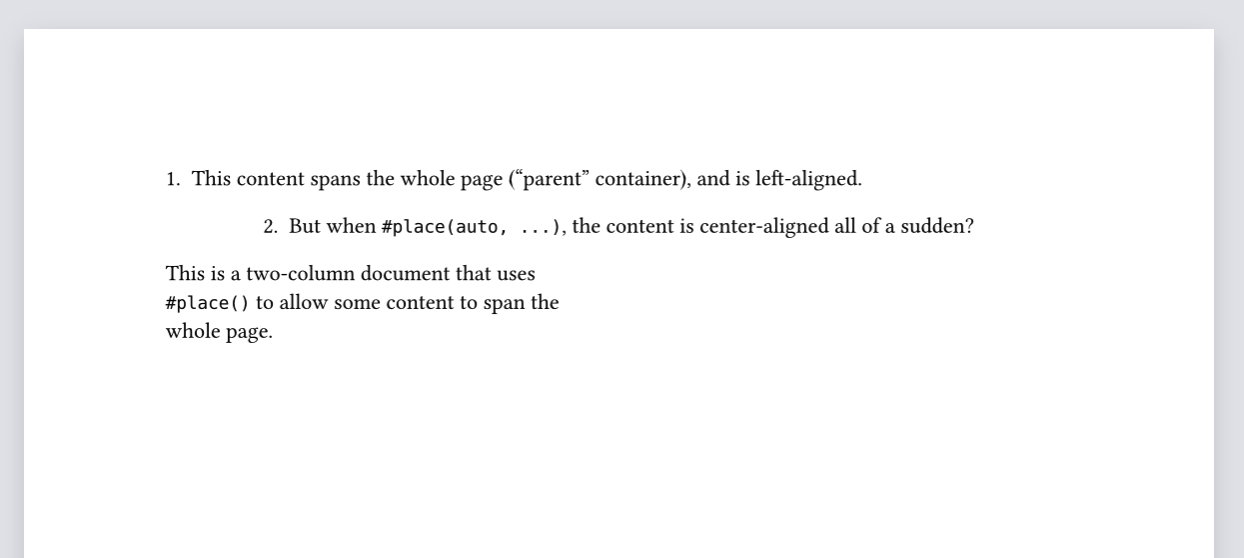
I am writing a simple two-column document with some content that spans the whole page width. To do so I use #place() as shown in the tutorial. This example document:
#set page(columns: 2)
#set align(left) // Superfluous but included to show it is also ignored by `#place(auto, ...)`

This is a two-column document that uses `#place()` to allow some content to span the whole page.

#place(top, scope: "parent", float: true)[
  1. This content spans the whole page ("parent" container), and is left-aligned.
]

#place(auto, scope: "parent", float: true)[
  2. But when `#place(auto, ...)`, the content is center-aligned all of a sudden?
]
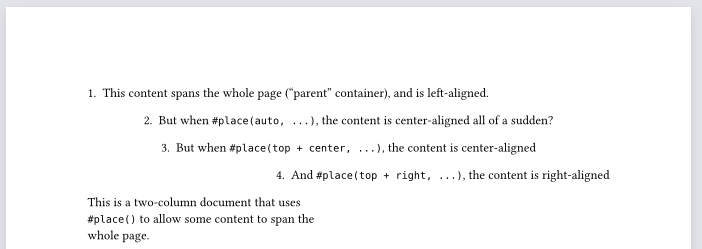
Notice that the placementalignment parameter of place() is of the typealignment. Knowing this, it can be specified to align top + center to get the same behaviour as auto (in this case).
It is mentioned that auto will pick between top or bottom, but not that it would be centered. This could be an improvement to the documentation.
#set page(columns: 2)
#set align(left) // Superfluous but included to show it is also ignored by `#place(auto, ...)`

This is a two-column document that uses `#place()` to allow some content to span the whole page.

#place(top, scope: "parent", float: true)[
  1. This content spans the whole page ("parent" container), and is left-aligned.
]

#place(auto, scope: "parent", float: true)[
  2. But when `#place(auto, ...)`, the content is center-aligned all of a sudden?
]

#place(top + center, scope: "parent", float: true)[
  3. But when `#place(top + center, ...)`, the content is center-aligned
]

#place(top + right, scope: "parent", float: true)[
  4. And `#place(top + right, ...)`, the content is right-aligned
]