I am currently trying to format footnotes and footnote entries in my own way. I believe that am almost there, but there is a behavior that I don’t understand.
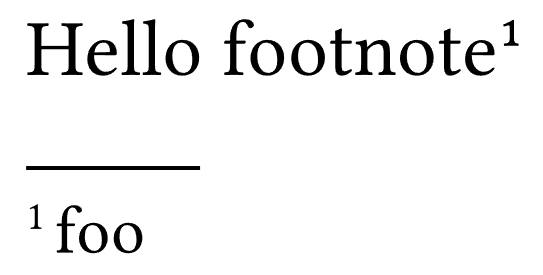
Please consider the following code and its outcome:
#set page(paper: "a9")
#show footnote.entry: it => {
  let loc = it.note.location()
  [
    #super()[#counter(footnote).at(loc).first()]
    foo
  ]
}

#v(3.2cm)
Hello footnote#footnote[]

When I now append a space character (or any other sequence of normal characters) at the end of the superscript, the footnote number changes its shape:
#set page(paper: "a9")
#show footnote.entry: it => {
  let loc = it.note.location()
  [
    // Note the space character before the closing square bracket in the following line
    #super()[#counter(footnote).at(loc).first() ]
    foo
  ]
}

#v(3.2cm)
Hello footnote#footnote[]
The footnote number in the footnote entry now looks completely different. It is taller and less bold than in the first picture.
According to the documentation, #counter(...)...first() returns a normal integer (not some sort of content or formatting). I don’t understand why appending a character to this integer does change its formatting (to be precise, the formatting of the whole superscript text).
Could somebody please help me understand this?
Thank you very much in advance!