In the recent blog post on automated generation of PDF there is a description of how a single typst file can take inputs from another source (e.g., an external json file) and be compiled to a single output based on the contents of the json file.
What I would like eventually is to be able to generate multiple output files from a single input file, for instance, rather than passing in a single customer’s details (as in the blog post), perhaps you could pass in the details for many customers and have typst generate a series of output PDFs like account_001.pdf, account_002.pdf, etc. (and maybe even the output file name could be described in the typst file or with command line options somehow).
I currently do this type of task using quarto and R, and I can imagine from the blog post how I could do it using shell scripts, but for various lightweight tasks it would be nice if it could be handled within a single call to the typst compiler itself.
Is this something that others have thought about and/or rejected as a possible future step in automated PDF generation?
I had the very same thought reading the blog post, especially as this is something where typsts incremental compilation can shine, and opened a feature request here:
I hadn’t even considered the incremental compilation advantages but that could make it possible to compile (say) 1000 versions of a document in far less than 1000x a single compilation.
I’m assuming it could also be possible to parallelise aspects of the process too if the typst compiler knew that the documents are independent of one another (although possibly then it becomes harder to use the incremental compilation tricks).
With the addition of “bundle export” coming to Typst 0.15.0, it appears it would now be possible to generate multiple PDFs from a single source file. Even if the motivating example was about creating HTML blogs, I couldn’t help thinking about this functionality as soon as I saw the announcement.
Has anyone tried to do this with the release candidate?
I’m picturing a scenario where you might have a spreadsheet that the typst file iterates over and then the “bundle export” includes outputs like account_001.pdf , account_002.pdf) corresponding to the rows in the spreadsheet.
Indeed, this is now possible with typst 0.15.0! Here is an example of a document that generates multiple reports from some json data:
#let data = json(bytes(```
{
  "acc1":	{
    "balance": 100,
    "debt": 0
  },
  "acc2":	{
    "balance": -100,
    "debt": 100
  },
  "acc3":	{
    "balance": 10000,
    "debt": 100
  },
  "acc4":	{
    "balance": 20,
    "debt": 1
  },
  "acc5":	{
    "balance": -200,
    "debt": 0
  }
}
```.text))


#data.pairs().map(((account-name, account-data)) => {
  document(account-name + ".pdf", title: account-name)[
    #title()

    Financial data information for #account-name

    The account has a balance of #account-data.balance, with outstanding debts of #account-data.debt
  ]
}).join()
I don’t think that typst uses incremental compilation here since each document is essentially separate (maybe there is a way of tweaking it, I don’t know), but compilation is multithreaded so that bundle export is still much faster than compiling each file individually
Note that typst doesn’t natively support reading excel files (see data loading), so to read a spreadsheet you’ll either have to save it in a typst-friendly format such as a .csv, or use an external package, the universe seems to have a few but I haven’t tested them.
Even though this started open-ended, it now (seems) to have a rather concrete solution. @Bryn, should I transfer this thread to Questions (and do you think aarnent has answered the question sufficiently)?
I’m not so sure, actually. I’d rather benchmark it than just claim it does, but iiuc, since the document content is only written once, memoization can happen here. There’s not a lot where it could help here, but if you have e.g. a set page(footer: ...) that doesn’t contain any variable content, I would expect that code being only evaluated once. On the other hand, since it’s different documents and pages, the layout work is probably still duplicated…
Happy for it to be moved to questions (not that I know how - maybe you do?). I don’t think the answer is as simple as it could be - I’d prefer something where a csv is loaded and iterated over as a list of dictionaries.
Thanks. I would prefer to actually choose an answer which has the simplest possible way that would make sense to a non-expert though, so they can apply it to their situation.
I had something in mind more like this:
#let records = csv("incoming_data.csv", row-type: dictionary)

#for row in records {
  let fname = "doc" + row.Number + ".pdf"
  document(
    fname,
    title: [Document number #row.Number]
  )[
    #title()
    Hello #row.Name and welcome to this document
  ]
}
where incoming_data.csv has column headings of Number and Name.
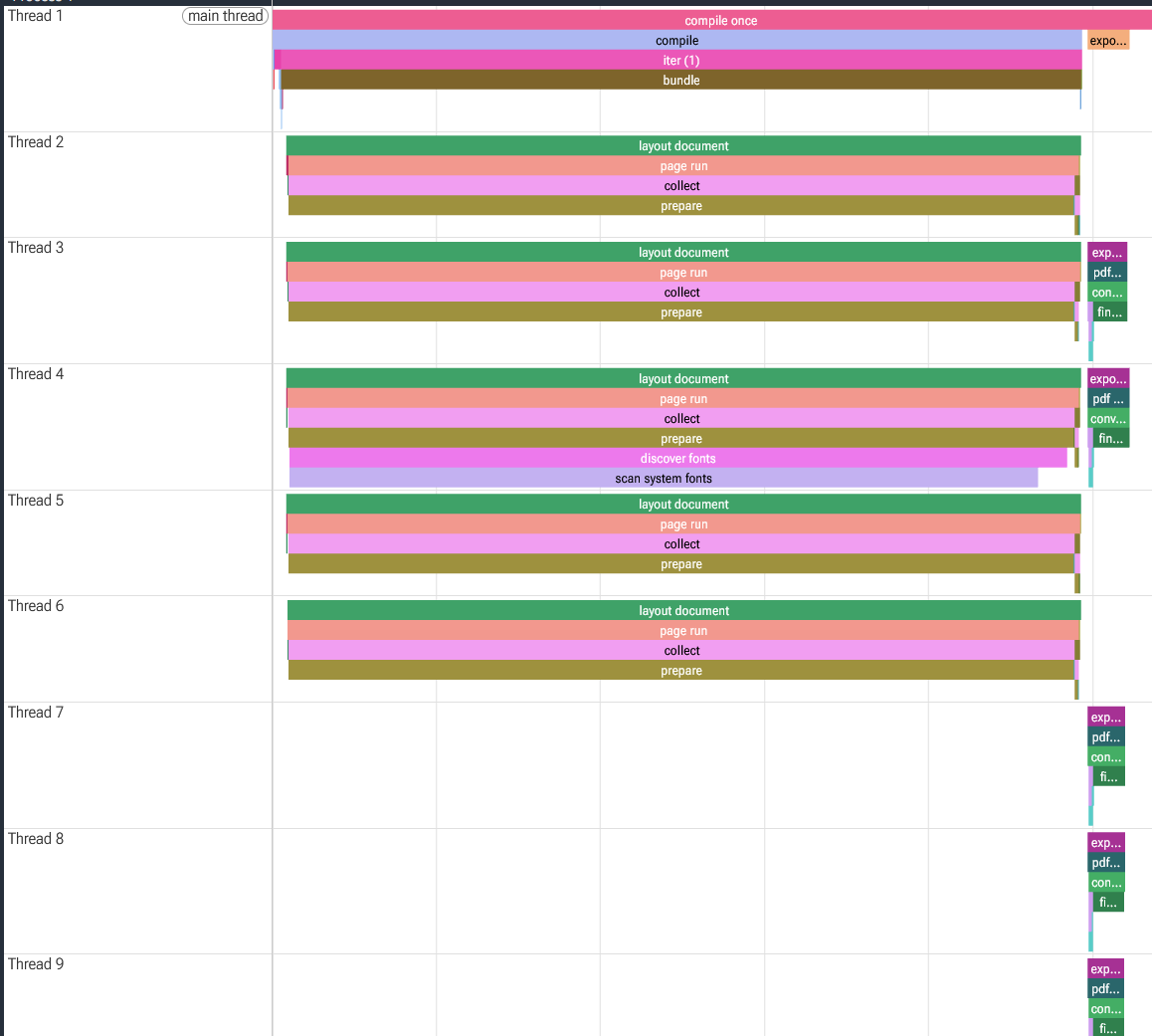
It seems you’re right. I had originally only checked the --timings flag for my toy example, and typst only spawned 5 threads which all did the same work in parallel which leading me to conclude incremental compilation was not used.
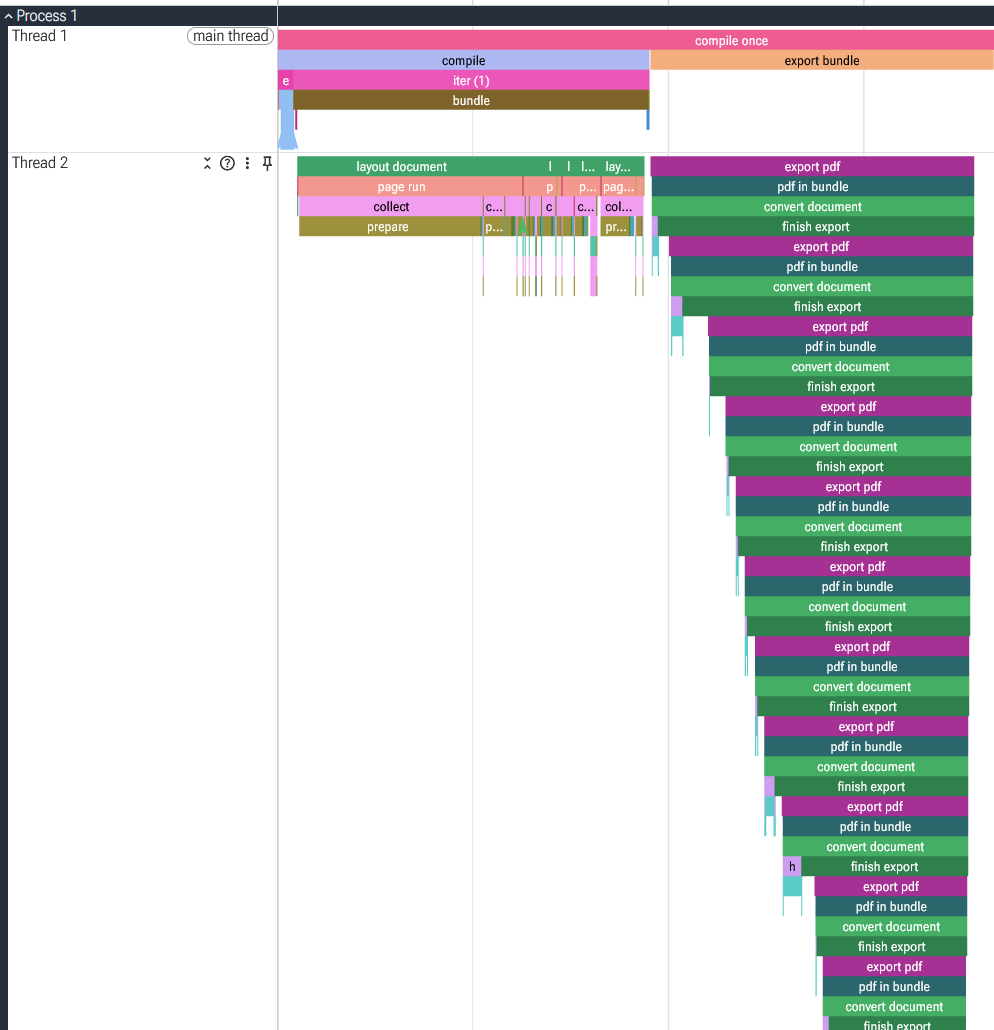
Testing with a slightly larger dataset of ~200 lines, it does indeed seem that typst is able to memoise large parts of the document. In this case, my computer spawned 13 threads. Each thread computed some layout info, but once that was done exporting did seem to use some kind of memoisation to speed up compilation. I’m still not sure whether typst will be able to memoise everything (particularly with more complicated documents where the layout is more dependant on the data), but I learned something new today. Thanks for the correction!
#let data = json("64KB.json")

#set page(footer: [
  #divider()

  Generated using typst with #emoji.heart
])

#data.map(((name, language, id, bio, version)) => {
  document(name + id + ".pdf", title: name)[
    #title()

    #let pronoun = if version > 5 {
      "future person"
    } else {
      "person"
    }

    Report about #name:

    #pronoun #name speaks #language, specifically #language version #version
    Their bio concludes that:

    #text(style: "italic", fill: black.lighten(20%), size: 0.8em, bio)

    The bio length is #bio.len()

    We can make a longer bio:

    #let longer-bio-len = int(calc.sqrt(bio.len()))

    #text(style: "italic", fill: black.lighten(20%), size: 0.8em, bio *  longer-bio-len)

    #h(1fr) #v(1fr) #box(width: 30%)[This report has been authenticated by #id]
  ]
}).join()
I mean, this code absolutely works so long as the data is formatted correctly, so if you think this is the simplest example you should mark your solution as the answer so that other users can find it more easily.
Could you clarify what makes the for-loop simpler than .map in your mind (assuming that was the problem)? My mental model of them is that they are very similar, one just does computation on the array directly. I’d want my future answers to be as inclusive as possible to everybody.
I didn’t even notice that in your answer, but I would also write for here. In general, when you do map(...).join() with content, I would prefer for. join() also works on non-content arrays, and there it may be a bit less readable, but content is where for loops’ auto joining behavior is imo clearly the idiomatic approach.
I think it is the combination of the map, the pairs and the join that makes it harder for a beginner.
I guess I am trying to replicate what someone coming from MS Word might try to do if they heard that there is a tool called Typst that can be used to “mail merge” documents.
I’ll only mark mine as a solution if it gets some more “likes” because I might just have a minority view.