#show math.equation: set text(font: "TeX Gyre Termes Math")
$ 66/88 $
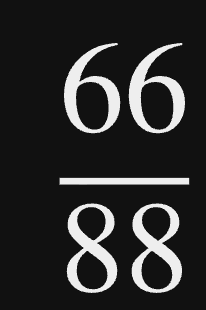
This question hasn’t gotten a lot of attention possibly because, well, it isn’t a question. In the quintessential How to post in the Questions category it says:
Good titles are questions you would ask your friend about Typst.
and
When you have picked a question, you should use the post body to share more about your problem. Give a brief description, describe what you have tried and where you got stuck.
The title is descriptive so there is some context, but it’s not clear what the problem is.
This post is trying to answer “How can I make the space between the dividing line and both numbers equal?”
Using the great package eeaabb to visualize the font, it seems like the spacing is based on the descender and ascender.
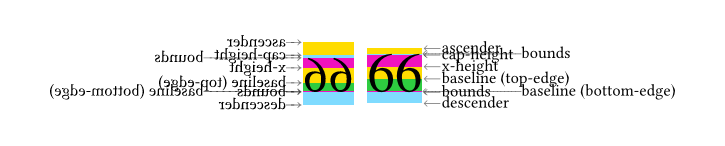
Code
#import "@preview/eeaabb:0.1.0": debug-font

#show math.equation: set text(font: "Libertinus Math")
#h(4.5em)
#box(scale(x: -100%, debug-font($66$)))
#show math.equation: set text(font: "TeX Gyre Termes Math")
#box(debug-font($66$))
The text() function allows changing this behavior, but I haven’t gotten it to work. Maybe I’m missing something or maybe this is a weak spot in the math rendering of Typst, I’m not sure.
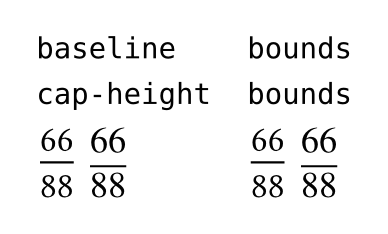
Code
#stack(
  dir: ltr,
  [`baseline`\ `cap-height`\
#show math.equation: set text(font: "Libertinus Math")
#box($ 66/88 $)
#show math.equation: set text(font: "TeX Gyre Termes Math")
#box($ 66/88 $)],
  h(1em),
  [`bounds`\ `bounds`\
#show math.equation: set text(font: "Libertinus Math")
#set text(bottom-edge: "bounds", top-edge: "ascender")
#box($ 66/88 $)
#show math.equation: set text(font: "TeX Gyre Termes Math")
#box($ 66/88 $)]
)
5 Likes
How did I miss that? Thanks for the cue🙏
1 Like
Hi @gbchu, your question can’t be answered in its current form. Please familiarize yourself with the question guidelines:
Good titles are questions you would ask your friend about Typst.
Please edit the title and body to state your problem. If you can’t edit the post, let me know and I can advise you.
This post is no longer visible until the mentioned issues have been addressed. In the current state, it is not helpful to readers of the forum.
sorry, i can’t edit the post