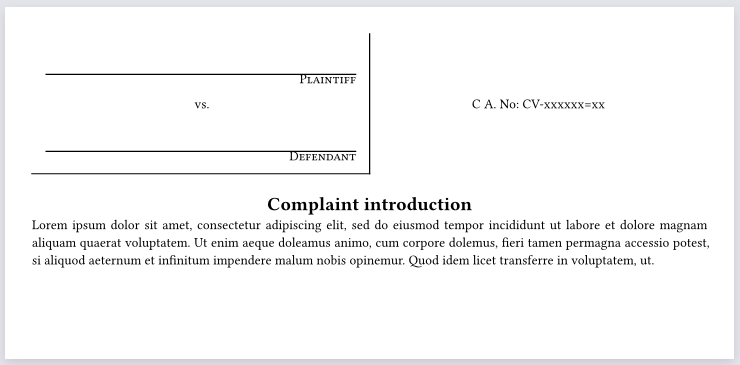
In legal pleadings, there is the style of the case. This includes the plantiff, defendant and case number.
Where I practice, I use the following
PLAINTIFF
VS
DEFENDANT
There is a line in the middle and a line at the bottome that covers half the page up to the middle line. I can’t recreate it here, but here is the code I have so far. I can’t get the middle line or bottome line right.
#set page(
paper: "us-letter",
margin: 1.5in,
numbering: "1"
)

#set text(
  font: "Libertinus Serif",
  size: 12pt,
)

#set align(center)
#show "In The": smallcaps
#show "United States District Court": smallcaps
#show "For the Eastern District of Virginia": smallcaps
In The\
United States District Court\
For the Eastern District of Virginia\

#show "Plaintiff": smallcaps
#show "Defendant": smallcaps

#grid(
  columns: auto,
  rows: (auto, 12pt),
  gutter: 1em,
)
  // LEFT: Plaintiff block
  #align(left)[
    INSERT NAME OF PLAINTIFF,\
    Plaintiff,

    vs. #h(1fr) C A. No: CV-xxxxxx=xx]

//#grid.vline(
//x: autoint,
//start: int,
//end: noneint,
//position: alignment,
//)

#curve(
 curve.line((0pt, 90pt)),
)


 // MIDDLE: vertical line
//#rect(
  //width: 1pt,    // thickness of the line
  //height: 100%,  // match the height of this grid row)
 //)

  // RIGHT: Defendant block
  #align(left)[
    INSERT NAME OF DEFENDANT, \
    Defendant.
  ]
  #line(horzonal, length: 50%)

#set align(center)

*Complaint*\
        *Introduction*\

#set enum(numbering: "1.", body-indent: 1em)
#set align(left)
+ this is a test of numbering paragraphs of a complaint and of using single spacing for the text.
+ also need to make the line longer to see how it looks and if it wraps,and it does wrap. if you type enough.
+ This is test
For a visual question like this, it’s helpful to attach images.
Add whether what you have so far is able to compile.
Or, if you for some reason can’t check that, mention this was made by AI, if it’s the case. I bring that up because it’s not the first time wrong quotes were used. Though I could be wrong and it’s automatically formatted like that by the forum.
Using a grid should achieve what I assume is what you’re asking for:
Please use back ticks ``` to format your code, before and after as it is not rendering properly and prevents other users to try and copy/paste your code.
Try it yourself and you will see your code won’t compile in its current state.
Could you please edit your two posts accordingly? Thanks
Hi @Legalbits, I just went through a few of your posts and formatted them properly (because there is a limit to how long users can edit their posts, and it may have passed for you already). You should have gotten notifications and should be able to look at the edit histories to see what changes were necessary, so that you can properly prepare your post next time. Please also review the guidelines that multiple users cited to you: How to post in the Questions category. I also recommend that you attach screenshots instead of PDFs, so that people don’t have to navigate to a separate page to fully understand a post.
I have re-marked the answer you selected for this topic. The answer you choose should usually be the response that you found most correct/helpful/comprehensive for the question you asked (the message you mark as answer appears at the bottom of the initial post in the thread, so that future readers can navigate directly to it). Selecting a message that doesn’t contain the actual answer doesn’t help others.
For questions, it is absolutely crucial that you format your code correctly, as this basic courtesy will encourage others to engage with your problem. Further failure to format your code may result in post deletion.