Hello,
Thanks for some insightful “hacks” one can apply. I never would have thought that with “inline mode” you could have negative things like gutters and h. I started testing, debugging and essentially writing a transcript here, so it became quite lengthy. I came to the conclusion that probably what I want is just not nicely possible with Typst, and maybe also outside of its focus area at this moment. I’ll solve my WCAG chalenges in a different way, e.g., a filled box on the yellow background to have darker text on it etc.
I’ve tested your solution with z-stack, and for some reason the performance with it is really bad. But besides that, it also doesn’t render properly: it renders on a single line. Try it out with a lorem(300) and you’ll see there’s no newlines appearing with this construction. That’s quite obvious given the way the column width is calculated. Changing it to (100%, ) does give a better effect, but that won’t work for some reason, as it shows no text for me. Swapping the order around doesn’t do anything either: I’m not sure about this. With 100% only, it will show the content, but with a multiplied height by the amount of layers.
But then I looked at the linked suggestion: What is the opposite of text stroke? Here I found out that when I copy the example, it works just fine. At the moment I replace the content with #lorem(50) no text is shown no more for some – to me that is, and sorry for my language – bullshit reason. I mean, check this out
#let opposite-stroke(stroke: black + 1pt, body) = context {
  box(text(stroke: stroke, fill: rgb("#00000000"), body))
  let m = measure(body)
  h(- m.width)
  box(body)
}

#let background-red = image("../../_images/background-red.jpg")

#let content-red = [
  = Hello \
  #lorem(50)
  \
  -----
  \

  #opposite-stroke(stroke: blue+1pt)[#lorem(50)
    foo
    #set text(fill: green)
    bar\
    #set text(fill: yellow)
    baz
  ]
]

#set page(
  background: box(width: 100%, height: 100%)[
    #rect(width: 100%, fill: tiling(background-red))[#content-red]
  ]
)
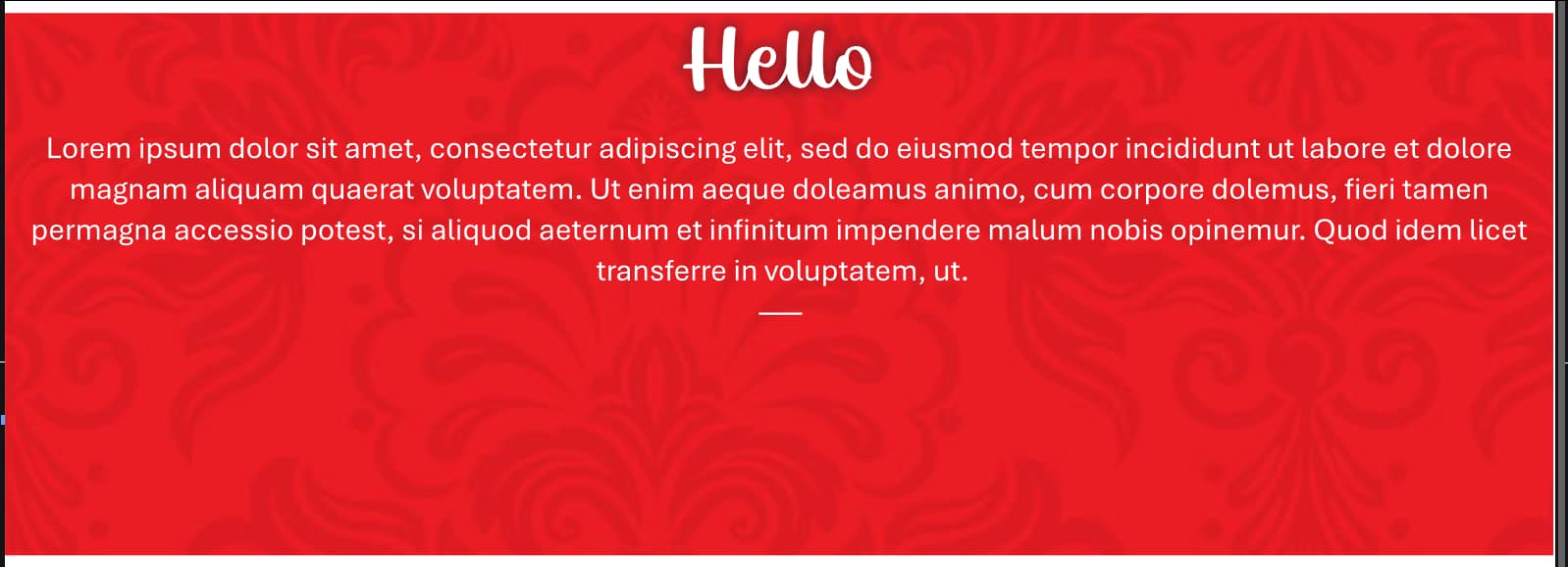
And when you remove the #lorem(50) inside the #opposite-stroke it becomes this. As they say in Dutch: “Just shoot me leak” (schiet mij maar lek).

Actually, after some more testing, I’m even more baffled… When you do something like this, it also gives the first effect! Even wrapped in [] it has the same effect. I’m totally incapable of understanding the underlying reasoning here.
#let some-text = "Lorem ipsum dolor sit amet, consectetur adipiscing elit. In porta in neque eget viverra. Maecenas dictum dolor eget ullamcorper sollicitudin. Cras fringilla ligula vitae pulvinar aliquam. Vestibulum ante ipsum primis in faucibus orci luctus et ultrices posuere cubilia curae; Integer egestas consectetur feugiat. Vivamus ut efficitur dolor. Donec aliquet imperdiet feugiat."

#let content-red = [
  = Hello \
  #some-text
  \
  -----
  \

  #opposite-stroke(stroke: blue+1pt)[
    #some-text
  ]
]
I’ve done a bit more analysis here. Because of the negative h the content is moved up. But for some reason, it’s then no longer visible, like as if it’s hidden behind everything for some reason. When only showing the first box, it’s visible. As soon as the negative h comes in, everything is hidden from view. Also, giving it some thought: how would horizontal spacing work anyway when we’d need vertical spacing (reduction)?
I don’t like to leave threads hanging, but I also feel that there’s no satisfying answer that works properly the way one would expect. The SVG trick works well, if you don’t have paragraphs for example.