Hello Forum,
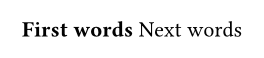
I want to use different styles for word within 1 line of text, for example:
#set text(weight: "bold")
First words
#set text(weight: "regular")
Next words
But when I use this example I get them in 2 lines. It seems that after changing the weight of the text back to regular also a linebreak is added. Is there also a shortcut similiar to the italics where I can use the underscore to toggle it on and off?
If your question pertains to a bit of Typst markup you have problems with, put it in the question body! You can syntax-highlight Typst code by wrapping it in ` ```typ … ````. It will then look like this:
#set font(size: 12pt)

Hello from *Typst* at $ pi.var + 1 $ o'clock!
If you need to highlight a code or math mode snippet instead, the language tags typc and typm do that, respectively.
You would enter yours like this:
```
#set text(weight: “bold”)
First words
#set text(weight: “regular”)
Next words
```
and it will appear like this:
#set text(weight: “bold”)
First words
#set text(weight: “regular”)
Next words
If you are looking to avoid Markdown for some reason, this is also an option:
Thank you for the fast reply. Excuse me for not using the ‘’’ for the coding block in my post. I just joined here last week and still ned to find out the basics.
Will using the asterisks generate the same weight as using bold? I will checkout the solution you posted at the end of your answer.
Will using the asterisks generate the same weight as using bold?
By default, yes, using * has the same effect as #strong() and the same effect as specifying a bold weight in #text(). This requires a couple pieces of information to prove:
In the meantime I tested out the version with the Asterisks. But it still adds a new line after the second asterisk. So this Markdown-Syntax is not working for me. Now I’ll try out the other one with
#set text(weight: “bold”)
First words
#set text(weight: “regular”)
Next words
and I hope this works better. Can I freely use those commands with others like font size, color, alignment etc. without any order or do I need to use them like in HTML where I need to “nest” them?
Hello again,
I wrote a VBA script in Excel that reads data from a spreadsheet and generates a textfile with the typst-code which I then put into the typst-app. The only plugin I use is the in-dexer plugin.
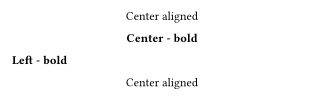
I toogle-on bold in line 4 and off at the end of line 9. Then I again toggle-on in the last line and off after the first word there. If I try to remove the toggles in line 9 and at begin of the last line then it creates another linebreak after “Name1” in the last line. That’s confusing for me.
Another strange effect: If I remove the statement in line 10 (because I have the same one in line 7) then the following text is centered.
My question now: Are all “#set-Commands” only valid for the next single text-paragraph?
The align function performs block-level alignment and thus always interrupts the current paragraph. To have different alignment for parts of the same line, you should use fractional spacing instead:
Thanks again for the fast answers. I only use typst since last friday and I still have to understand the syntax.
So, if I put certain parts of texts between brackets then all the #set-commands I made before will affect this text?
I read it but some concepts I still don’t understand. I never used a tool like this before and my coding skills are also a little rusty but I think that typst will be ideal for my recent project. The last one I made using MS Word but having a text with 800+ pages at the end almost crashed it. I will rearrange the statements I generate and see which errors then get after following your tips.
Hi @Marco1, I’m glad you found a solution. The answer you choose should usually be the response that you found most correct/helpful/comprehensive for the question you asked, not the last message in the thread (the message you mark as answer appears at the bottom of the initial post in the thread, so that future readers can navigate directly to it).
Please either select one of the posts that contain the relevant information, or add the solution to your post and quickly describe it; see also How to post in the Questions category—Answering. For now, I have removed the checkmark from your post.