How can I avoid the p tag and white space from being produced automatically when converting to html?

How can I avoid the p tag and white space from being produced automatically when converting to html?

p tag

// template.typ
#let itemplate(
  title: "Document",
  lang: "en",
  contents,
) = {
  html.html(lang: lang)[
    #html.head()[
      #html.meta(
        charset: "utf-8",
      )

      #html.title(title)

    ]
    #html.body(
      html.div(class: ("container1","container2"))[
        #html.span(class: ("text",))[some text]
        #contents
  ]
  )]
}

a test file:

// test.typ

#import "./template.typ":*
#show: contents => itemplate(contents)


= A level 1 heading

#lorem(5)

This is what the 0.15.2 version of tinymist produced:

<!DOCTYPE html>
<html lang="en">

<head>
    <meta charset="utf-8">
    <title>Document</title>
</head>

<body>
    <div class="container1 container2">
<!--- typst wrap the span element with a p tag automatically which is not what I want. -->
        <p><span class="text">some text</span></p>
        <h2>A level 1 heading</h2>
        <p>Lorem ipsum dolor sit amet.</p>
    </div>
</body>

</html>

white space

Some times, it produces white spaces between elements which is also not what I want.

<!-- white spaces automatically produced between span elements -->
<span style="white-space: pre-wrap">&#x20;</span>

These problems are very annoying.

Could someone provide some help?

I also encountered this problem when I first used Typst.
The quirk is that Typst has three syntactical modes: markup, math, and code. Markup mode is the default in a Typst document, and it’s also the mode inside […]; code mode is the mode after # and inside {…}. In markup mode, spaces and newlines become spaces; but in code mode, they vanish.

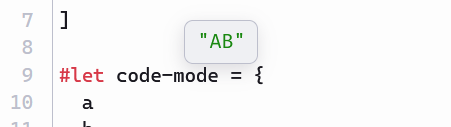
To see that, you can copy the following Typst document to your editor, and hover the variable markup-mode or code-mode. You’ll see that the value of markup-mode is a sequence of space, A, space, B, space, and that of code-mode is A and B concatenated without any space in between.

#let a = "A"
#let b = "B"

#let markup-mode = [
  #a
  #b
]

#let code-mode = {
  a
  b
}


(Copied from How can I add a dotted line like bibliography between two texts that are left and right aligned? - #5 by Y.D.X)

In your case, try replacing html.html(…)[…] with html.html(…, {…}):

#let itemplate(
  title: "Document",
  lang: "en",
  contents,
) = {
  html.html(lang: lang, {
    html.head({
      html.meta(charset: "utf-8")
      html.title(title)
    })
    html.body(
      html.div(class: ("container1", "container2"), {
        html.span(class: ("text",))[some text]
        contents
      }),
    )
  })
}