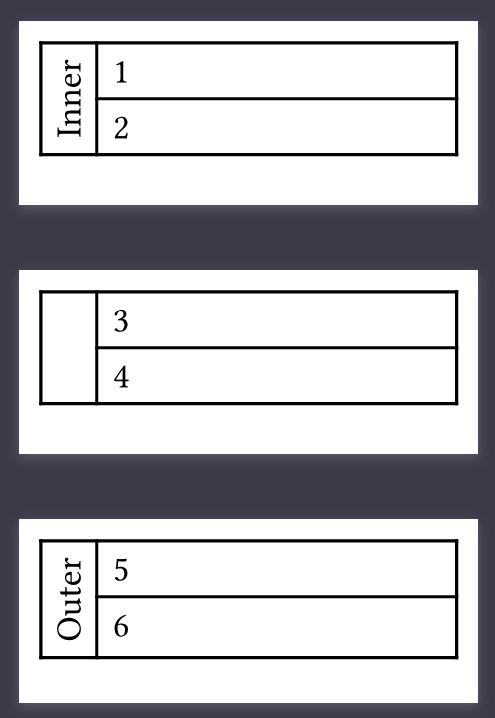
I have a table with a rowspan that spans over two pages. Can I make the text in cells with row spans appear on both pages?
#set page(height: 2cm, width: 5cm)

#table(
  columns: (auto, 1fr),
  table.cell(rowspan: 4, rotate(-90deg, reflow: true)[Inner]),
  [1], [2], [3], [4],
  table.cell(rowspan: 2, rotate(-90deg, reflow: true)[Outer]),
  [5], [6]
)
I want “Inner” to apper next to 3 and 4 as well.
Hi @TheJanzap – FYI, I had a similar but slightly different question, different enough I thought to create a new topic. I did get an answer which might work for you, or at least be adaptable by you. I’m commenting here so you get a notification:
I tried a workaround for this using layout introspection.
The basic idea is to let the grid paginate normally, mark the beginning and end of each logical row with invisible metadata, then use those physical page positions on the next layout iteration to repeat the first-column content on continuation pages.
Something like this:
#let page-top = 12mm
#set page(
width: 12cm,
height: 9cm,
margin: (x: 12mm, y: page-top),
foreground: context {
let page-num = here().page()
let star…