I wrote a function to increase a counter for text in headings. Then I wanted to reference that heading and display its text. Unfortunately, by referencing it, it also increases the counter
#let us_num = counter("us-counter")
#let user-story = {
  us_num.step()
  "User Story " + context us_num.display()
}

= #user-story: Example <us-example>

#let heading-text(label) = {
  show ref: r => {
    let el = r.element.body
    link(label, el)
  }
  ref(label)
}

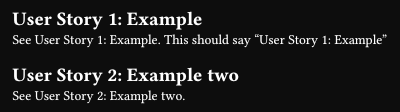
See #heading-text(<us-example>). This should say "User Story 1: Example"
How can I fix this? Or is there a more appropriate way to do this?
You update counter in the content of the heading, never do that.
#let us-num = counter("us-counter")
#let user-story(label, body) = {
  us-num.step()
  context [#heading[User Story #us-num.display(): Example]#label]
}

#user-story(<us-example>)[Example]

#let heading-text(label) = {
  show ref: r => {
    let el = r.element.body
    link(label, el)
  }
  ref(label)
}

See #heading-text(<us-example>). This should say "User Story 1: Example"
Without using numbering, since the formatting of the reference also uses heading body, a more automatic way would be using the hack that was also used in the recent Typst paper (well, in the template):
#import "@preview/t4t:0.4.3": get

#let us-num = counter("us-counter")
#let user-story(body) = heading[User Story #context us-num.display(): #body]

#show: doc => context {
  let headings = query(heading.where(level: 1)).filter(
    it => "User Story" in get.text(it.body),
  )
  if headings.len() == 0 { return doc }
  let select-headings = headings.map(it => heading.where(body: it.body))
  show selector.or(..select-headings): it => us-num.step() + it
  show ref: it => {
    if it.element not in headings { return it }
    link(it.element.location(), it.element.body)
  }
  doc
}

#user-story[Example] <us-example>

See @us-example. This should say "User Story 1: Example"

#user-story[Example two] <us-example2>

See @us-example2.
However, since there is a context in the body, the applied link now has 3 distinct parts.
If there are some things to look for, it can be further improved. Like if every single one of them use a label with a consistent pattern, you can use native Typst syntax:
#show: doc => context {
  let headings = query(heading.where(level: 1)).filter(
    it => "label" in it.fields() and str(it.label).starts-with("us-"),
  )
  if headings.len() == 0 { return doc }
  let us-num = counter("us-counter")
  let transform-body(body) = [User Story #us-num.display(): #body]
  let heading-labels = headings.map(it => it.label)
  let headings-selector = selector.or(..heading-labels)
  show headings-selector: it => context block(transform-body(it.body))
  show headings-selector: it => us-num.step() + it
  show ref: it => {
    if it.element not in headings { return it }
    link(it.element.location(), transform-body(it.element.body))
  }
  doc
}

= Example <us-example>

See @us-example. This should say "User Story 1: Example"

= Example two <us-example2>
See @us-example2.
I guess you might be able to do something even better, but with this the only downside is simple reimplementation of heading and incomplete text in the PDF’s Document Outline.