I am dabbling with Typst… one seemingly simple thing I wanted to do was to define a custom alternative to:
#set heading( numbering: "1." )
I wanted a different intermediate and final separator - and I wanted to fix the width of the numbered part of the headings - so the fist letter of the textual headings align horizontally throughout the document.
I supposed that I wanted to implement a function, to put in place of “1.” - and that it would need to iterate over the counters for the heading - and decorate those with the separators I choose using conditionals. I assumed I’d want to use a for loop to iterate over the hierarchical heading numbers. I found I could extract the current hierarchical heading numbers using:
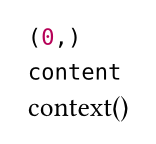
#let labels= context(counter(heading).get())
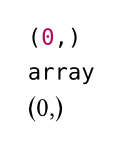
#labels // Outputs an array - e.g. "(1,2,7)"
However, when I tried to iterate over the heading numbers in labels:
#for label in labels { /* Deal with each level separately */ }
I get the typst error: “cannot loop over content” I also note that while labels renders as an array of integers, typst does not let me call len on it to get its length… a hurdle to iterating over the heading numbers by index.
I assume there is something I’m overlooking? Is the sort of customisation I envisage supported by Typst?
I’ve read the numbering documentation - but this has left me with more questions than answers. Is one restricted to a unary function to provide custom hierarchical heading numbers?
For the code you posted (which is not using the correct formatting by the way. See here) you can see why you get a complaint about content and why len() didn’t work:
About the heading numbering width, I think the easiest would be to rebuild the headings in a custom show rule, and maybe use a grid with a fixed size column for the number. The following answer shows the general approach on how to modify headings: How can I show the heading number after the heading itself? - #2 by janekfleper
I’m able to access the raw array when I accept it as an argument to my numbering formatting function. It’s not absolutely perfect… as I’d prefer the width of the box to be determined dynamically - for example as 12pt wider than the widest box content (numeric labelling) in the document. I’m not sure how that could be tackled.
Thanks to gezepi’s answer - I’ve now grasped that I need to use values like counter(heading).get() - c.f. the function calls themselves - inside the scope of a *context"… and I can now see how to do that in a variety of ways in which I want to dynamically create layout depending upon counters. I’ll play with it some more.
I’m not sure I follow flokl’s answer. If the grid had a fixed size column for the numeric part of headings… then I’d still need to pick that width by hand. If I want the width to be dynamically set, from document content, then I’d need a way to calculate the length of the longest numeric-part of any heading. Can this be done using context() - or am I barking up the wrong tree?
Whether you create a box or use a grid, you’ll need a fixed width. You can query for the final heading number and measure its width like this:
#set heading(numbering: "1")

#context {
  let max-heading = counter(heading).final().first()
  let max-heading-width = measure([#max-heading]).width

  [The last heading is number #max-heading which has a width of #max-heading-width]
}
#pagebreak()

#for i in range(100) {heading([Heading #str(i)])}
That’s an interesting snippet - it gets at least part-way there.
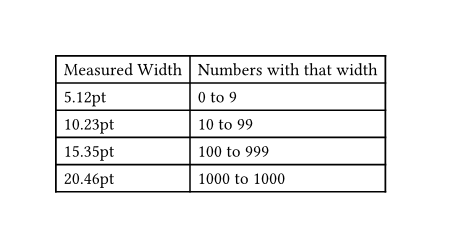
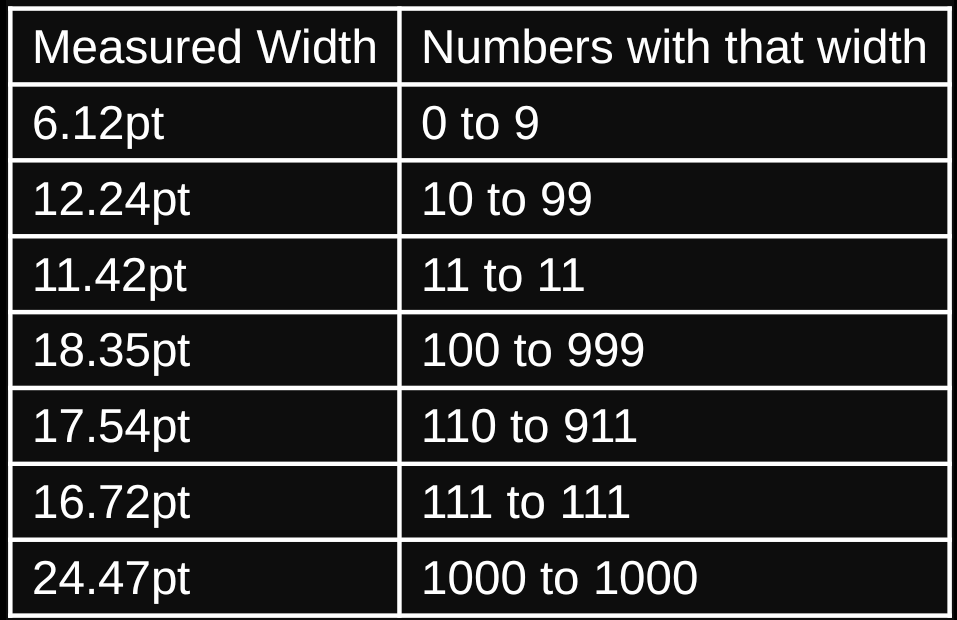
It looks as if it works if there are “100” labels - because “100” is extremely likely to be the widest (depending upon font, of course). Of course, if there were 111 items, it would likely fail as “100” would be wider than “100”. I can’t see a short-cut that would reliably eliminate needing to determine the maximum width for any of the labels. More experimentation required, I think.
#set page("a6")
#set page(height: auto)

#let max-num = 1001

#context {
  let widths = (:)
  set text()
  for i in range(max-num) {
    let i-str = str(i)
    let to-measure = [#(i)]
    let w = measure(to-measure).width
    widths.insert(i-str, w)
  }

  // widths

  let grouped = (:)
  for kvp in widths.pairs() {
    let num = kvp.at(0)
    let width = str(repr(kvp.at(1)))

    if width not in grouped.keys() {
      grouped.insert(width, ())
    }

    grouped.at(width).push(num)
  }

  // grouped

  table(
    columns: 2,
    table.header([Measured Width], [Numbers with that width]),
    ..for kvp in grouped.pairs() {
      (kvp.at(0), [#kvp.at(1).first() to #kvp.at(1).last()])
    }.flatten()
  )
}