How to achieve 45 degree, centered tick labels?

I want my x-axis tick labels rotated by 45 degrees and aligned so that the end of every word is at the center of the tick.
The rotation is easy, even the example docs mention it:

#show: lq.show_(
  lq.tick-label.with(kind: "x"),
  rotate.with(-45deg, reflow: true),
)

But I don’t know how to center it this way. Thanks for the help in advance!
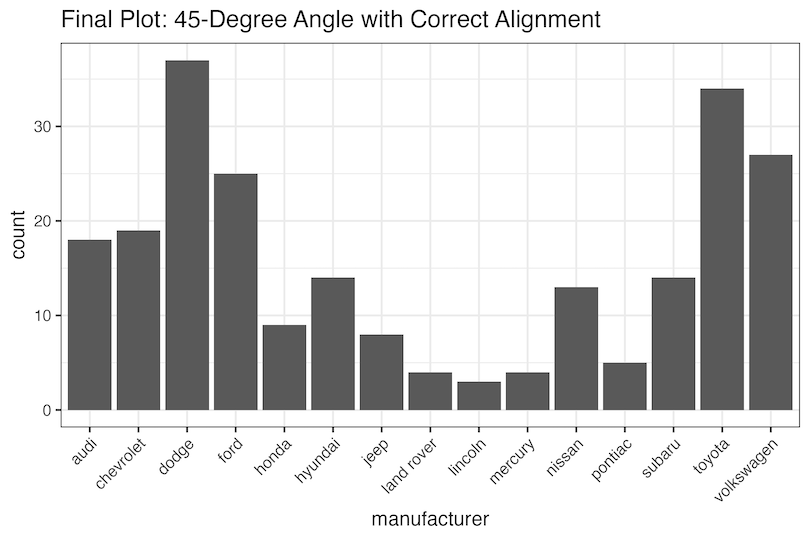
Random image from internet as a demo of what I’m looking for:

1 Like

Wrapping it within align(center) like this helps?

#show: lq.show_(
  lq.tick-label.with(kind: "x"),
  align(center, rotate.with(-45deg, reflow: true)),
)

That wouldn’t be the correct syntax. The original rotate.with(-45deg, reflow: true) is a function that accepts content, so the replacement should be as well. When nesting functions, with is not sufficient any more. The correct way to write this would be

body => align(center, rotate(-45deg, reflow: true, body))

or alternatively

body => {
  set align(center)
  show: rotate.with(-45deg, reflow: true)
  body
}

(idk if this solves the original problem, but if the original answer is on the right track, this should help make it work)

Thanks for the replies, I tried this but you see, this is exactly what my original issue was:

I don’t want to align it in this way, where you can draw an imaginary vertical line between the tick and the center of the text. I want the right side of the text to be directly under the tick, as in the uploaded reference picture.

I hope we find the solution. :)

In the meantime I found a solution, not sure if its the idiomatic way, but it works:

body => move(
  align(center, rotate(-45deg, reflow: true, body)),
  dx: -33.3%,
  dy: 0%,
)

p.s.: this only works if the labels are the same length, there’s gotta be a better solution.

From https://lilaq.org/docs/reference/bar:

In addition, we show how to rotate the labels by 45° and align them nicely to the ticks.

I would have expected

#lq.diagram(
  xaxis: (
    ticks: ("Apples", "Bananas", "Kiwis", "Mangos", "Papayas")
      .map(rotate.with(-45deg, reflow: true))
      .map(align.with(right)) // this line seems to have no effect
      .enumerate(),
    subticks: none,
  ),
  lq.bar(
    range(5),
    (5, 3, 4, 2, 1)
  )
)

to do the trick by changing align to center, but it doesn’t seem to have any effect.

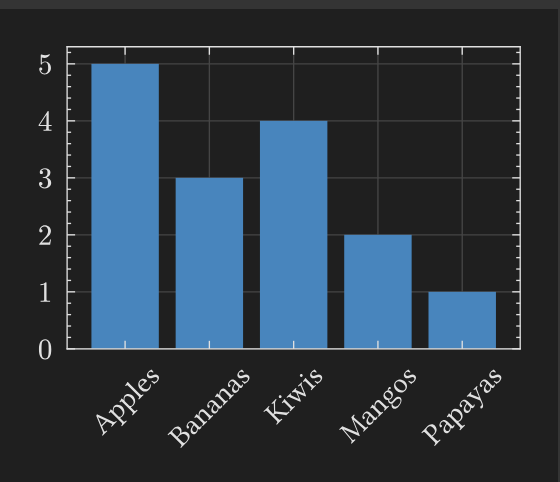
I saw that example too, but as you said, it doesn’t seem to have any effect, even the picture they have attached looks like this:

Which makes it possible, that this could be a bug.

Hi @hunortakacs , author of Lilaq here.

You need to write

#show: lq.show_(
  lq.tick-label.with(kind: "x"),
  it => box(
    width: 0pt, 
    align(right, rotate(-45deg, reflow: true, it))
  ),
)

For now, this is the best solution and not even a bad one.

Tick placement is very tricky. This came up in Alignment of 45° rotated labels · Issue #14 · lilaq-project/lilaq · GitHub. I thought I had found a solution so that the zero-width box can be omitted but I had to revert that because it introduced undesired side effects.

And I forgot to update the bar example in the docs.

3 Likes

As a meta comment, this is why you should specify in your question what you already tried—so that others can take a shortcut and not also try the same things—and add a runnable example (like @vmartel08 did), so that others can easily test whether their modifications have the expected/desired effect. See How to post in the Questions category for more details on asking best practices :slight_smile:
2 Likes

For the benefit of everyone, this works:

#import "@preview/lilaq:0.5.0" as lq

#lq.diagram(
  xaxis: (
    ticks: ("Apples", "Bananas", "Kiwis", "Mangos", "Papayas")
      .map(box.with(width: 0pt)) // missing
      .map(rotate.with(-45deg, reflow: true))
      .map(align.with(right)) 
      .enumerate(),
    subticks: none,
  ),
  lq.bar(
    range(5),
    (5, 3, 4, 2, 1)
  )
)

Thanks to everyone, I marked the reply of @Mc-Zen as the solution.

@SillyFreak if I will have any other question in the future I will make sure to make my post much more detailed! :)

1 Like